1
PANEL DESCRIPTION
1-4
Previous view
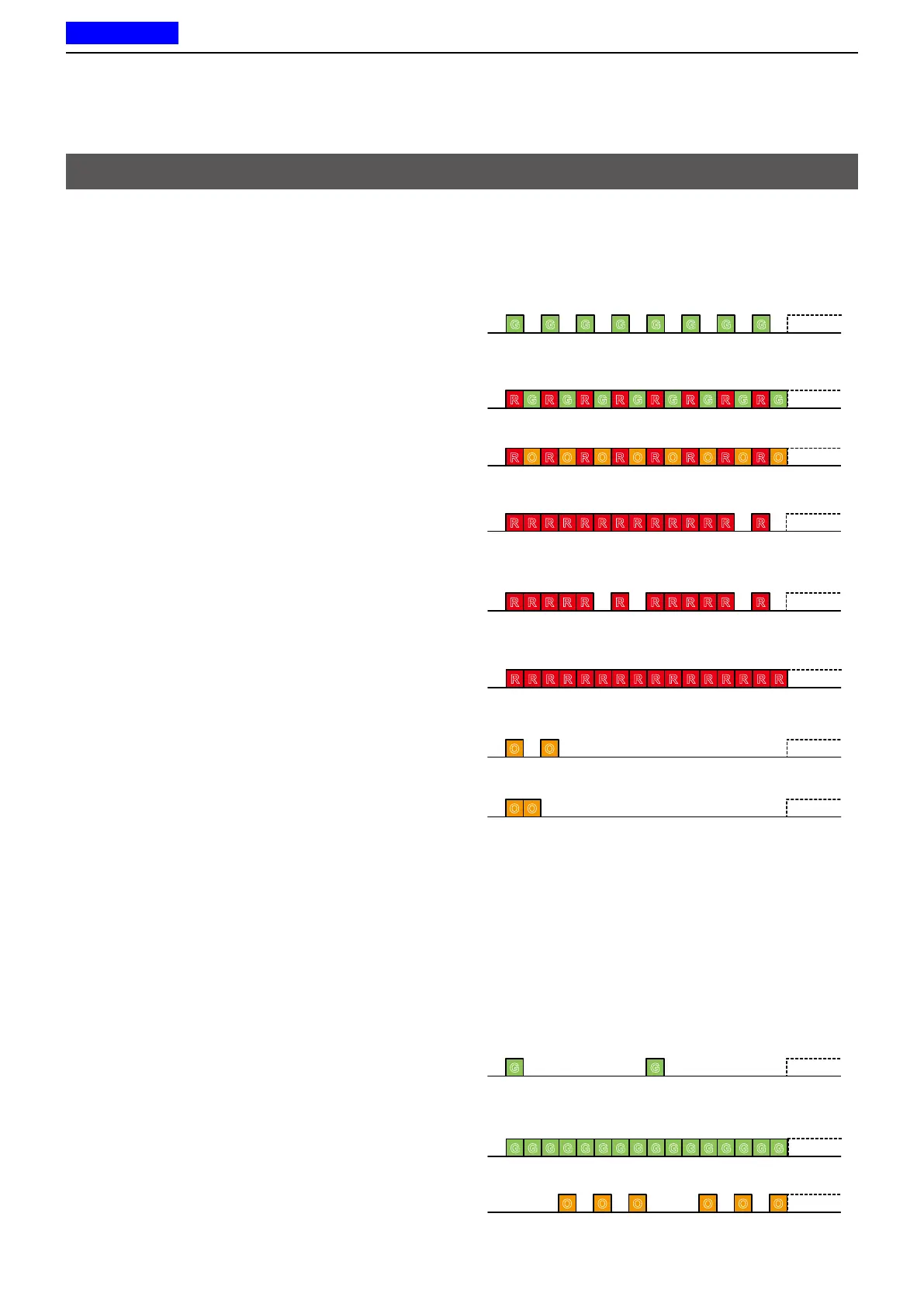
The Status indicator indicates the status of various
parameters of the transceiver, as described below.
(Reference: R=Red, G=Green, O=Orange)
• Programming:
Blinks while reading or writing data.
• Programming Error:
Continuously blinks green and red if programming
fails.
• Channel Error:
Continuously blinks red and orange when you select
a blank channel, or an unlocked channel.
• TX low Battery 1:
Blinks while detecting a low battery while
transmitting.
• TX low Battery 2:
Blinks while detecting a very low battery while
transmitting.
• TX:
Lights while transmitting.
• Bell (Blink):
Blinks about twice every second, when the preset
signal is received.*
• Bell (ON):
Blinks about once every second, when the preset
signal is received.*
* Depending on the “Bell” setting, the Status indicator blinks:
• When a call that includes a matching 2-Tone code is
received.
• When a call that includes a matching 5-Tone code is
received.
• When a Call Alert is received.
• When a Message is received.
• When a Status call that includes a matching status
number is received.
• Scan
Slowly blinks green while scanning for a channel
with a signal.
• RX:
Lights green while receiving a signal.
• CH Access:
Blinks orange while making a call.
G G G G G G G G
R G R G R G R G R G R G R G R G
R O R O R O R O R O R O R O R O
R R R R R RR R R R R R R R
R R R R R R R R R R R R
R R R R R R R RR R R R R R R R
O O
O O
G G
G G G G G G G GG G G G G G G G
O O O O O O
Status indicator
► Continued on the next page



 To Next Page
 Loading...