PRT-CTRL-SE Protege SE Integrated System Controller Installation Manual | June 2017 21
5.3 Door Contact Connection
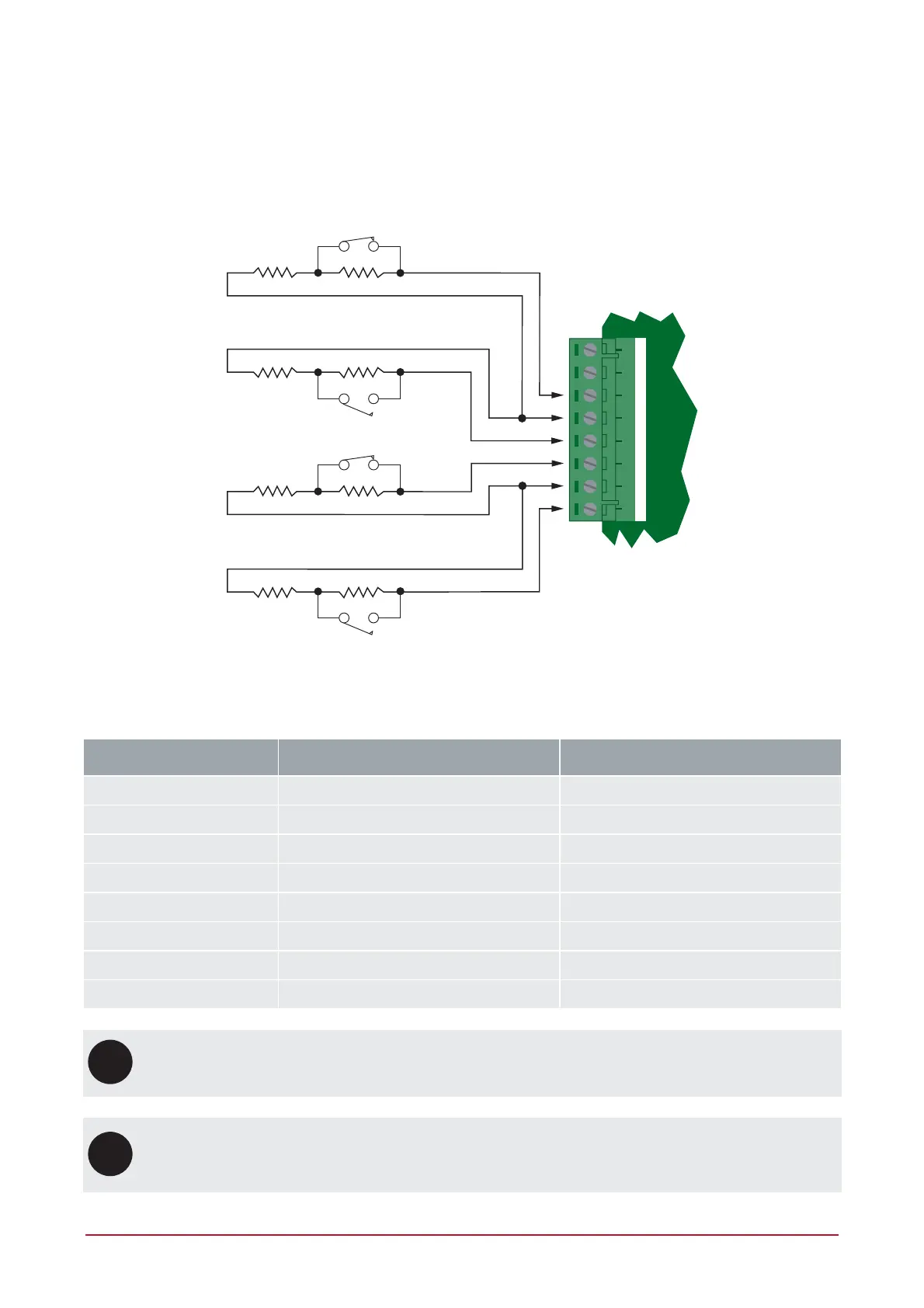
The Controller allows the connection of up to 4 contacts for monitoring and controlling access control doors.
Each input on the reader expander can be used for the door function that is automatically assigned and as a
normal input on the system. The following example shows the connection of a normally closed door position
monitoring contact to monitor the Open, Closed, Forced and Alarm conditions of the door.
+AUX- Z9 COM COMZ10 Z11 Z12
N.C Zone Contact
1K 1K Door Contact
N.O Zone Contact
1K 1K REX
N.C Zone Contact
1K 1K Bond Sense
N.O Zone Contact
1K 1K REN
Door Contact Connection
The zones 9-12 and 13-16 can operate as either general purpose zone inputs or as onboard reader inputs. If
used as general purpose zone inputs, make sure that these inputs are not defined in the onboard reader set up.
Zone Access Control Function Default Setting
Zone 9 Door Contact, Port 1 Door Contact, Port 1
Zone 10 REX Input, Port 1 REX Input, Port 1
Zone 11 Bond Sense, Port 1 General Purpose Zone
Zone 12 REN Input, Port 1 General Purpose Zone
Zone 13 Door Contact, Port 2 Door Contact, Port 2
Zone 14 REX Input, Port 2 REX Input, Port 2
Zone 15 Bond Sense, Port 2 General Purpose Zone
Zone 16 REN Input, Port 2 General Purpose Zone
UL
ULC
When zone inputs are configured as bond sense and/or general purpose zones (access control and
burglar installations), remaining zone inputs cannot be used for fire.
i
When connected, the REX Input can be programmed to operate regardless of the door contact state.
The REX input can also be programmed to recycle the door alarm time to prevent nuisance alarms
when the door is held open to permit longer entry.



 To Next Page