SECTION 2 - INSTALLATION
Installation and Servicing
36
MENU OPERATIONS
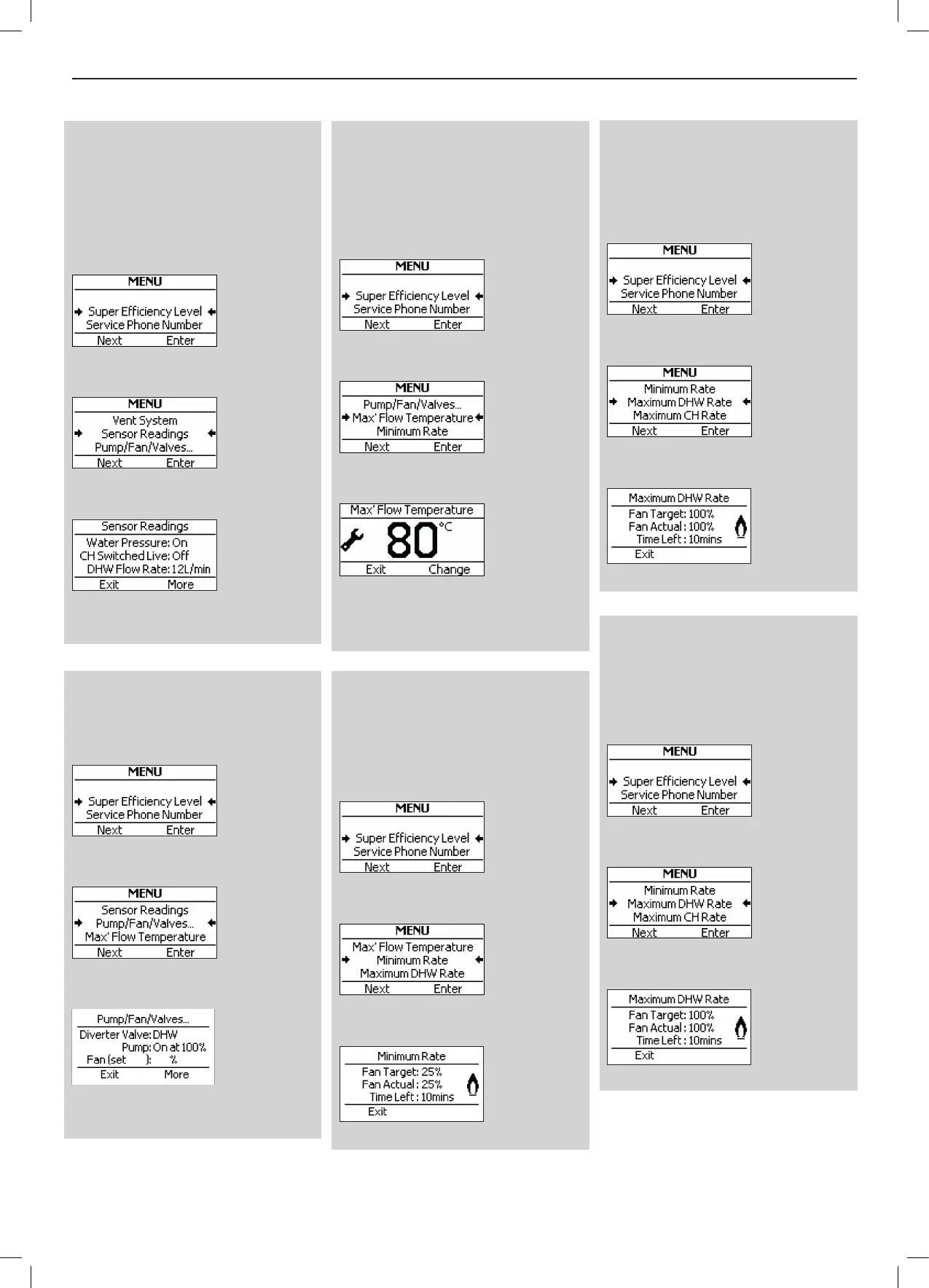
Sensor Readings
To view the current Water Pressure,
Switched Live Status, DHW Flow Rate,
DHW Temperature, Flow Temperature,
Return Temperature, Flame Status,
Outside Temperature, DHW switch Live
Status, and OpenTherm Status, press
“Menu” and the following screen will be
displayed:
Press “Next” until the following screen is
displayed.
Press “Enter” and a screen similar to the
following will be displayed:
Press “More” to see the full list.
Press “Exit” to return to normal operation.
Pump / Fan / Valves
To view the current status of the pump,
diverter valve, fan and gas valve press
“Menu” and the following screen will be
displayed:
Press “Next” until the following screen is
displayed:
Press “Enter” and a screen similar to the
following will be displayed:
Press “More” to view the full list.
Press “Exit” to return to normal operation.
Maximum Flow Temperature
It is possible to limit the maximum ow
temperature that can be set from the CH
ow temperature knob using this feature.
Note that this could prevent adequate
room temperature being achieved in
winter. Press “Menu” and the following
screen will be displayed:
Press “Next” until the following screen is
displayed.
Press “Enter” and a screen similar to the
following will be displayed:
Press “Change” until the desired
temperature is displayed
Press “Exit” to return to normal operation.
Service Mode Minimum Rate
This feature will run the burner at minimum
rate. Note that a CH demand has to
already be present for this feature to
be active. To activate the feature press
“Menu” and the folloiwng screen will be
displayed.
Press “Next” until the following screen is
displayed.
Press “Enter” and a screen similar to the
following screen will be displayed.
Press “Exit” to return to normal operation.
Service Mode Maximum DHW Rate
This feature will run the burner at
maximum DHW rate. Note that a CH
demand has to already be present for
this feature to be active. To activate the
feature press “Menu” and the folloiwng
screen will be displayed.
Press “Next” until the following screen is
displayed.
Press “Enter” and a screen similar to the
following screen will be displayed.
Press “Exit” to return to normal operation.
Service Mode Maximum CH Rate
This feature will run the burner at
maximum CH rate. Note that a CH
demand has to already be present for
this feature to be active. To activate the
feature press “Menu” and the folloiwng
screen will be displayed.
Press “Next” until the following screen is
displayed.
Press “Enter” and a screen similar to the
following screen will be displayed.
Press “Exit” to return to normal operation.
35 35





 To Next Page