10 Installation, Support, and Maintenance Guide
Evolution X7 Satellite Router
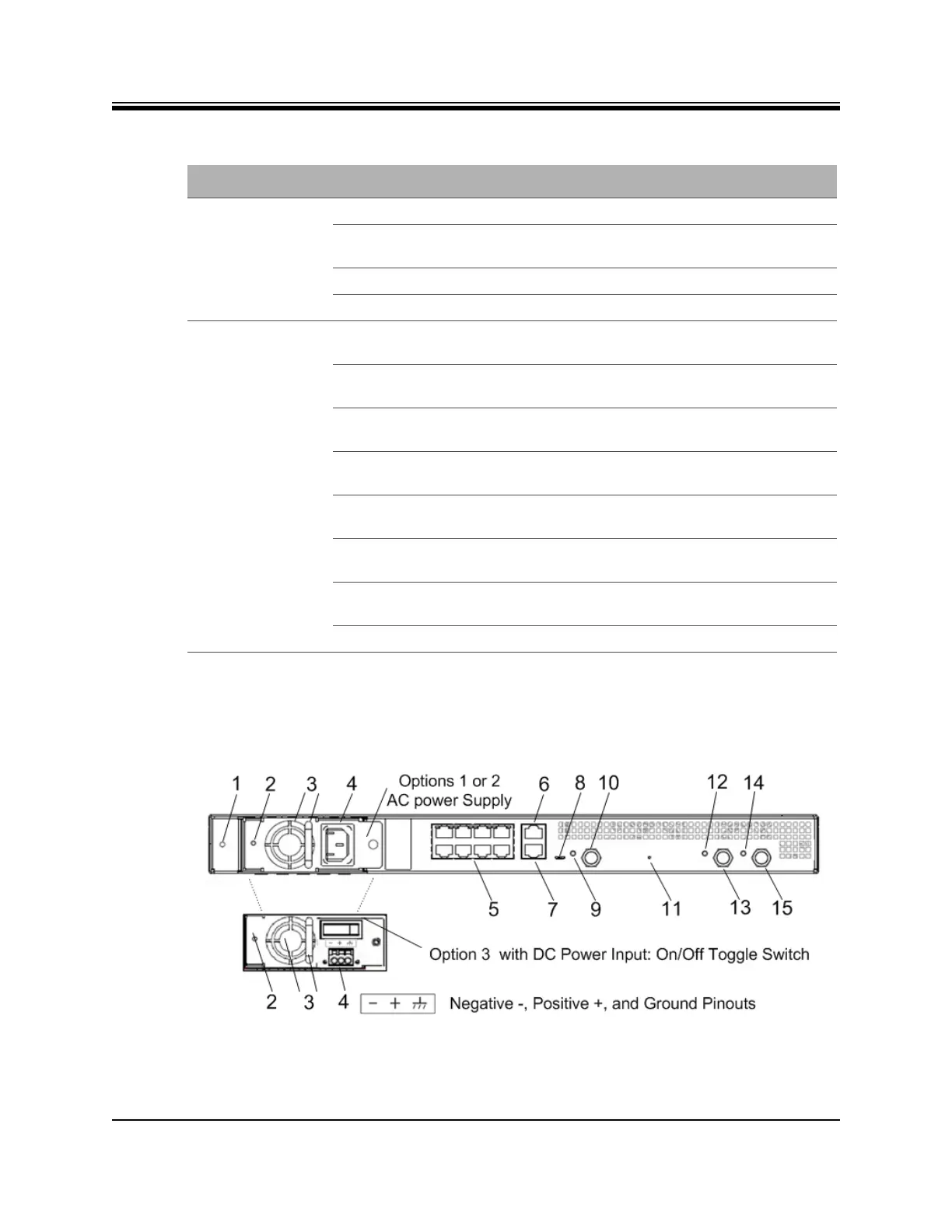
X7 Router Rear Panel Description
3.3 X7 Router Rear Panel Description
The X7 Router rear panel is shown in Figure 3-2 and defined in Table 3-3 on page 11.
Figure 3-2. Rear Panel Description
TX Indicates the state of the transmitter
Off Transmitter is off: if STATUS LED is green, then
transmission disabled by configuration
Yellow Transmitter enabled, mute ON
Green Transmitter enabled, mute OFF
NET Indicates the state of the satellite network
connection
Off Router off or in sleep mode if TX LED is yellow
(mute ON)
Yellow Demodulator is not locked on the primary
downstream carrier
1 second flashing Yellow Demodulator locked on primary downstream
carrier, NCR not yet locked
2 second flashing Green Demodulator locked on the primary downstream,
NCR locked
1 second flashing Green Network acquisition and authentication in
progress
Green Network acquired and authenticated; if TX LED is
OFF, then router is in Rx (receive) only mode
Red Authentication failed
Table 3-2. X7 Router iDX 3.2 LED Descriptions (continued)
Label Signal Color/Type Definition



 To Next Page