36 Installation, Support, and Maintenance Guide
Evolution X7 Satellite Router
Coax Cable Preparation
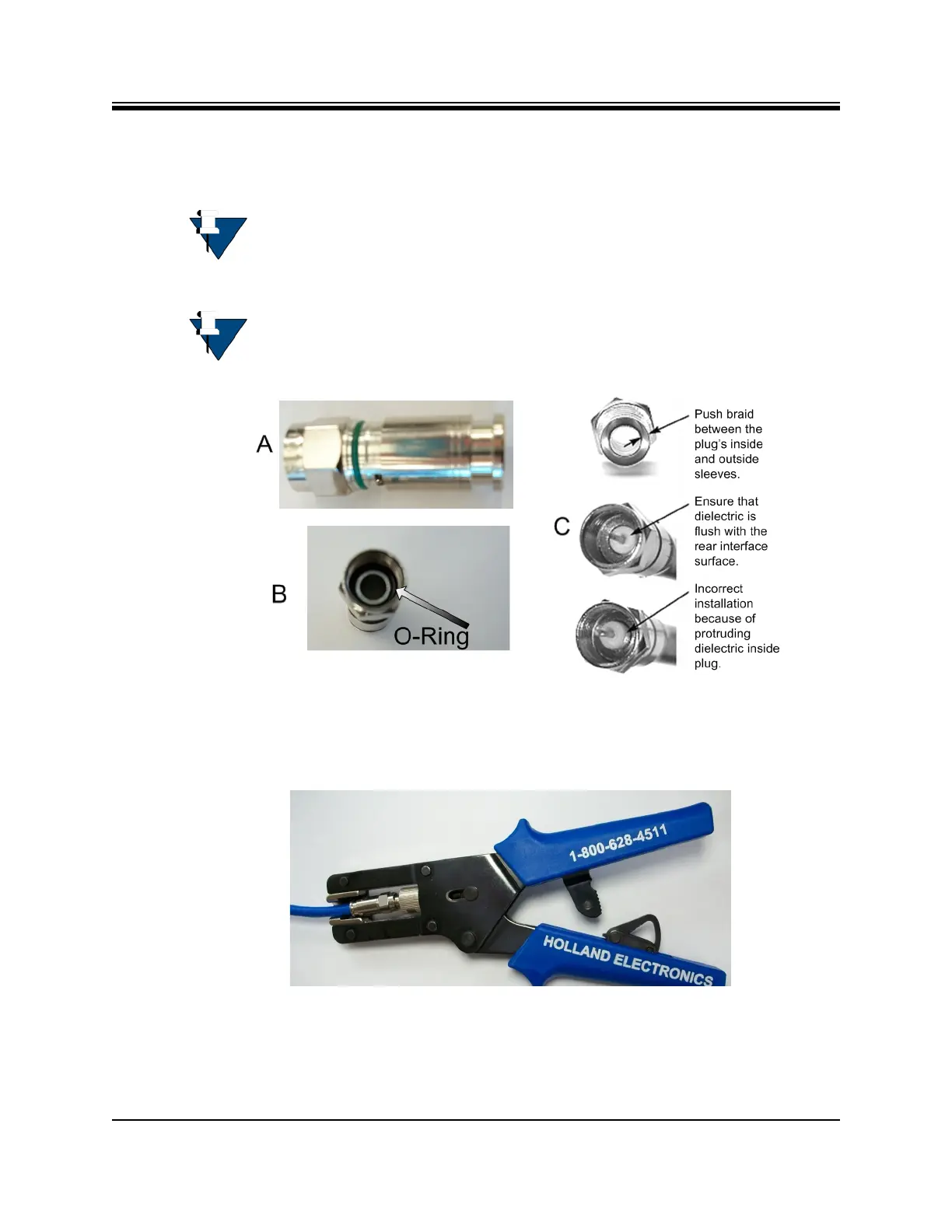
8. Install the RG-6 connector compression sleeve, or mandrel, (top left (A) in Figure D-4)
over foil and underneath the braid. A good, weatherproof outdoor connector mandrel
should have a visible O-Ring (bottom right (B) Figure D-4).
NOTE: The white colored inner dielectric insulation should be flush with the inner
rear surface of the connector. Refer to the picture on the right (C) in Figure D-4
for an RG-6/RG-11 termination.
NOTE: Since the RG-11 connector has a built-in center pin, ensure that the coax
center pin makes contact to the internal seizing pin of the connector
. Refer to
Figure D-4.
Figure D-4. Attaching the Compression fitting F-type Connector
9. Finish connecting the cable to the connector with the compression tool connector, such as
Holland Compression Tool 1855 as shown in Figure D-5.
Figure D-5. Compression fitting F-Type Weatherproof Plug and Tool



 To Next Page