Home
iiNet
Modem
Budii Lite
Page 51 (URL Website Filtering Rule)
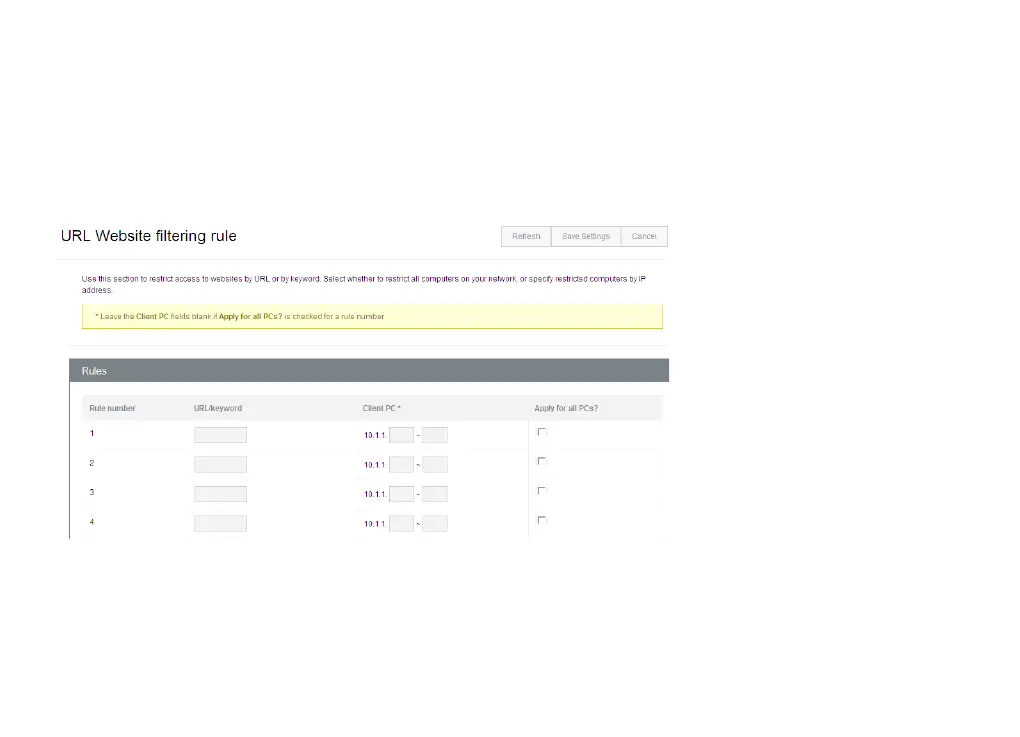
iiNet Budii Lite - URL Website Filtering Rule; Website Filtering Configuration
84 pages
Manual
Save Page as PDF
To Next Page
To Next Page
To Previous Page
To Previous Page
Loading...
51
URL w
ebsite
filtering rule
Enter
the ke
ywords
you
would lik
e Budii Lite
®
to block,
then enter
the IP addr
esses of specific de
vices,
or nominat
e whether
you
want all
devices connected
to Budii Lite
®
to be aff
ected by
this rule.
50
52
Table of Contents
Main Page
Table of Contents
3
Budii Lite ® Overview
7
Budii Lite ® Front Panel
7
Budii Lite ® Back Panel
8
Getting Started
9
Login Page
9
Navigation Bar
10
Wizard
11
ADSL Status
11
Modem Restart
11
Setting up My Wireless
12
Enable/Disable Budii Lite ® Wireless Features
13
Security Options
14
Hiding Ssids
17
Setting up a Secondary Wireless Network
17
Configuring Wireless Protocol and Channel Options
18
Set up a Wireless Distribution System (WDS)
19
Set up Mac Address Filtering
21
Wi-Fi Protected Setup (WPS)
23
Voip Advanced Settings
25
Set up My Voip
25
Netphone (Voip) Advanced Setup
25
General Settings
26
Advanced Call Features
28
Voice Codecs Configuration
29
Voip Port Advanced Settings
30
Voip Dial Plans
31
Call History
33
DECT Settings
34
Configure My USB Port
35
USB Configuration
35
Set up a USB Hard Drive as an FTP (File Transfer Protocol) Server
36
Set up a USB Hard Drive as a File Server
39
Advanced Settings
41
Remote Management
41
Remote Management Settings
42
Changing Modem Passwords
43
Modem Date/Time
44
DNS (Domain Name Server), UPNP (Universal Plug and Play) and DDNS
45
About DNS (Domain Name Server) Lookup
46
DNS Settings
46
Changing Your DNS Addresses
46
Dynamic DNS (DDNS)
47
Access Control and Parental Control Tools
49
Internet Schedule Rule
50
URL Website Filtering Rule
51
Internet Setup & ADSL Standard
52
Select an ADSL Standard for Your Internet Connection
53
WAN Configuration (ADSL)
54
WAN Configuration (NBN/FTTH)
56
Local Area Network Settings
57
VLAN Settings
58
Firewall
59
Port Forwarding
60
Setting up Port Forwarding
62
Ipsec
63
Handy Tools
64
Firmware Upgrade
64
Backup
65
Restart Budii Lite
66
Restore Budii Lite ® to Factory Settings
67
Status/Diagnostics
68
DHCP Client List
68
Fix IP Address to Client
68
Viewing the NAT (Network Address Translation) Mapping Table
69
Buddi Lite's Routing Table
70
ADSL Monitoring
71
Network Connection Diagnostics
73
Ping Test
73
LAN Connection Diagnostics
75
WAN Connection Diagnostics
75
Current Time and Uptime
76
Internet
77
Gateway
79
Wireless
80
Information
82
Atm Pvc/Eth Wan
83
Contact
84
Other manuals for iiNet Budii Lite
Quick Start Guide
40 pages
Related product manuals
iiNet Budii
20 pages
iiNet TGIINet-1
28 pages



 To Next Page