59
44
11.2 AUDAX PRO 9 V2 TESTING OPERATIONS.
1. Check the supply voltage between the outdoor unit and the
auxiliary switch.
- Single phase power supply: L, N
2. Check that the power and communication cables have been
connected properly. (If the power and communication cables
are mixed or connected improperly, the PCB will be damaged).
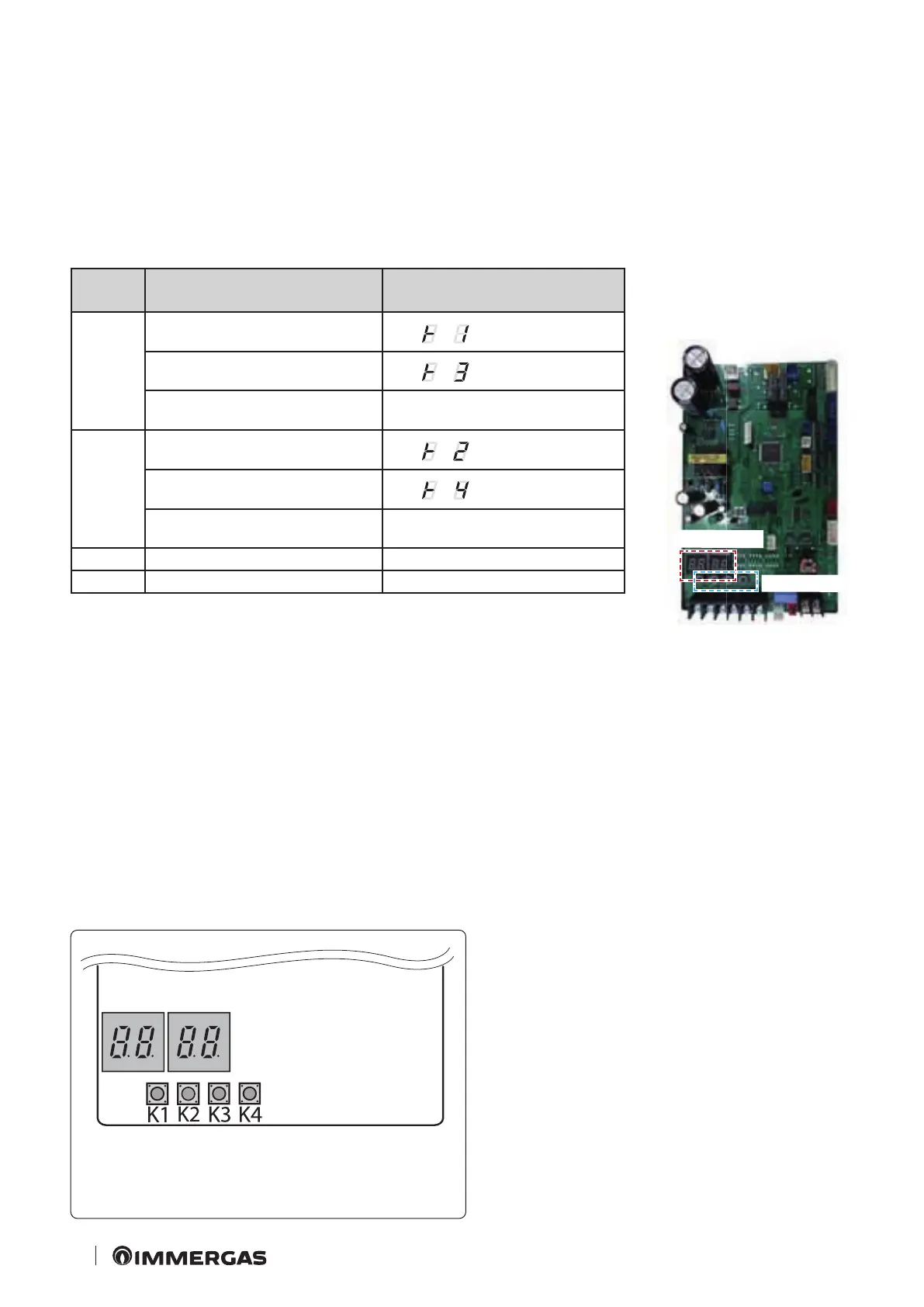
3. Press K1 or K2 on the outdoor unit board to execute the test
mode and to interrupt (for the operating conditions of the indoor
unit, see the relative booklet).
KEY Function of BUTTONS 7-segment display
K1
Press once:
Operating test in central heating
"BLANK" "BLANK"
Press twice:
Operating test in defrosting
"BLANK" "BLANK"
Press 3 times:
End the test mode
-
K2
Press once: Cooling operation test
(heating only: skip)
"BLANK" "BLANK"
Press twice:
Signal emission operating test
"BLANK" "BLANK"
Press 3 times:
End the test mode
-
K3 Resetting -
K4 View mode Refer to view mode
7-segment display
KEY (K1~K4)
4. View mode: pressing K4, allows you to view information on the
status of the system, as follows (in Test stage it is not possible to use
the key K4).




 To Next Page