30
Connections
Network Connection
This unit can be connected to the network using a wired LAN or Wi-Fi (wireless
LAN). You can enjoy network functions such as Internet radio by network
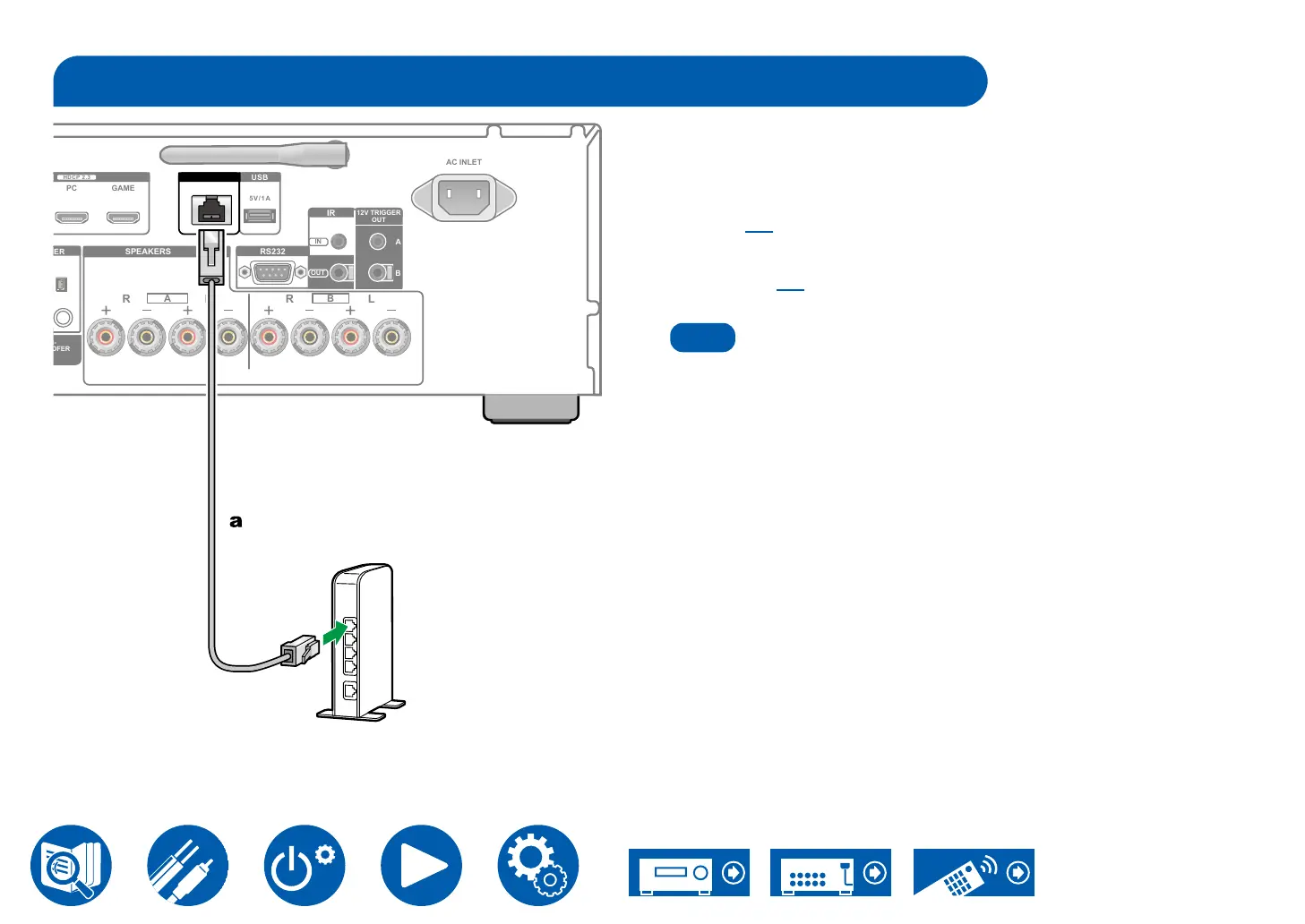
connection. If connection is made by the wired LAN, connect the router and
the ETHERNET jack with the Ethernet cable as shown in the illustration. To
connect by Wi-Fi, select your desired setting method in "2. Connect the unit to
Wi-Fi" ( →p36) of Initial Setup, and then follow the on-screen instructions.
press the Setup button on the remote controller, and select "3. Network" to make
the setting ( →p80). For the Wi-Fi connection, stand the wireless antenna for
use.
Note
• For security reasons, always connect via a router, etc., when connecting this
unit to the Internet. Do not directly connect to the communication circuits
(including public wireless LAN) of a telecommunications provider (mobile
provider, etc.).
Router
SPEAKERS
R L
A
L
R
B
ETHERNET USB
HDCP 2.3
PC GAME
5V/1A
AC INLET
RS232
IR
OUT
IN
12V TRIGGER
OUT
A
B
a Ethernet cable



 To Next Page