15
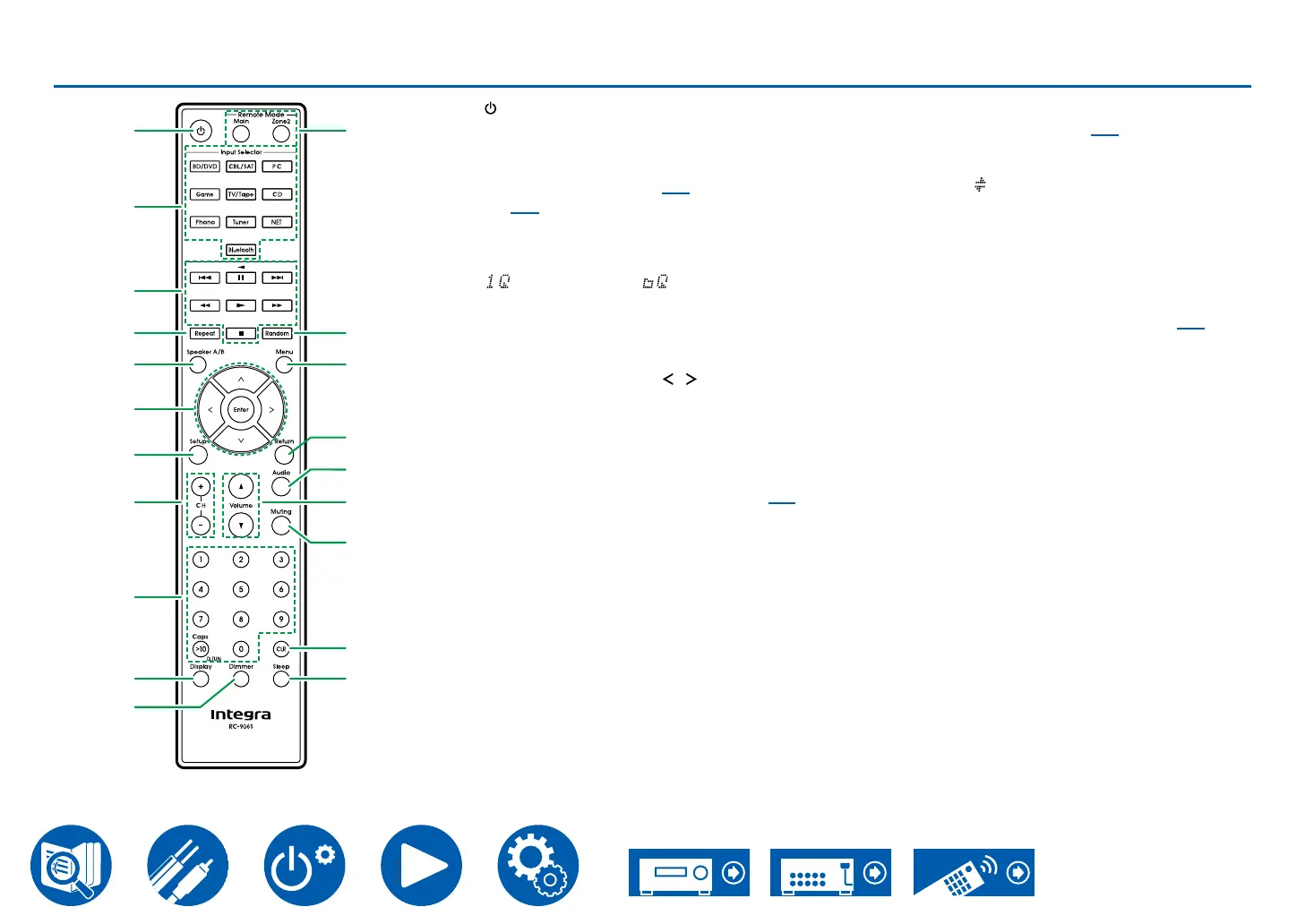
Remote Controller
A On/Standby button
B Input Selector buttons: Switches the input to
be played.
C Play buttons: Used for playback operations
for the Music Server ( →p67) or USB device
( →p65).
D Repeat button : Used for repeat play operations
when playing Music Server or USB. Each time
you press the button, the mode switches from
(1-track repeat) to (folder repeat).
E Speaker A/B button: Select the terminals to
output audio from between SPEAKERS A/B.
F Cursor buttons and Enter button: Select an
your selection. Pressing / LEFT/RIGHT
button allows you to switch the screen when a
screen on the TV.
G Setup button: Displays advanced setting
items on the TV or the display to have a more
enjoyable experience with this unit. ( →p73)
H CH (+/-) buttons: Used to select AM*/FM* radio
stations.
* North American models only
I Numbered buttons
J Display button: Switches the information on
the display. You can display information such as
the input source, volume, and input format when
pressed repeatedly during play.
K Dimmer button: Switches the brightness of the
completely.
L Remote Mode Main/Zone 2 buttons: Controls
the multi-zone function ( →p61).
M Random button: Used for random play
operations when playing Music Server or USB.
Random (
press the button.
N Menu button: Used to display the menu.
O Return button: Returns the display to the
previous state while setting.
P Audio button: Enables you to make adjustments
such as the strength of the bass and treble and
the balance between left and right. ( →p39)
Q Volume buttons
R Muting button: Temporarily mutes audio. Press
the button again to cancel muting.
S CLR button: Deletes all characters you have
entered when entering text on the TV screen.
T Sleep button: You can allow the unit to enter
has elapsed. Select the time from "30 min",
want to turn the unit to standby automatically,
P
Q
R
S
T
M
N
O
L
A
2
3
4
5
6
7
8
9
J
K



 To Next Page