D-0116684-B – 2020/03
OtoRead™ - Instructions for Use - US Page 17
2.7 Installing the wireless thermal printer
The OtoRead
TM
communicates with the thermal printer using a wireless connection protocol. Use only the
recommended label printer provided with the equipment.
Refer to the recommended thermal printer’s Instructions for Use for initial setup and installation of the battery
and paper.
2.7.1 Pairing the wireless printer to OtoRead
TM
Pairing with the instrument is necessary before wireless printing is possible.
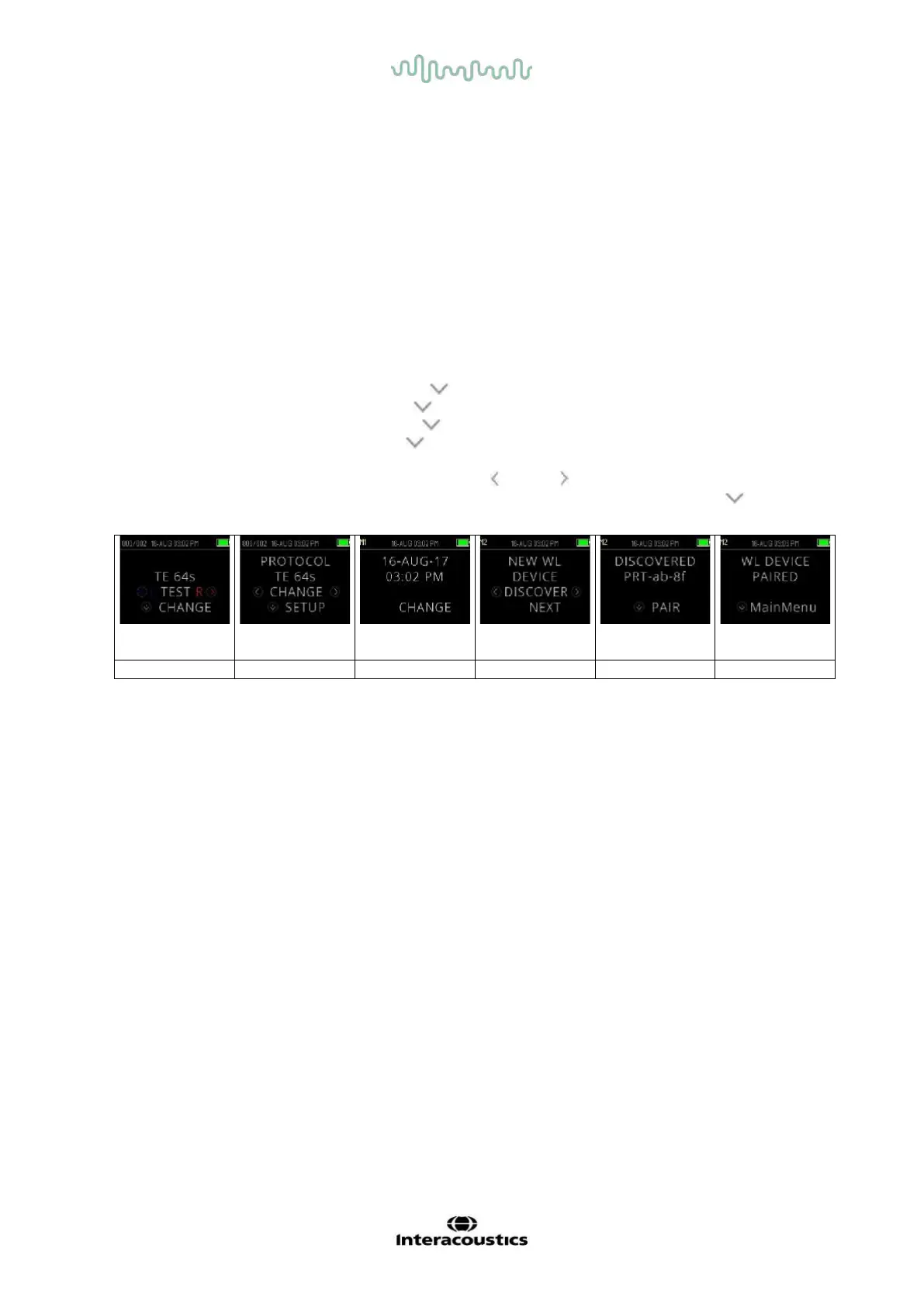
Pairing process:
1. Power on the printer.
2. Power on the OtoRead
TM
by pressing the DOWN key.
3. From the Main Menu, press CHANGE ( DOWN key).
4. From the Protocol Menu, press SETUP ( DOWN key).
5. From the Date Screen, hold down the DOWN key for a few seonds until the green ‘READY’ LED
turns off.
6. You are now at the NEW WL menu and can press LEFT or RIGHT key to search for the printer.
7. Wait for the device to find the printer (ensure it is switched on) and then press PAIR ( DOWN key).
8. The printer is now paired to your device.
Note: Do not have several printers powered on and within range while searching.
It is possible to pair up to 8 instruments with one printer. If more instruments are paired, the oldest will be
deleted.
2.8 OtoRead
TM
Module & Auto Print software
The OtoRead
TM
can be used in conjunction with the OtoRead
TM
Module & Auto Print software for storing,
viewing, printing and managing patient information. For further information about the software, refer to the
OtoRead
TM
Module & Auto Print Instructions for Use.















 To Next Page