D-0116684-B – 2020/03
OtoRead™ - Instructions for Use - US Page 55
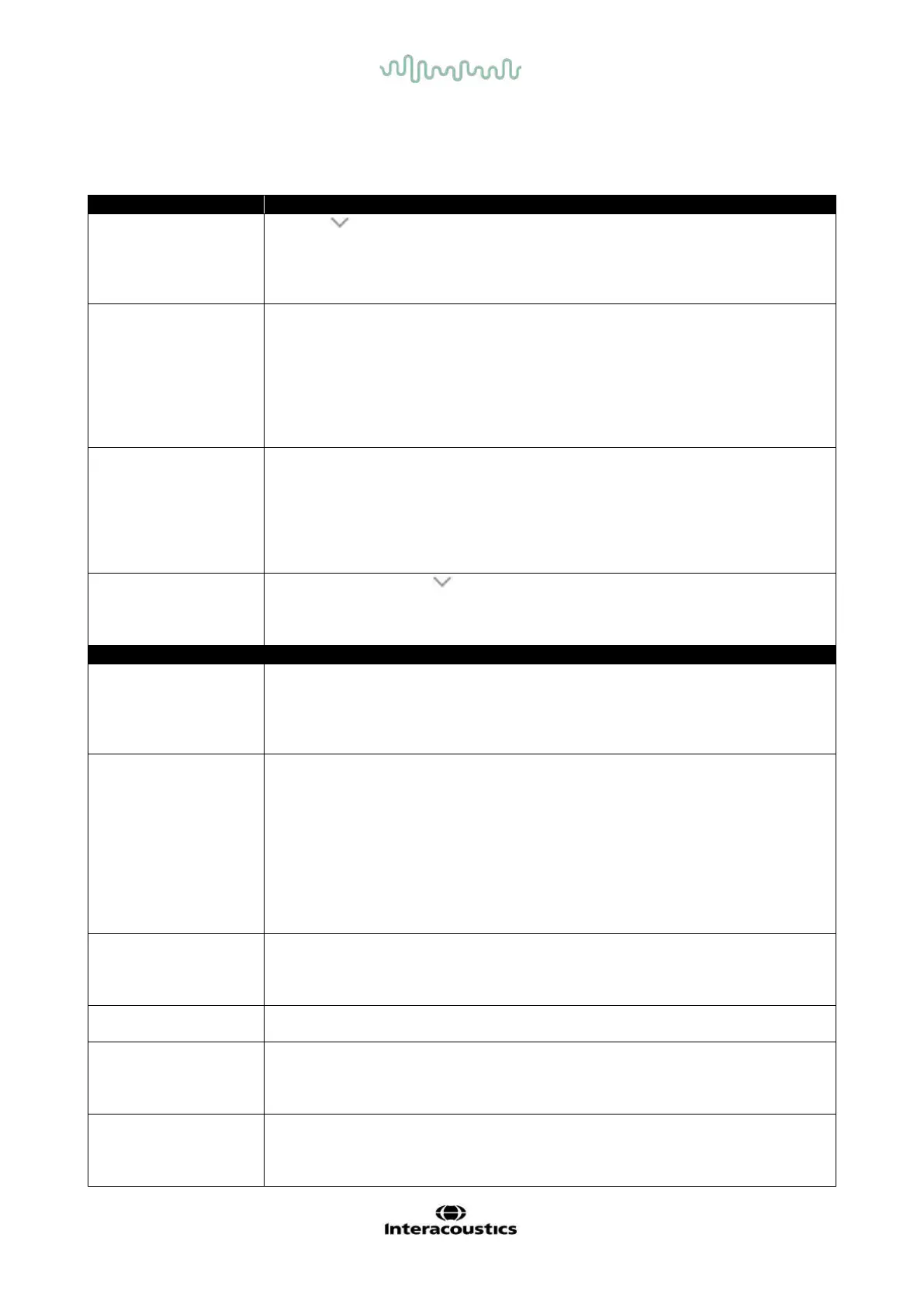
5 Troubleshooting
not turn on
The DOWN arrow must be pressed for a full second (the Yellow ‘TEST’
LED will illuminate)
Connect the charger as shown in chapter 2.6.2. Confirm that the blue
’Charging’ LED is illuminating in a slow blink pattern. Wait at least 10
minutes and then attempt to turn on the instrument
start
Select a different sized ear tip
Reposition the probe
Change the probe tube
Verify that the ear tip is sealed in the ear canal via feedback from the
PROBE CHECK screen
Check that the instrument will start in your own ear with the proper ear tip for
testing yourself. If the test will not start or if the AutoStart tones sound
unusual, replace the probe tube
print
Check the printer status. Turn the printer on (wake from sleep mode) by
pressing the large button
If the printer does not turn on, plug in the power supply to charge the battery
Be sure the printer has paper
If paper comes out of the printer but there is no text on the paper then the
paper is in backwards
Press the large printer button twice, rapidly, to run demo print
and instrument will
not respond to
Press and hold the DOWN arrow button for 10 seconds to force the
instrument to power off. Powering the instrument back on again should
reset/restore normal function
Probe
No probe is detected at the start of a test.
Check that the probe connector is fully seated in the socket
Disconnect and reconnect the probe
Cycle instrument power
Not Found
The paired wireless device cannot be detected. The device may be turned
off or too far away.
Paired to Printer:
Check that the printer is turned on
Move closer to the printer
Try again
Paired to PC Computer or dongle:
Check that the serial port in the module is identical to the setting found in the
Device Manager. Establish that the serial port is handled by the PC and/or
the software, not by the OtoRead
TM
#xxx
There is an error condition with the wireless device. Check the status.
Check BT device (printer or PC) status
Attempt to connect to BT device again
The OtoRead
TM
device is not paired with any wireless device.
Pair the OtoRead
TM
with the wireless device (printer or PC)
Responding
The printer is not responding to queries from the instrument.
Check the printer status
Awaken printer from sleep mode
Charge printer battery if necessary
Cannot Obtain P
For a DP test, the desired stimulus level (L1 or L2) cannot be obtained within
allowable limits.
User should refit the probe in the paitnet’s ear and retry the test















 To Next Page