iPECS eMG80
Hardware Description and Installation Manual Issue 1.3
65
6. KSU AND EKSU WIRING
6.1 Connecting the Basic and Expansion KSUs
If an Expansion KSU is installed, it must be connected to the KSU for command and control.
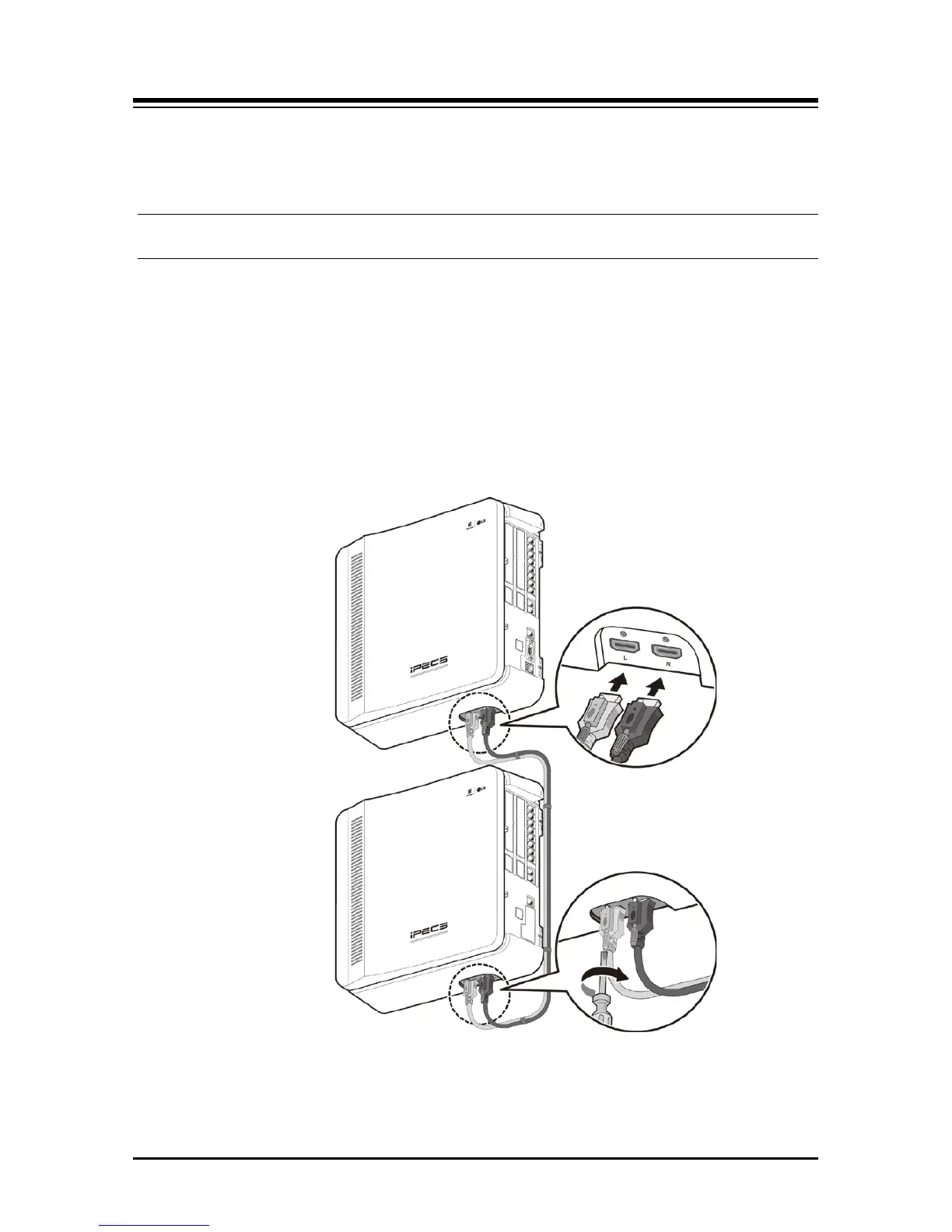
The EKSU must be connected to the KSU employing the Expansion cabling as shown in
Figure 6.1-1. The Expansion Cable is included in the EKSU package and consists of two
colored cables terminated at each end in a connector. The grey cable must be connected to
the KSU-L and EKSU L ports and black to the KSU-R and EKSU-R ports.
To connect, perform the following steps:
1. Connect the grey cable to both the KSU and EKSU “L” ports.
2. Connect black cable to both the KSU and EKSU “R” ports.
3. To fix the Expansion cable connector securely, tighten the thumbscrews on each
connector.
Figure 6.1-1 Expansion KSU to KSU Connection
NOTE
If during normal operation, power to the EKSU is turned OFF and ON, the KSU will restart
to reconfigure automatically.



 To Next Page