iPECS eMG80
Hardware Description and Installation Manual Issue 1.3
24
4.3 Removing and Replacing the KSU & Cord cover
Prior to installing option boards in the KSU or EKSU, it is necessary to remove the KSU and
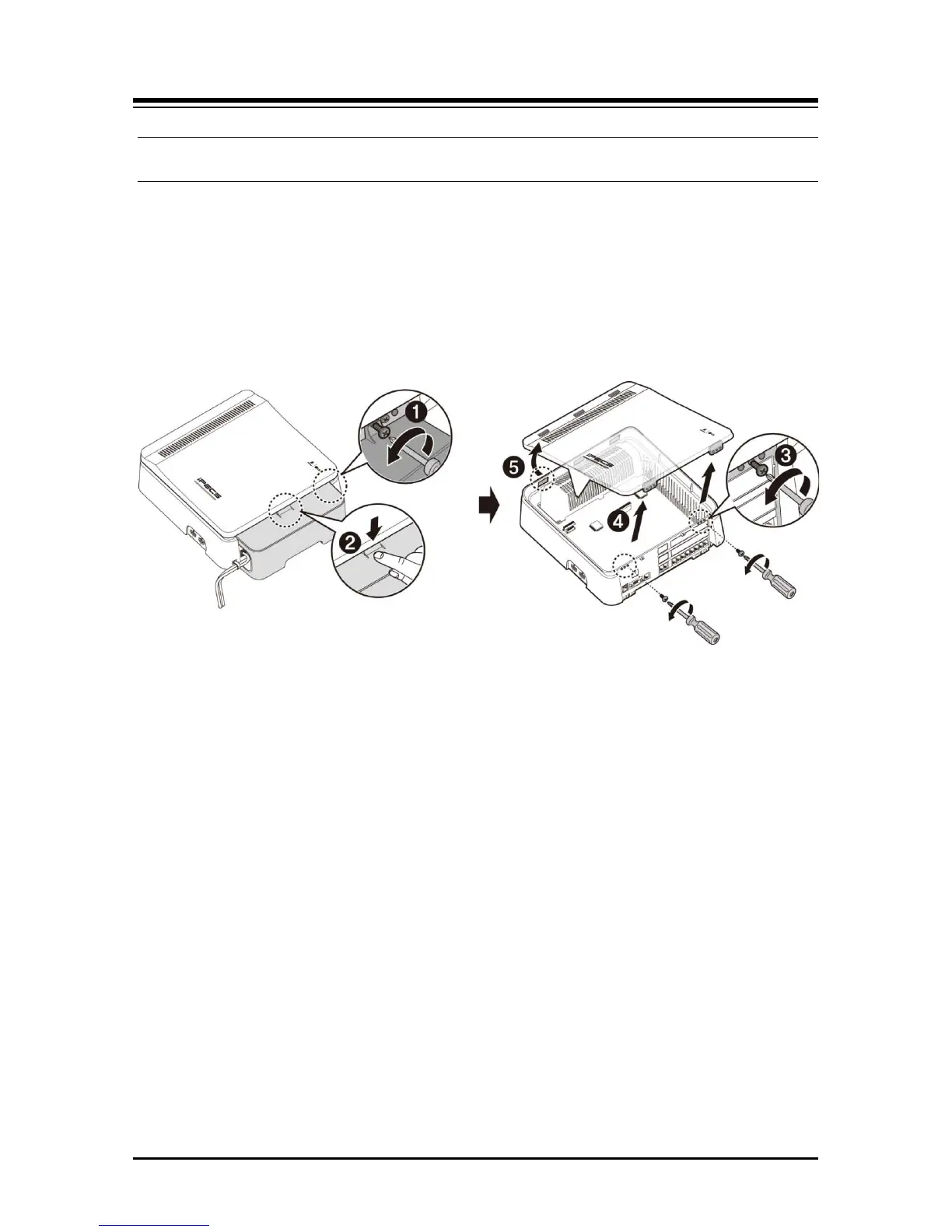
Cord covers. To remove the cord & KSU cover and expose the MBU:
1. Locate and remove the Cord cover hold-down screw as shown in #1 in the below
figure.
2. Press down slightly on the top of the Cord cover to be away from the KSU.
3. Remove the two screws holding the KSU cover as shown in #3 in the below figure.
4. Lift the front of the KSU cover in the direction of the arrow.
5. Remove the cover. Be sure to place both covers in a safe location.
Figure 4.3 Opening the KSU and Cord Cover
NOTE
For safety, prior to operation, replace the KSU and Cord cover before operating the eMG80.
Regarding attaching the cord cover, refer to the section 6.9.3.
To replace the covers, reverse the removal procedure as below.
1. Insert the tabs of the KSU cover into the KSU slots.
2. Press the KSU cover down on to the KSU.
3. Insert the screws and tighten screws with screwdriver to fix the front cover.
4. Install the Cord cover
5. Insert and tighten the cover hold-down screw.


 To Next Page