Sensor Installation
Modline 5
Rev. L6 Feb 2017 61
The Modline 5 Sensor with the Dirty Window Detector Option (DWD) cannot be
installed in a WJ-5 Jacket because of its additional length.
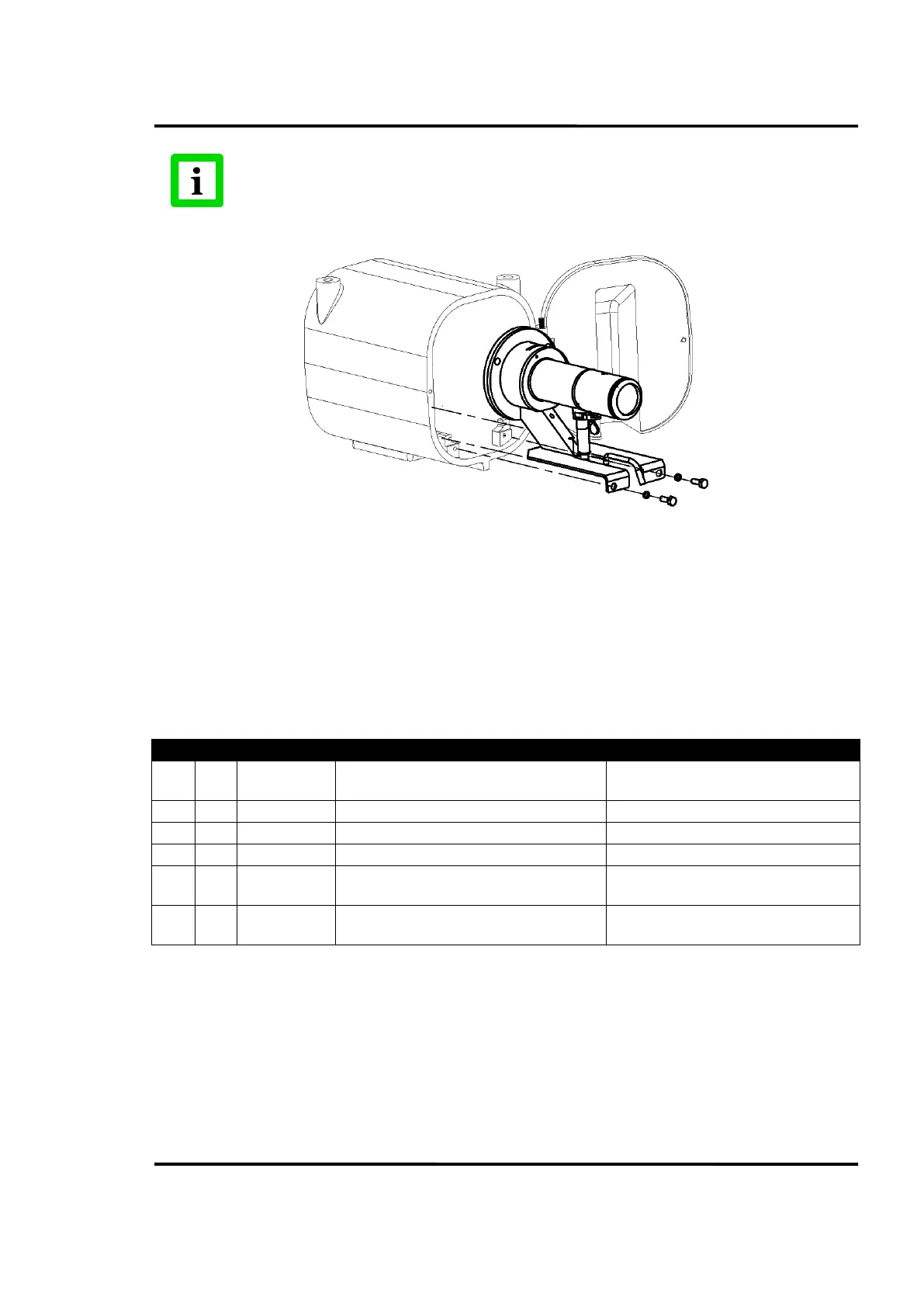
Figure 53: M5WJ5 – Mounting Kit
Accessories and kit required for mounting Modline 5 Sensor in WJ-5 Water Cooling Jacket:
Model WJ-5 Water Cooling Jacket with Air Purge Supplied with its own mounting
hardware (M5WJ5 Kit is not included.)
UAA Universal Adapter Accessory Supplied with its own mounting hardware
MFL Mounting Flange Large Accessory Supplied with its own mounting hardware
M5WJ5 Mounting Parts Kit: Consisting of the following. (Note: These parts are sold only as a
kit.)
Complete specifications, cautions and
installation instructions
Spacer between UAA and Plate
Slides assembly into WJ-5
¼-20 X ¾ inch long Socket Head Cap Screw
Mount Spacer Block to UAA
¼-20 X ¾ inch long Hex Head Screw
Mounting Plate to Spacer (2)
Mounting Plate to WJ-5 (2)
1/4 in. Split-ring lock washers
Use with ¼-20 X ¾ inch long Hex Head
Screws (4)
Table 13
Assembly and Sighting Instructions:
Refer to Installation Instructions for WJ-5, Included in M5WJ5 Kit
1. Assemble as indicated in drawing to the right and at top of page.
2. Slide assembly into WJ-5 and tighten rear mounting plate screws.
3. Focus Sensor with rear rotating focus section.
4. If looking through a sight tube or sight hole, position, align and rotate the Sensor and Sight tube
to center the reticle or laser image in the field of view.


 To Next Page