Manual No. 085-3435-07 26/45 IGB/IGX Series (Overseas Specifications) Service Manual
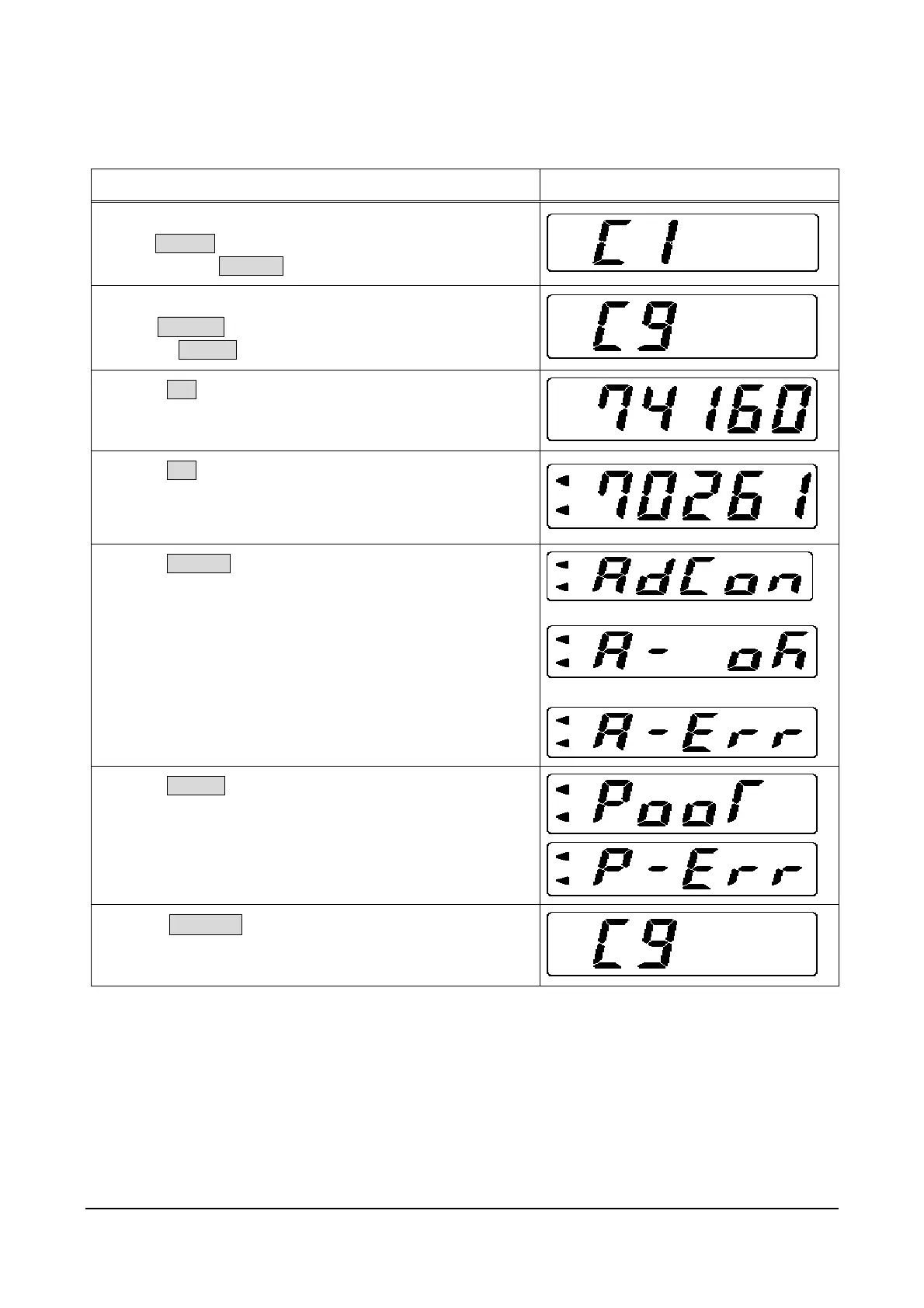
2.10 C9 Mode: Board Inspection (A/D Check, I/F Check)
This mode is for factory inspection, and shall not be used for maintenance.
Operation Display
1. Starting Test Mode
Press ON/OFF.
Press and hold ZERO(+) while all segments are lit.
2. Entering C9 Mode
Press ZERO(+) eight times.
Or, press TARE(-) .
3. Press SET.
Span adjusted A/D data is displayed.
4. Press SET.
A/D converter output value is displayed.
However, the lower 3 bits of 24-bit output change rapidly and
are outside of visual inspection range, so they are excluded.
5. Press ZERO(+).
Used for A/D board drift inspection.
The inspection result is displayed: OK or Err
6. Press TARE(-).
Connect the inspection jig and all I/O ports are checked.
The inspection result is displayed: OK or Err
7. Press COLUMN to return to Key Test Mode.



 To Next Page