Chapter 2 INSTALLATION & SETUP
INS-100 Service Manual No. 085-6692-09 13
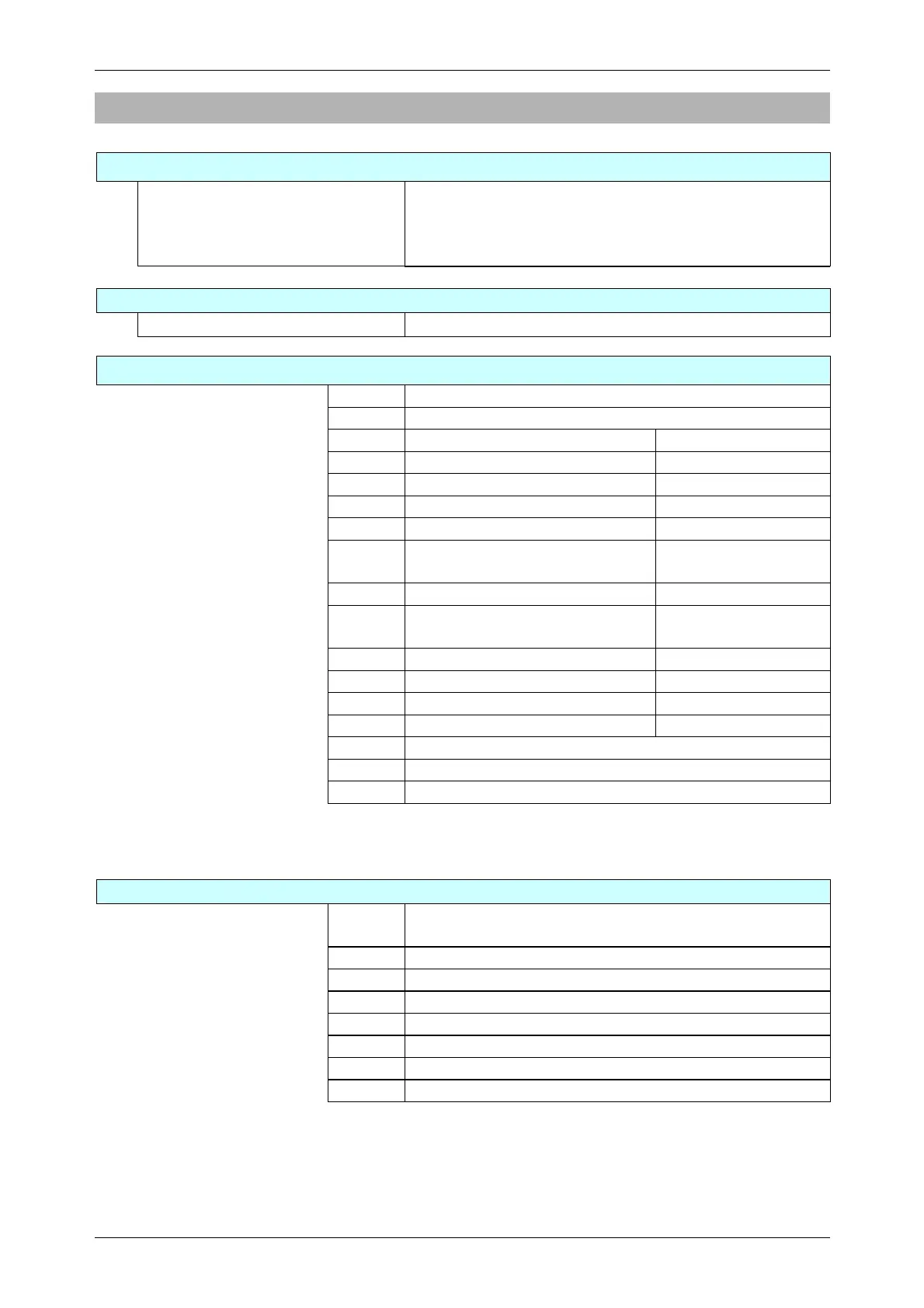
2.3 Items in Each Mode
Normal Mode
ON/OFF key
Weight, Unit price, and Total price
display
Zero point adjustment
Tare weight subtraction
Unit price input or cancellation
Price addition function
Voltage Check Mode
ON/OFF key TARE key
Battery level check Current voltage level can be checked.
Setup Mode
ON/OFF key CLEAR key
F 1 Automatic power OFF change function
F 2 Invalid (Automatic preset call function)
F 3 Invalid (Digit number change) (Printer specification)
F 4 Invalid (Date print) (Printer specification)
F 5 Invalid (Preset number print) (Printer specification)
F 6 Invalid (Upper/Lower tare print) (Printer specification)
F 7 Invalid (Serial number print) (Printer specification)
F 8 Invalid (Continual/Single label
specification)
(Printer specification)
F 9 Invalid (Baud rate) (RS-232C)
F10 Invalid (Serial output message
specification)
(RS-232C)
F11 Invalid (Serial output method) (RS-232C)
F12 Invalid (Serial output condition) (RS-232C)
F13 Invalid (Output signal setting) (Contact point box)
F14 Invalid (Input signal setting) (Contact point box)
F15 Invalid (Large volume buzzer)
F16 Built-in buzzer output condition
F17 Automatic power OFF function existence setting
Note: F2 – F15 is Invalid function.
Test Mode
ON/OFF key [ 1 ] key
C 1 Scale adjustment (country code, weighing capacity, area,
zero, span)
C 2 Key check
C 3 Display check 1 (simplified check)
C 4 Display check 2 (detailed check)
C 5 Program number display
C 6 RAM and E2ROM clear
C 7 Country specification/Weighing condition settings
C 8 E2ROM data read


 To Next Page