iTriangle Infotech Pvt Ltd
Interface 18 of 43
Note: Engineering Documents are Highly Confidential
7.3.2 Full Setup
Connect the Red wire of the device to +ve terminal of the power supply.
Connect the Black wire of the device to Ground wire of the power supply.
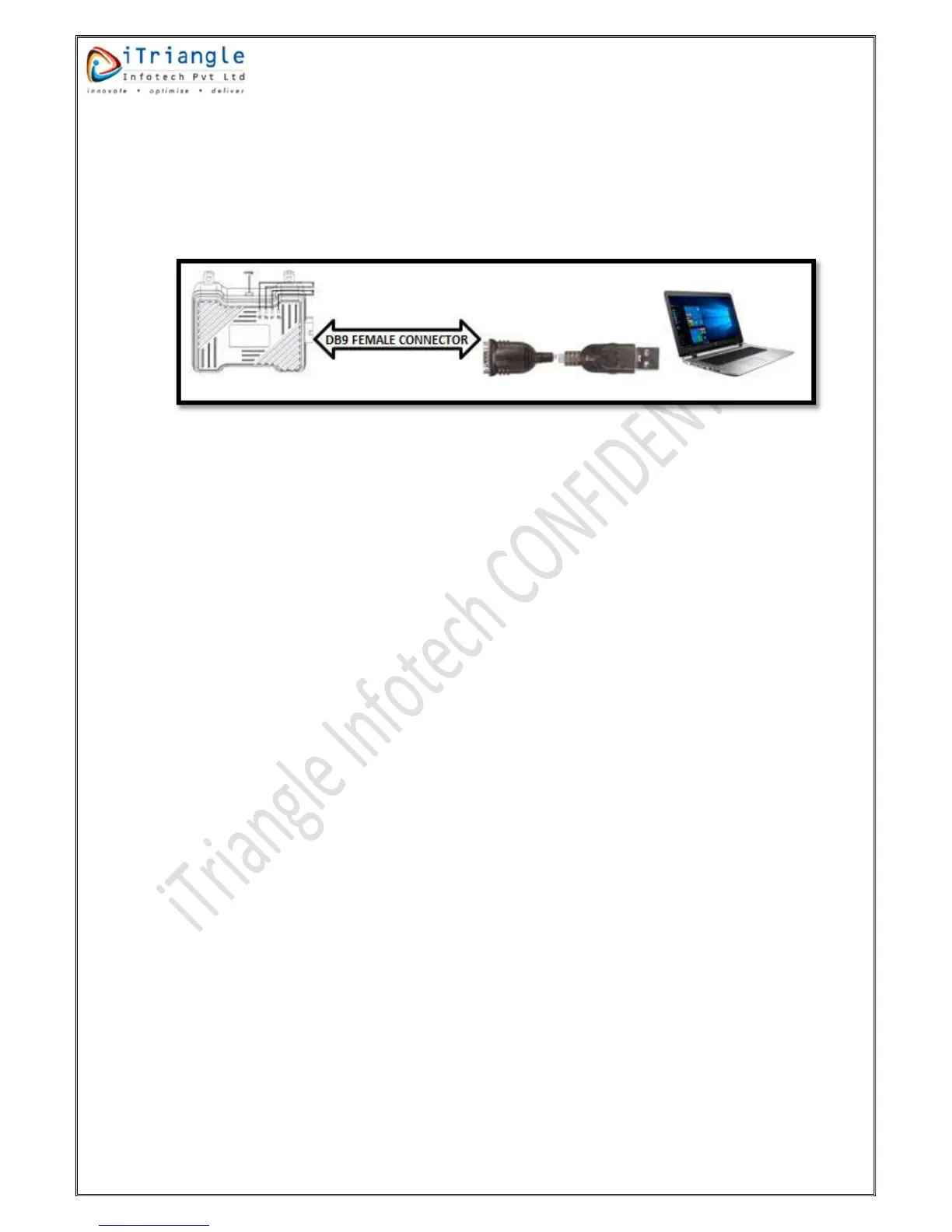
Connect the Orange wire of the device to orange wire of the DB9 female connector.
Connect the White wire of the device to white wire of the DB9 female connector.
Connect the DB9 female connector to USB to Serial converter.
Figure 14: Configuration setup
7.4 Firmware Update
Please request the latest firmware to FAE or a Sales coordinator.
7.4.1 Using Flash Tool
Flashing of TS101 Basic(GC) can be done by using a tool called Q flash. iTriangle FAEs will have the
flash tool. Get the flash tool and the latest firmware from FAEs. Below are the steps to update the
firmware of the device.
7.4.1.1 Upgrade Procedure
The tool is used to upgrade the firmware. It works according to following steps.
Configuration of the tool
File setting
Upgrade
7.4.1.1.1 Configuration of upgrade tool
As soon as QFlash tool is opened the main interface is shown as below


 To Next Page