iTriangle Infotech Pvt Ltd
Interface 25 of 43
Note: Engineering Documents are Highly Confidential
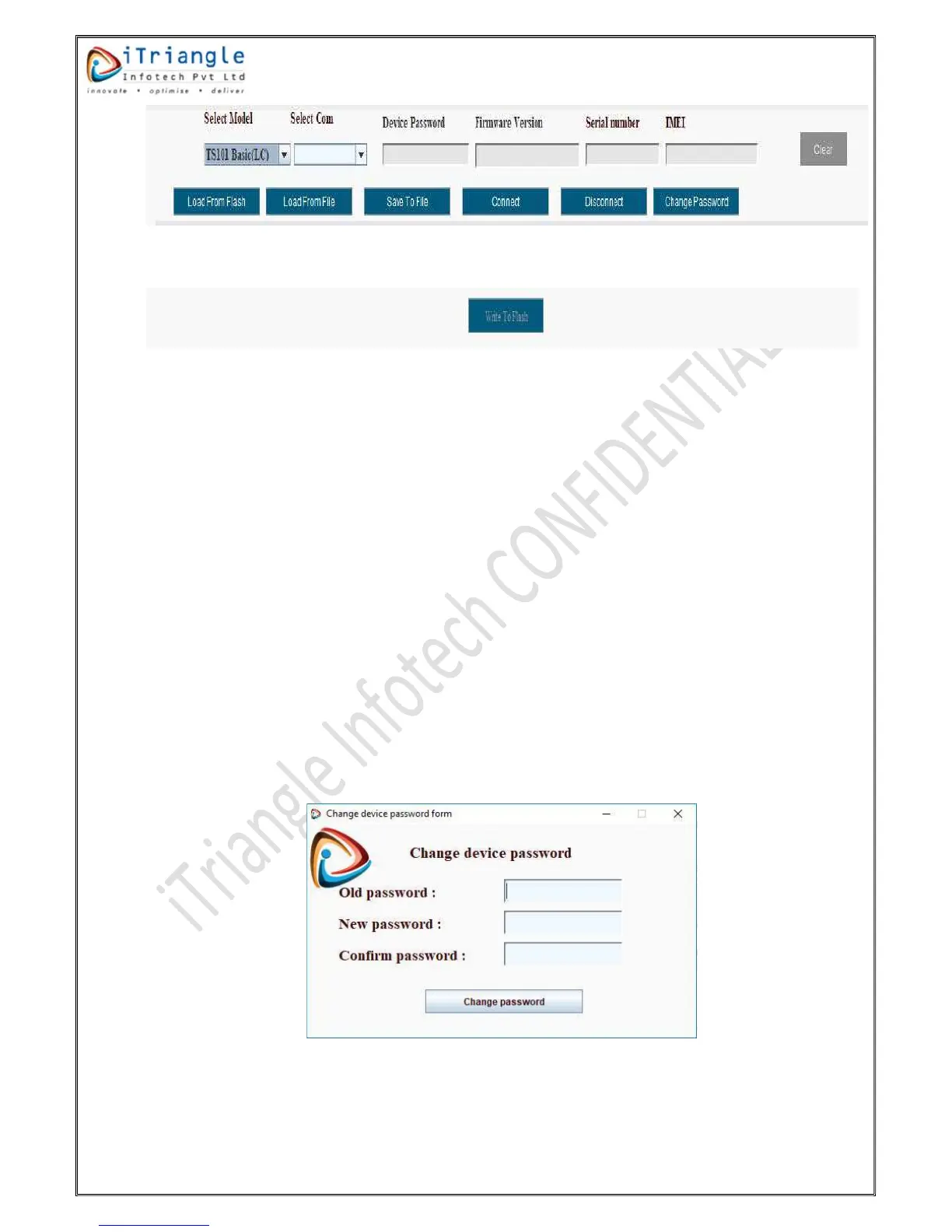
Figure 24:DCT options
Figure 25: Write to flash
Select Com port: It is serial communication port, determines the device is connected to
respective port. Make sure that port was selected before clicking on the connect button.
Device Password: The password to configure the device should be entered in this place.
Firmware Version: This field is an information field in which the current firmware version of
the device will be displayed.
Serial Number: This is an information field in which the serial number of the device will be
displayed.
IMEI: This is an information field in which the IMEI number of the device will be displayed.
Clear: This button is used to clear all the filled configuration fields.
Load From Flash: This button is used the get the current configuration details of the device.
Tool will get the all the configuration information from the device.
Load from File: This button is used to load the configuration details from the saved file. File
browse option will popped up on clicking of “Load From File” and already saved file should
be selected to load the configuration.
Save To File: This button is used to save the configuration to a file and this file can be used
for other device configurations.
Connect: This button is used to connect the tool with communication port.
Disconnect: This button is used to disconnect the tool with communication port.
Change Password: This button is used to change the password of the device. On clicking of
the button, a popup will be shown with an option to enter the old password and new
password as shown below.
Figure 26:Change password


 To Next Page