iTriangle Infotech Pvt Ltd
Interface 41 of 43
Note: Engineering Documents are Highly Confidential
8.2.5 Installing the Battery
Below are the steps to install the battery to the device.
Open the back casing of the device.
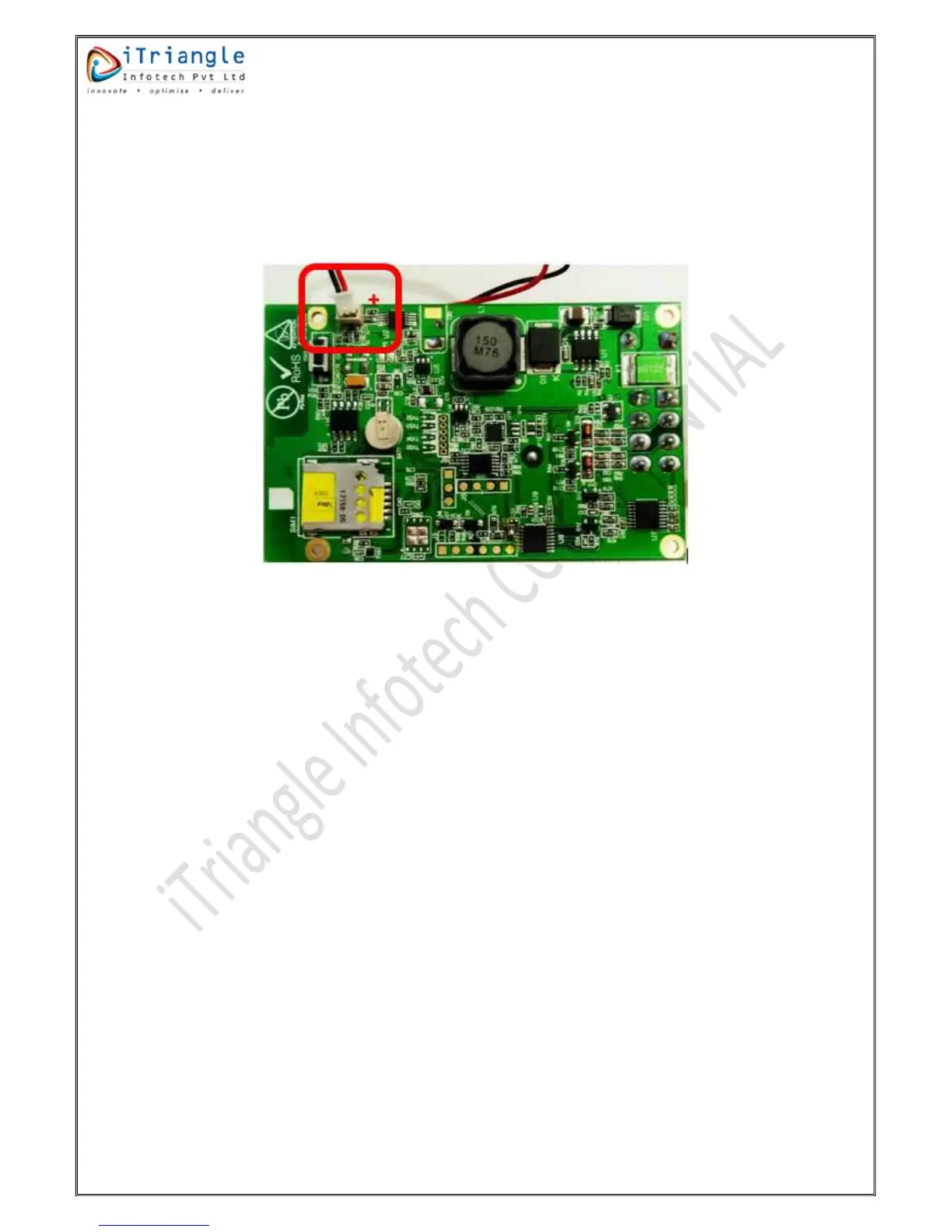
Connect the battery terminal to on-board connector of the device.
Figure 41: Installation of the battery
Close the back casing and fasten the screws.
8.3 Installation Steps
Open the Box and check for contents as specified on the box.
Check the SIM card activation by inserting in to Mobile Phone and check, SIM card for
Registration, and the GPRS connectivity.
If all parameters are found working, insert the SIM card in the holder as shown in section
8.2.4.
Connect the internal battery connector to on-board connector.
Connect device’s power and ground terminals to vehicle battery/ continuous power source
in the vehicle as explained below in this document. If the internal battery level is very low, it
will take 10-15 minutes to turn on the LEDs and start working normally.
Connect the ignition sense of the device to ignition wire of the vehicle.
Do the placement of the device as per section 8.2.2 and 8.2.3.
Check the process LED for normal behaviour.
Check the GNSS LED for normal behaviour.
Check the GSM LED for normal behaviour.
Make sure that the device starts communicating to destination server before leaving the
vehicle.
8.3.1 Power Connection
Remove the Ignition Key
Identify the Direct power wire by using multi-meter.


 To Next Page