iTriangle Infotech Pvt Ltd
Interface 26 of 43
Note: Engineering Documents are Highly Confidential
Write to Flash: This button is used to write the configurations in to the device’s flash. The
tool will start pushing the configurations to device flash and the loading interface will be
populated. Approximately it will take around 2 minutes to push all the configurations to the
device.
7.5.2 Configuration parameters
The configuration parameters are grouped in to 4 different sections.
Communication Parameters
Transmission Parameters
Eco Driving
Miscellaneous
7.5.2.1 Communication Parameters
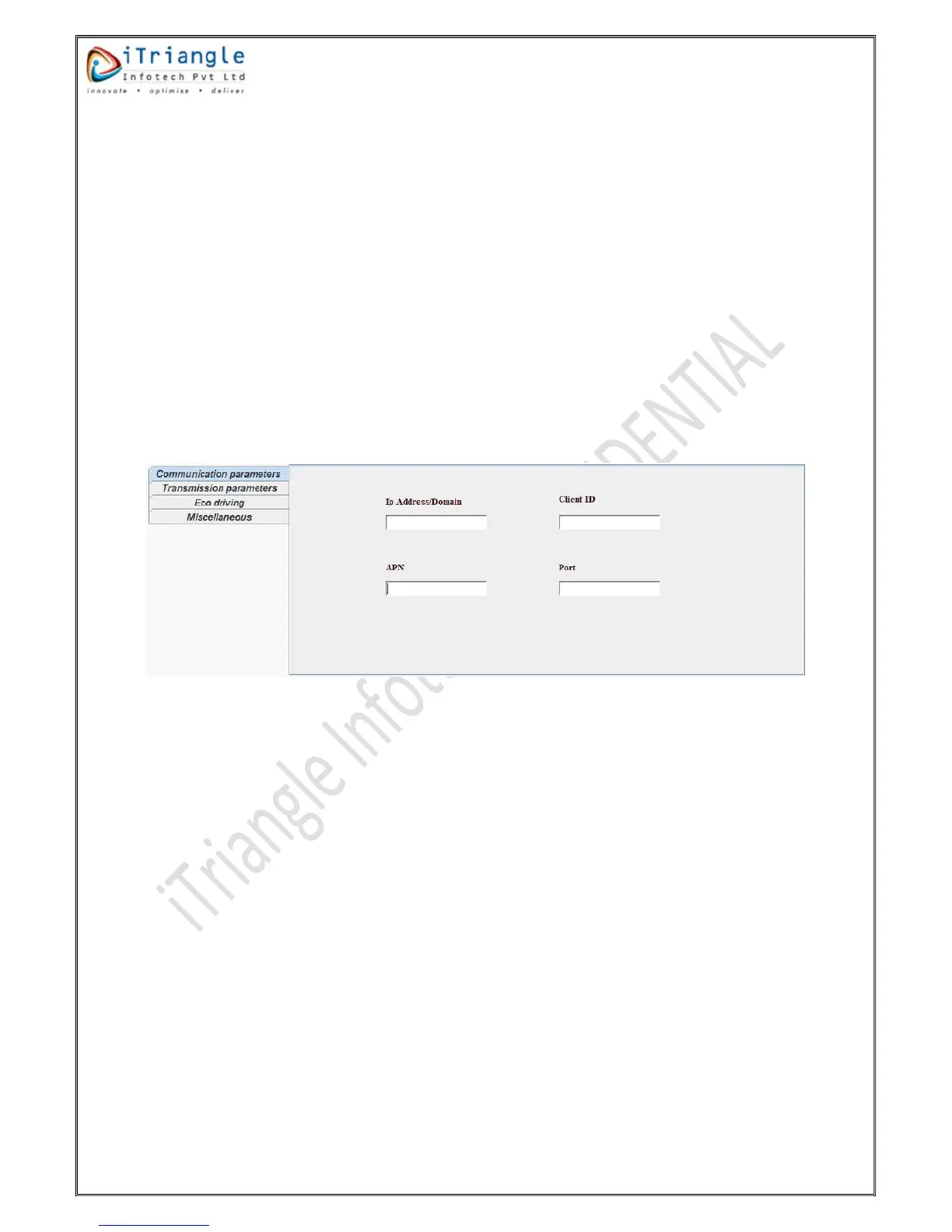
This group contains configuration parameters related to communication. Please find the below
figure for the reference.
Figure 27: Communication parameters
The communication parameters group contains below different parameters.
IP Address/Domain: This parameter is used to configure the destination server address. This
field can accept either domain name or IP address.
Client ID: This parameter is used to configure the client id which will reflect in the packet
protocol. This field should have at least one underscore character.
APN: This parameter is used to configure the APN of the internet service provider. The
maximum length of this parameter is restricted to 30 characters.
Port: This parameter is used to configure the destination port in which server listens the
data.
7.5.2.2 Transmission Parameters
This group contains configuration parameters related to data transmission. Please find the below
figure for the reference.


 To Next Page