46
Programming
In actuator mode the drive can work with pre-selected frequencies for manual control of the HYDROVAR.
Two different frequencies can be set in the submenu REQUIRED VALUES [0800]. Switch between these
frequencies using parameter SW REQ. VAL [0815].
0106
0106 PUMP ADDR.
Select desired address for the Master Inverter
* 1 *
Possible settings: 1-8
Set desired address on each Master Inverter and press button for approximately 3 seconds and the
following messages will appear:
Addressing
->
1220 PUMP ADDR.
or
1220 PUMP ADDR.
Addressing * 1 * - 1 -
Address Set Address failed - retry
When using Master and Basic drives together in a multi-pump system the Basic Inverters have separate
addresses. For detailed Information see chapter 8.4.3.2 Addressing.
0110
0110 SET PASSW.
Set Password by pressing ▲ or ▼
0066
Possible settings: 0000 - 9999
Caution: Resetting the password is not recommended! However, the pre-set password (0066) can be
changed. After the password has been changed, the new password should be recorded where multiple
people have access to it.
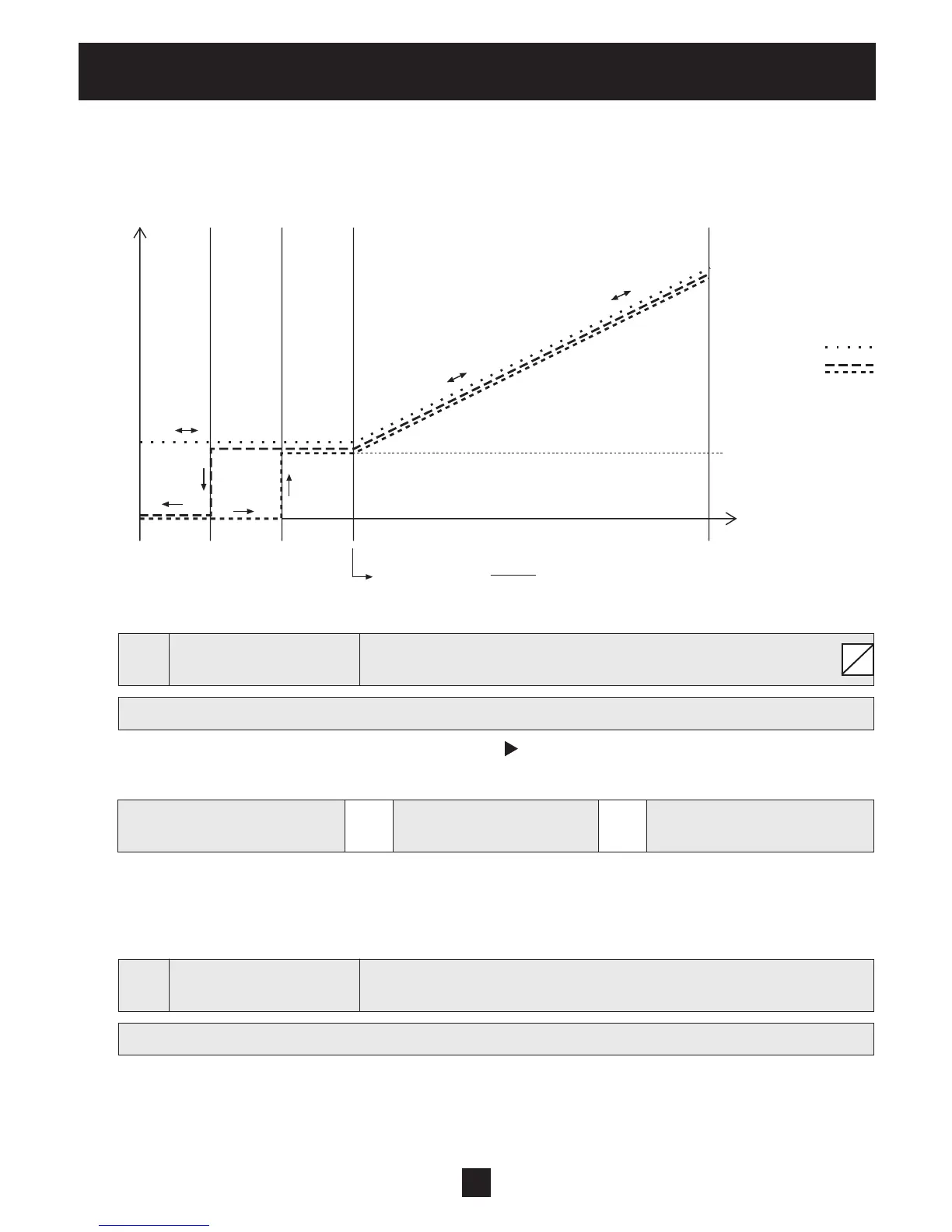
f[Hz] 1/3 2/3 3/3
OFF ON
0Vdc
0mA
4mA
10Vdc
20mA
20mA
= signal range *
f min
+ zeropoint
f max
fmin
fmax
[0255] f ->min
[0255] f ->0
range of control
S


 To Next Page