5: System Configuration
○○○○○○○○○○○○○○○○○○○○○○○○○○○○○○○○○○○○○○○○○○○○○○○○○○
User’s Manual
5•13
○○○○○○○○○○○○○○○○○○○○○○○○○○○○○○○○○○○○○○○○○○○○○○○○○○
Advanced Boot Options
Main Section Functions
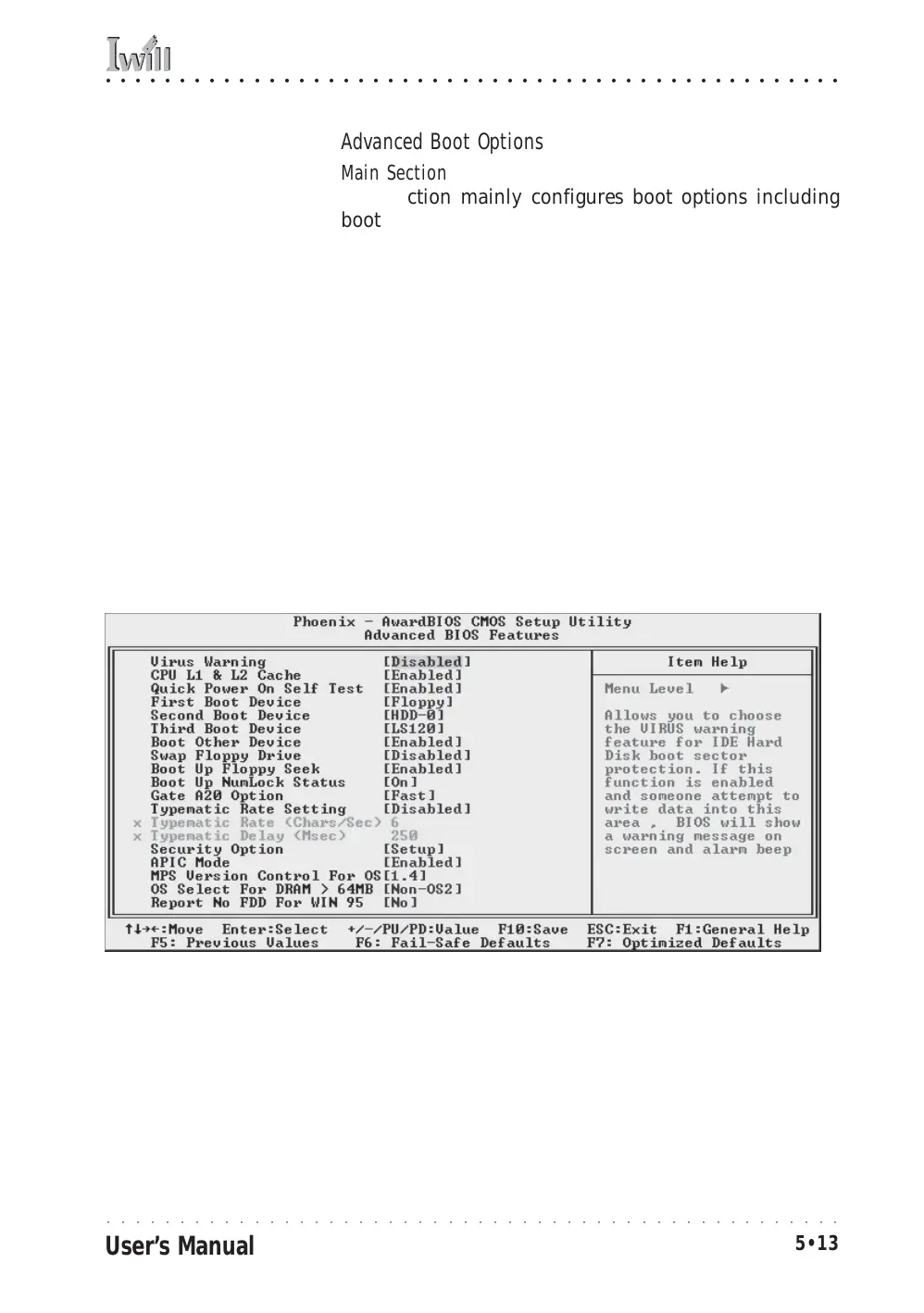
This section mainly configures boot options including
boot devices and their boot order and some power func-
tions. There are also some miscellaneous boot configura-
tion settings.
Default & Autodetected Settings
The screen illustration shows the default settings. These
do not need to be changed. You can customize the set-
tings to suit your purposes if necessary and you know
what you’re doing.
Setting Options & Constraints
You can change the boot device assignments and order,
the boot options and the power on settings as you like. If
you are using OS/2 set the OS Select For DRAM>64MB
line to the OS2 setting.
CMOS Setup Utility – Advanced Boot Options



 To Next Page