5: System Configuration
○○○○○○○○○○○○○○○○○○○○○○○○○○○○○○○○○○○○○○○○○○○○○○○○○○
User’s Manual
5•15
○○○○○○○○○○○○○○○○○○○○○○○○○○○○○○○○○○○○○○○○○○○○○○○○○○
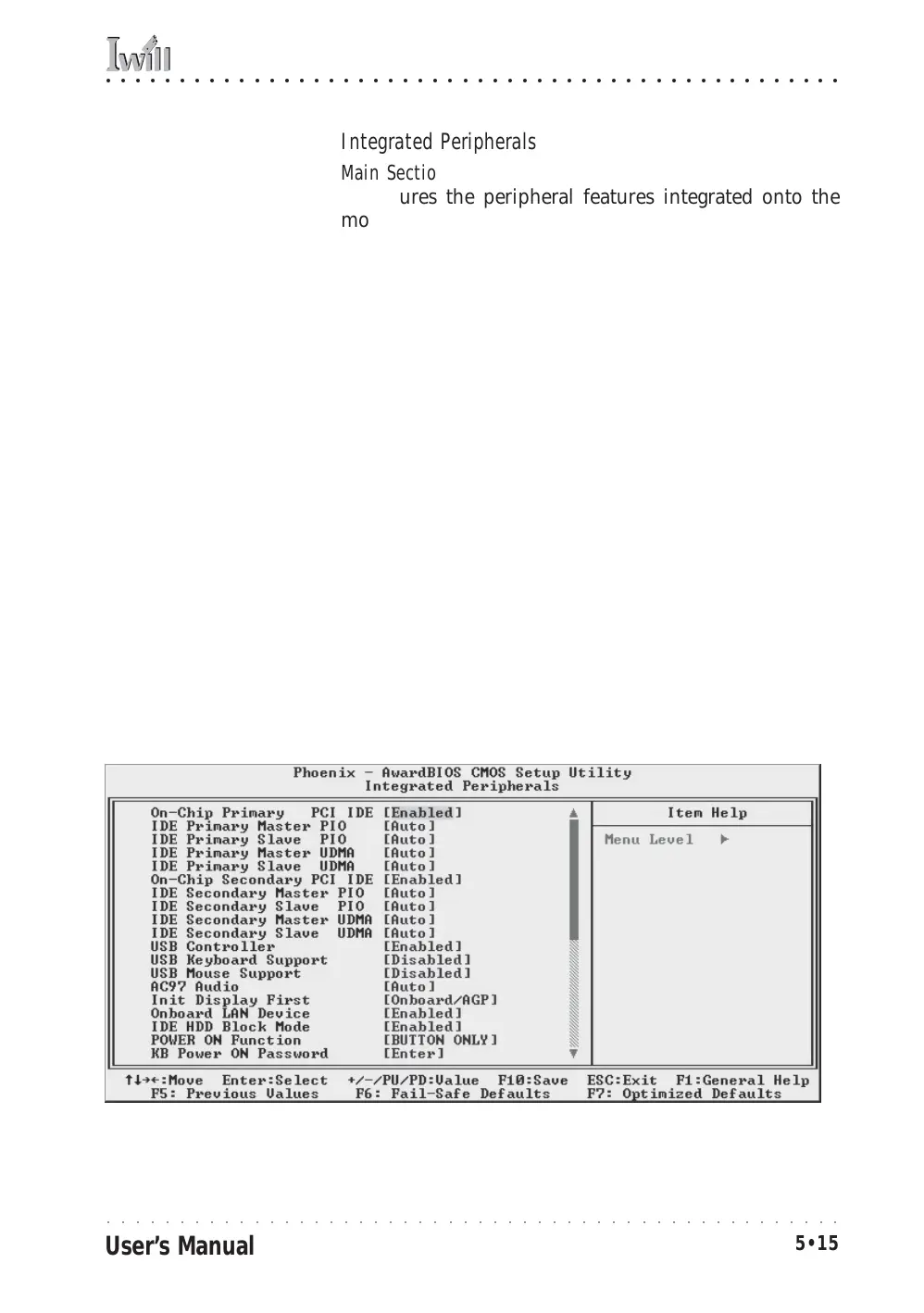
Integrated Peripherals
Main Section Functions
Configures the peripheral features integrated onto the
motherboard.
Default & Autodetected Settings
Everything on this screen is an optimized default. The
IDE transfer mode settings are autodetected. The system
will work with these defaults. The port settings are stan-
dard PC settings.
Setting Options & Constraints
You can disable onboard devices and change port set-
tings. If you’re going to use a USB keyboard or mouse,
you have to enable support for them from this screen.
You can disable the onboard audio and LAN features if
you need to.
The IDE HDD Block Mode feature should work with newer
IDE hard disk drives.
The Power On Function line sets what actions will turn
the computer on. The default is just the power button,
and there are several other options.
The KB Power ON Password line lets you enter a pass-
word to protect the Keyboard Power On feature.
CMOS Setup Utility – Integrated Peripherals



 To Next Page