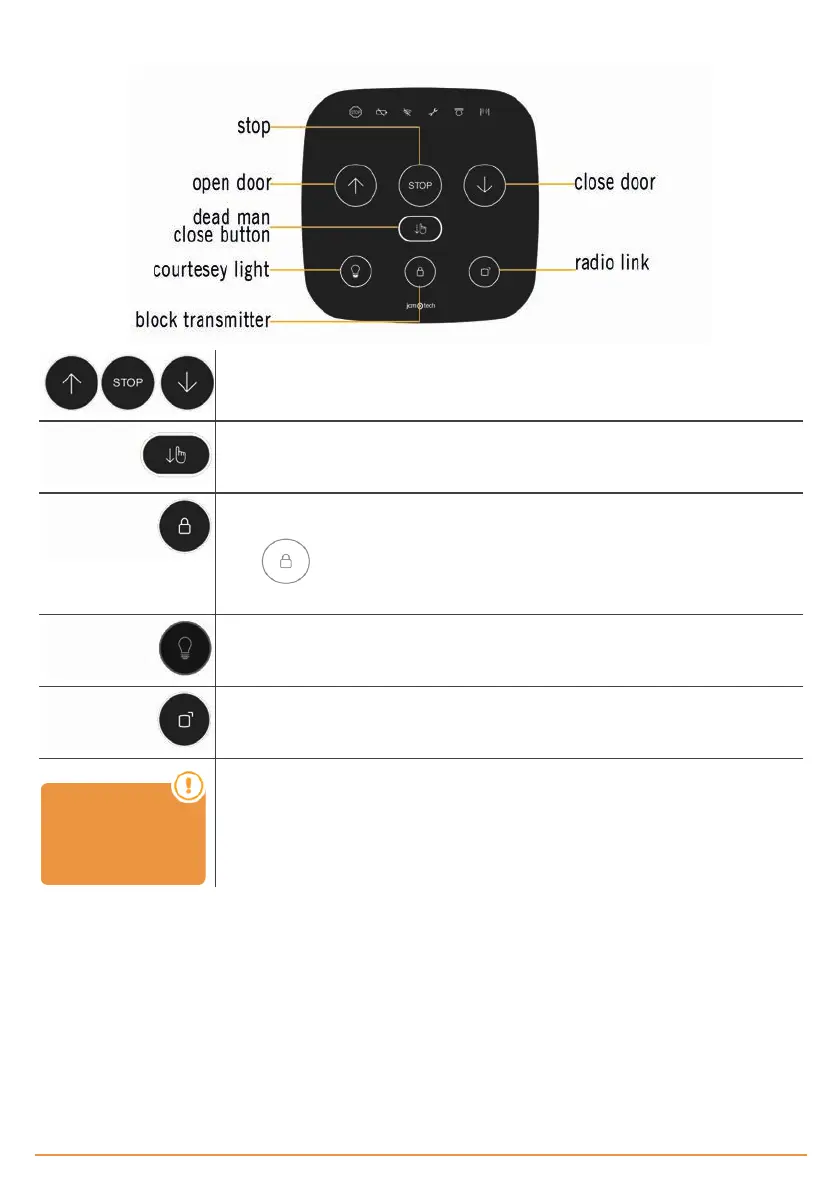
Actions
Press to open, stop and close the door.
Press to close the door in dead man mode.
Block transmitter function: KEEroll control panel incorporates a block button on the cover to
prevent the door from being opened accidentally.
Press to block the door, key lights on. The control panel will not be able to move the
door neither to receive any transmitter. Useful function to block the door during the night.
Adjust courtesy light activation time: The user can set the desired time to leave the cour-
tesy light at on simply by pressing a button on the cover.
New transmitters: The user can program new transmitters simply by pressing a button on the
cover (deleting transmitters is an action that is only allowed in installer mode).
ALARM device is
necessary to activ-
ate this function
Alarm function: With the ALARM accessory it is possible to detect unwanted openings of the
door (robbery), enabling the control panel’s sound alarm to be activated, or even connecting it
to the alarm system already present in the home.
With door totally closed, if someone tries to move it manually, the alarm will be activated.
To stop the alarm, press any button of a programmed transmitter.
jcmtechnologies
7


 To Next Page