radio control system
EN
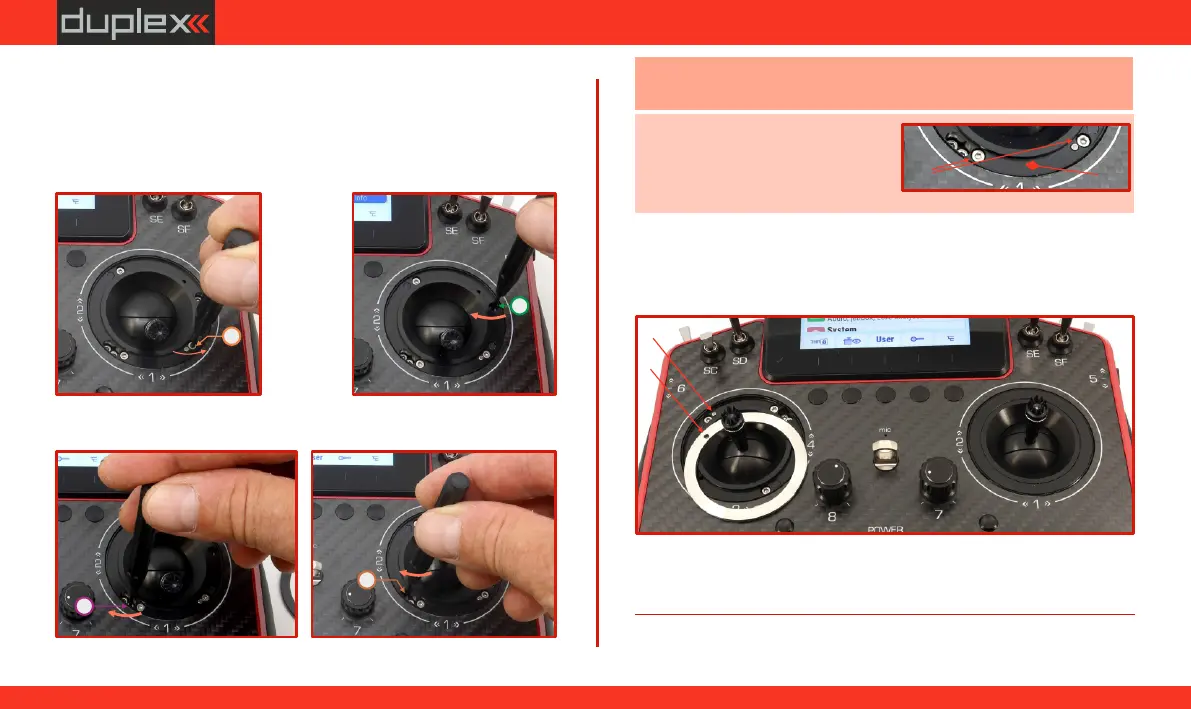
3. Activation of the throttle stick with locking (brake)
adjustment and limitation of centering using a spring:
Use the screw to reduce the strength of the return spring (to
"D”
avoid unnecessary tension).
Tighten screw by turning it clockwise to the maximum,
"C”
which will gradually deactivate the center return spring.
By tightening screws (ratchet) and (smooth) clockwise,
"F”"G”
adjust the locking force (brake) of the throttle stick.
Caution:
Tighten the screws with care to avoid damaging the gimbal
(d)
(e)
Note: When fully loosened, the
head of the screw must not be
(a)
higher than the seating surface of
the cover ring
(b)
(b)(b)(b)
(a) (a) (a)
5. Turn on the transmitter and in the "menu/system/input display,"
press the "F1" button ("Calib") and perform a new calibration of
the throttle stick and its range.
-
D
C
F
G
Fig. 6.46Fig. 6.46Fig. 6.46
Fig. 6.44Fig. 6.44Fig. 6.44
Fig. 6.45Fig. 6.45Fig. 6.45
Fig. 6.47Fig. 6.47Fig. 6.47
Fig. 6.48Fig. 6.48Fig. 6.48
RightRight
RightRight
4. (e) Place the cover ring back onto the gimbal so that its groove
fits precisely over the locking pin (in the area of adjustment
(d)
screw ") on the gimbal. Visually, the ring should lie in line "D”
with the front side of the transmitter ).
64
www.modellmarkt24.ch



 To Next Page