radio control system
EN
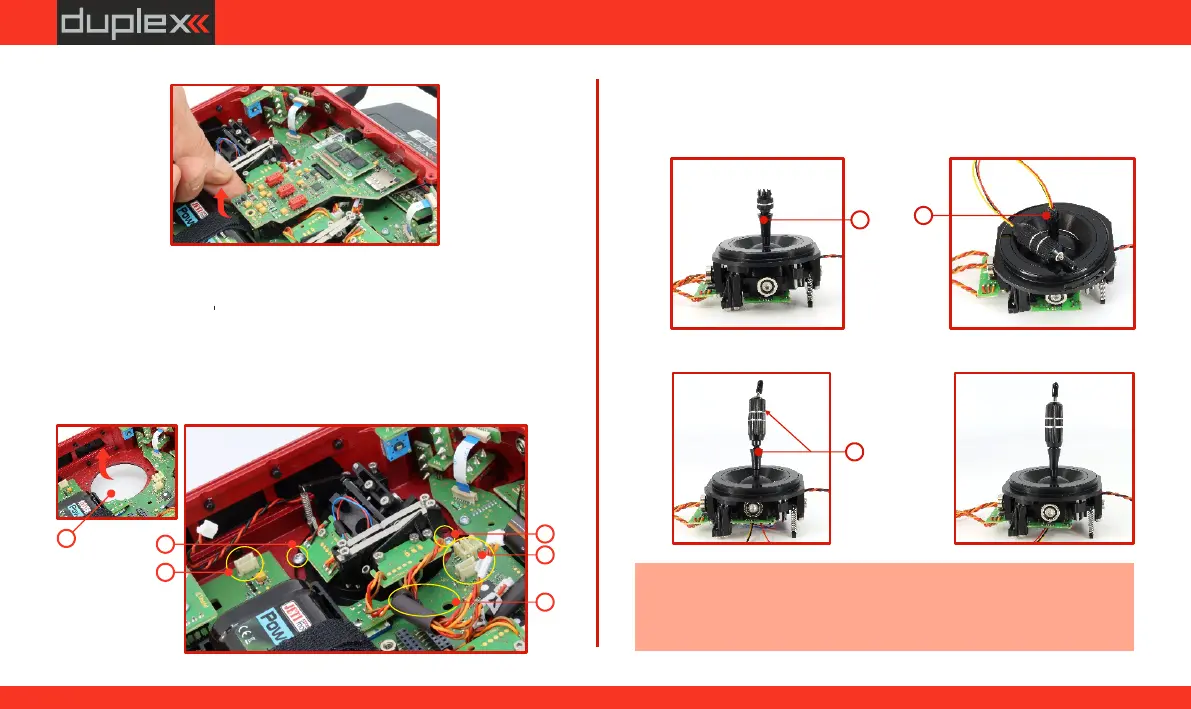
3. Remove the control circuit board (PCB) as shown in the pictures.
4. Disconnect the cable connectors leading from the gimbalr (3
connectors: and ).
X, Y, SVM
5.
Remove the gimbal cables from the mounting holders.
6. Loosen both mounting screws of the gimbal.
7. Pull the gimbal towards you (through the back of the
transmitter). The following installation will be carried out outside
of the transmitter.
[
(a)
(b)
XXX
YYY
SSS
4
VMVMVM
4
5
6
6
8. Unscrew the top part (with the knurling) of the stick
(counterclockwise).
9. Gradually thread the cables of the stick with the switch/button
through the hole in the gimbal stick.
10. Adjust the height of the gimbal stick.
Caution: After installing the stick with the switch/button, it is only
possible to adjust the height of the stick if you loosen the locking
screw. Otherwise, the cables of the switch/button may get twisted.
7
8
9
10
66
www.modellmarkt24.ch



 To Next Page