SECTION 3 - MACHINE OPERATION
3-8 31215821
Battery Charging Status Indicators
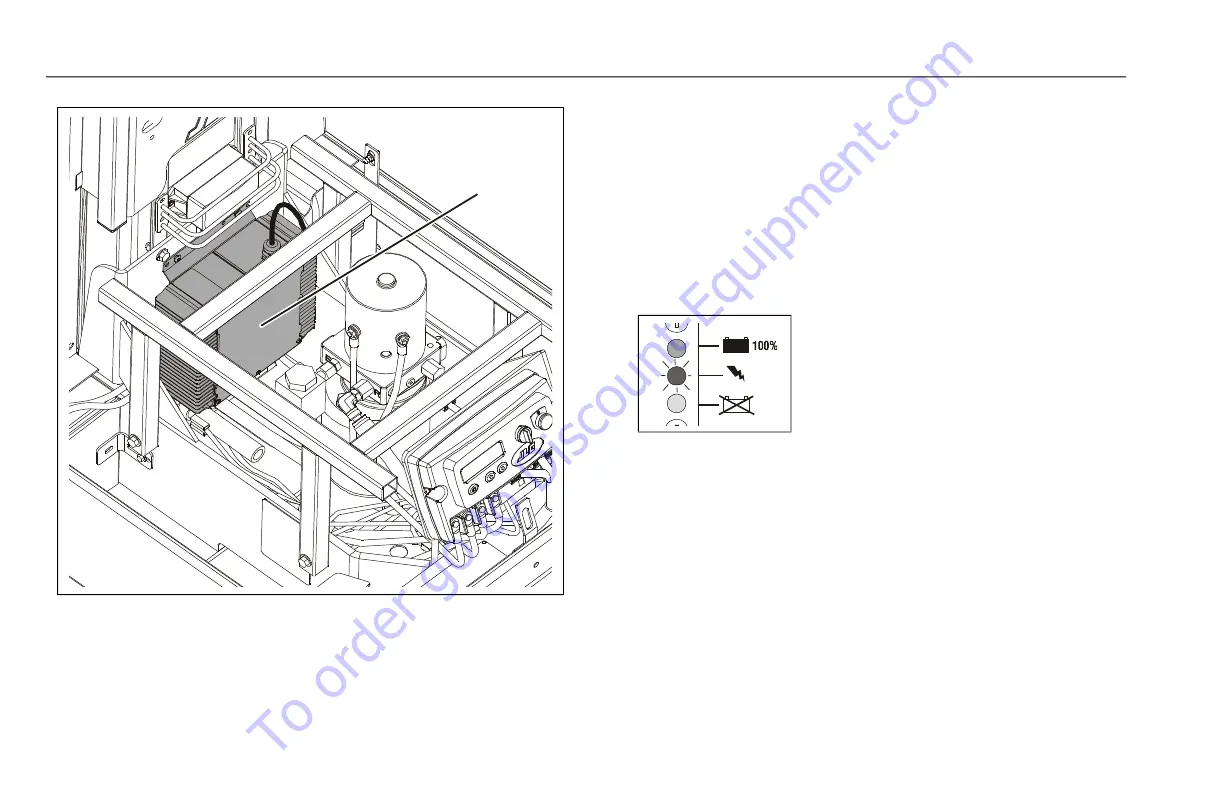
The battery charging status indicators are located just above the
Charger AC input receptacle on the center cover section at the
rear of the machine.
1. When first plugged in, the charger will automatically
turn on and go through a short LED indicator self-test
(all LEDs will flash in an up-down sequence for two
seconds), then charging will begin.
2. The YELLOW ‘CHARGING’ LED will turn on and a trickle
current will be applied until a minimum voltage is
reached.
Once a minimum battery voltage of 2 volts per cell is
detected, the charger will enter the bulk charging con-
stant-current stage and the YELLOW ‘CHARGING’ LED
will remain on. The length of charge time will vary by
how large and how depleted the battery pack is, the
input voltage (the higher, the better), and ambient
temperatures (the lower, the better). If the input AC
Figure 3-4. Battery Charger Location
1. Battery Charger
CHARGING
YELLOW(MIDDLE) LED ON
Charge Incomplete
To order go to Discount-Equipment.com


 To Next Page