5-44
5.4.5 Product Type Settings
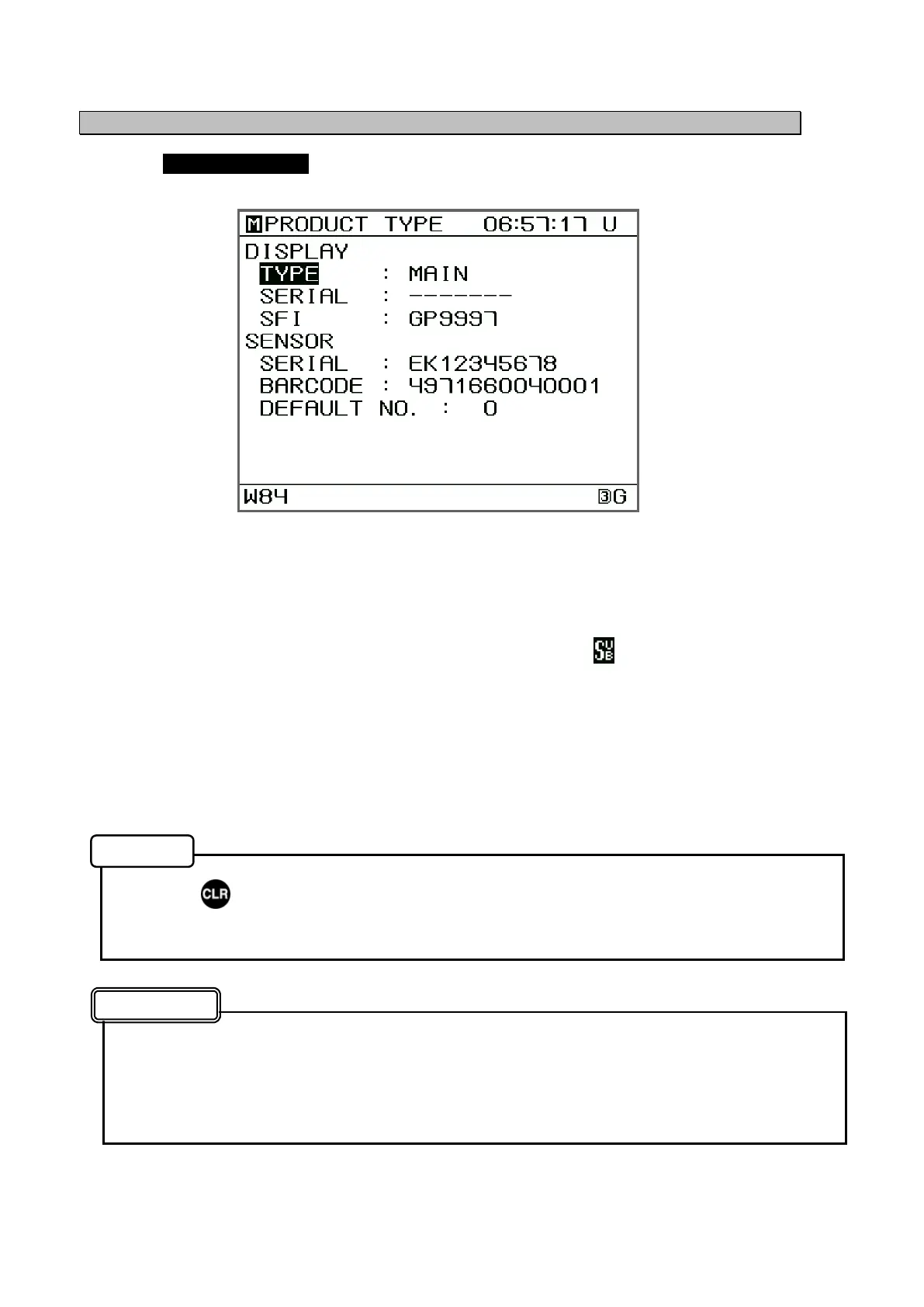
Selecting PRODUCT TYPE from the "5.4 Maintenance Menu" displays the settings screen.
The following submenus are available.
DISPLAY
• TYPE: If any additional display units are connected, set any units besides
the primary unit to "SUB".
When a display unit is set to "SUB", an symbol appears in the
upper right of the screen.
• SERIAL : The equipment number can be entered. (This value is already
entered when the unit is manufactured)
• SFI : The SFI can be entered. (It is not necessary to change normally.)
SENSOR
• SERIAL: Displays the equipment number. (Can not enter)
• BARCODE: Displays the internal circuit board number. (Can not enter)
• DEFAULT NO.: Normally, Displays at “0”.
• Press to return to the Main Menu.
• The SERIAL is not erased even if a master reset is performed.
• If the display unit is set to "SUB", sensor settings cannot be performed by that display
unit.
• Do not change the SERIAL.
(If the serial number is accidentally erased, enter the serial number that appears on
the plate on the back of the display unit)
Product Type Settings Menu
Memo
Attention


 To Next Page