5-29
5.3.7 Data I/O Settings (DATA I/O)
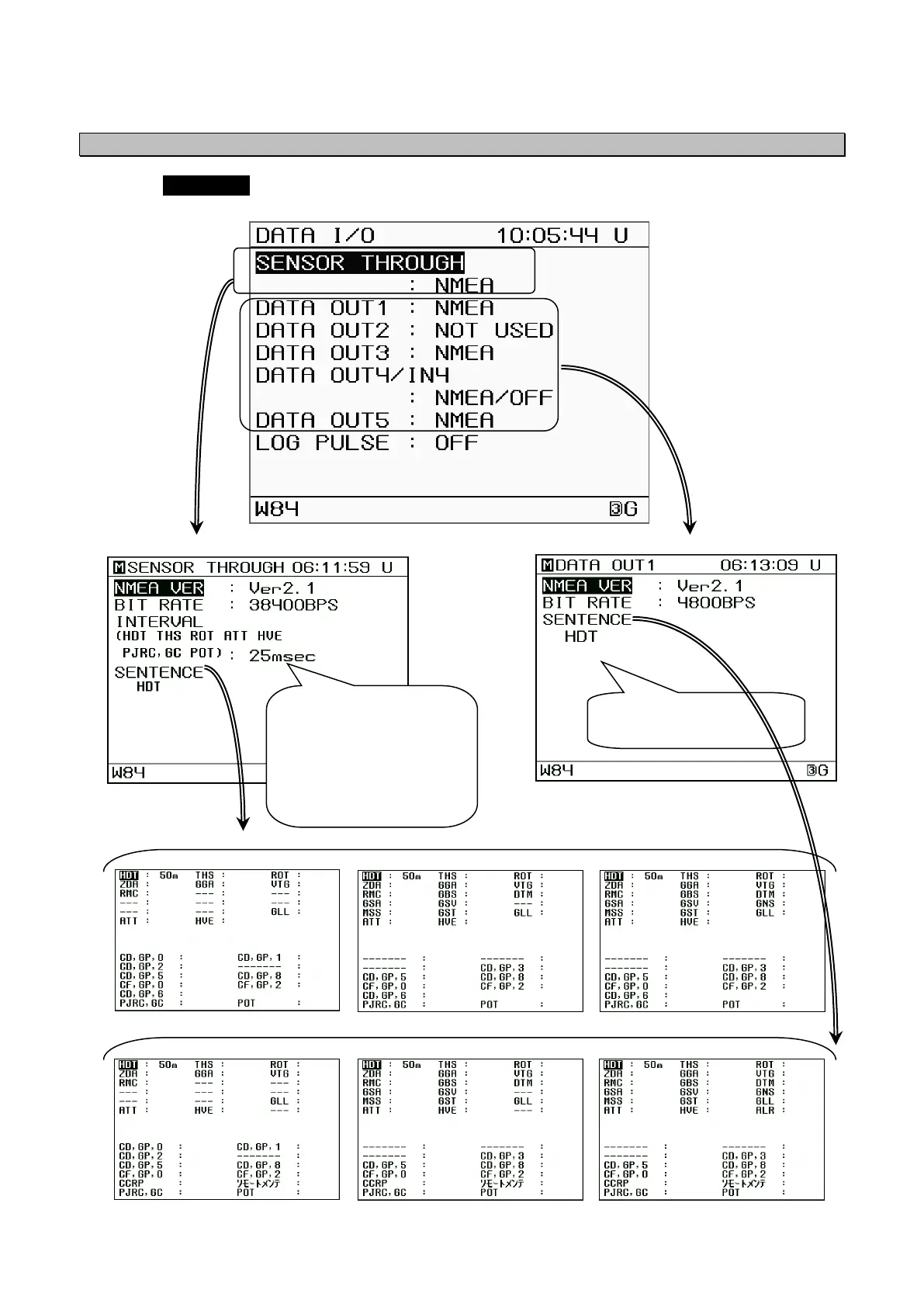
Selecting DATA I/O from the "5.3 Main Menu" displays the DATA I/O Settings Screen.
The DATA I/O Settings Screen can be used to confirm connection settings for external devices.
Version : Ver 1.5 Version : Ver 2.1 Version : Ver 2.3
Version : Ver 1.5 Version : Ver 2.1 Version : Ver 2.3
Data I/O Settings Menu
Screen display change example for NMEA selection
Screen display change example for output sentence settings
The set sentence is
displayed.
INTERVAL:
Sets the HDT, THS, ROT,
ATT, HVE, PJRC,GC and POT
output intervals.
To turn output on, set the
sentence selection to "ON".
* For SENSOR THROUGH
sentences other than HDT
THS
and ROT can onl
be set to "OFF" or "1s".
Screen display change example for NMEA selection


 To Next Page