5-10
5.2.8 Alert Display
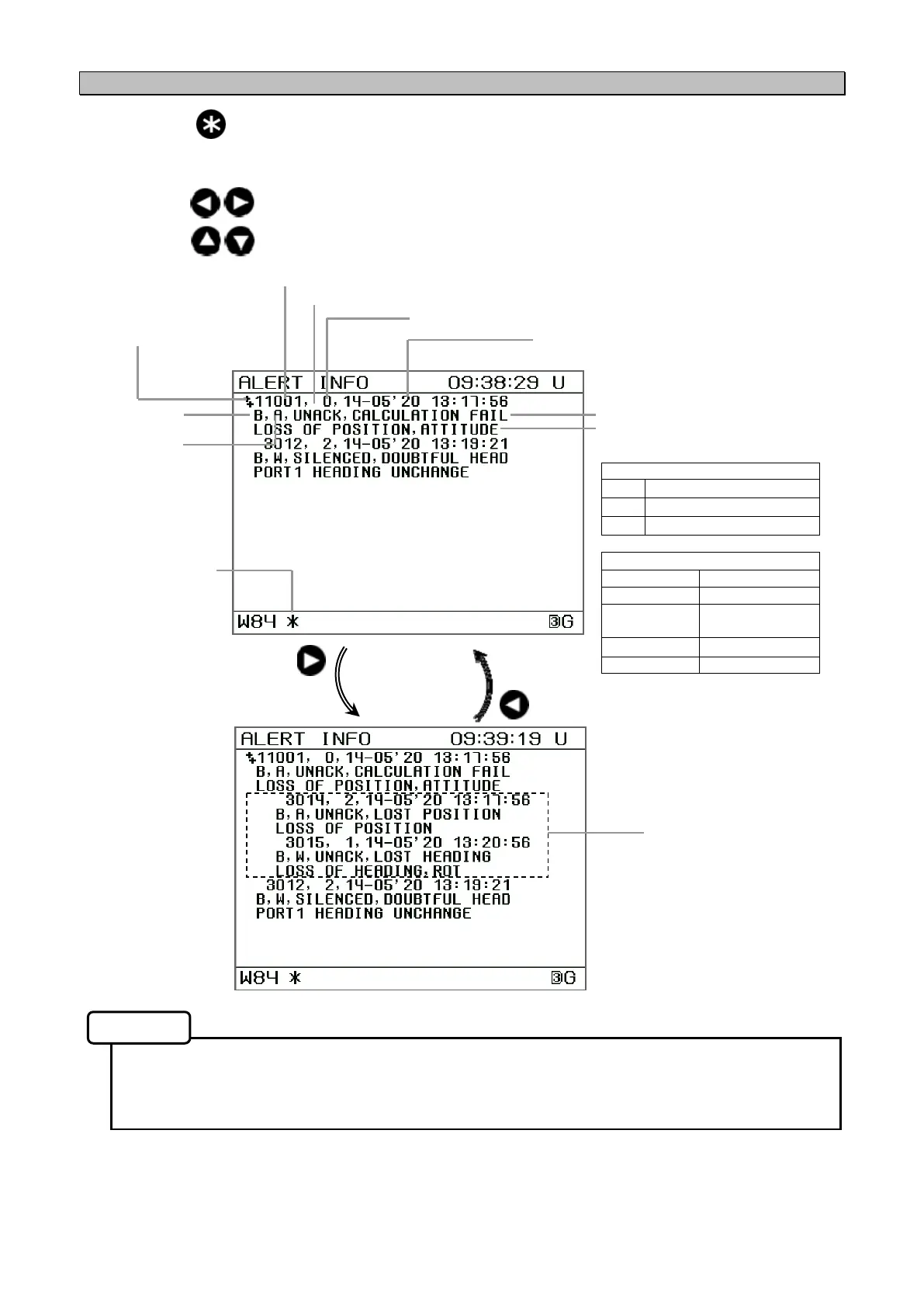
Each time the key is pressed, the screen display changes.
When alert information is updated, the *symbol appears on the status bar.
Pressing the key will diaplay the member of grouping / aggregation.
Pressing the key will scroll the screen.
• If alert has not occurred, "NO ALERTS" is displayed.
• To display the menber of grouping / aggregation, refer to "5.3.9 Alert Settings (ALERT)" and
"HEADER ALERT DISP" set to "ON".
Priority
Alarm
W
Warning
C
Caution
Alert state
UNACK unacknowledged
ACKED acknowledged
RESP responsibility
transferred
SILENCED silenced
RECTIFIED rectified
Memo
Alert information
update symbol
Alert title
priority
Category
Alert ID
Alert description text
Date and time
Alert state
Alert instance
++: Guroping header
+: Aggregation
space: Alert
Member
Date and time


 To Next Page