4-3
4.1.2 Bow Heading Screen
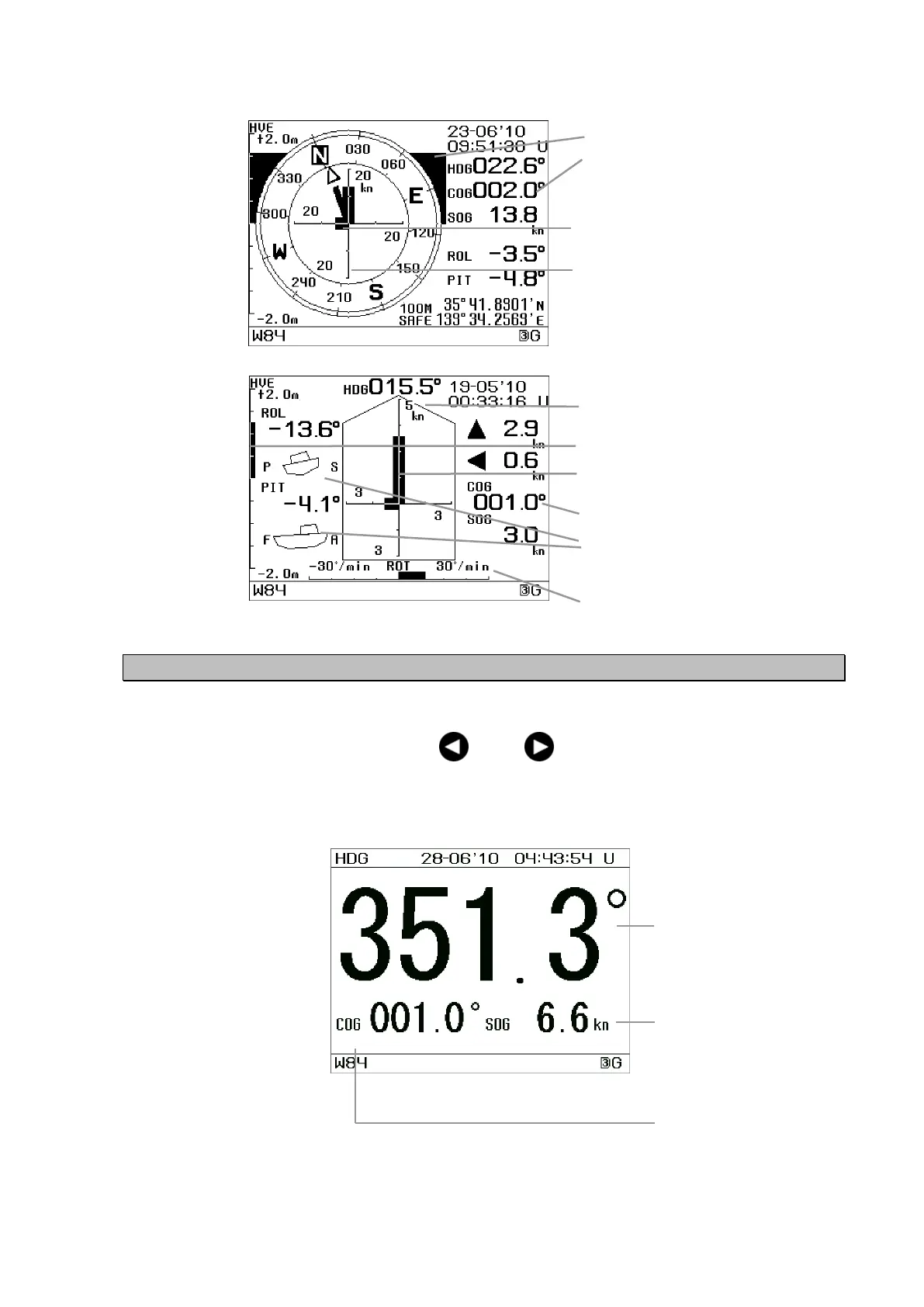
The Bow Heading, SOG and COG are displayed numerically.
Each screen can be cycled using the or the key.
HDG Screen
Bow heading (HDG)
SOG: Speed over
ground
COG: Course over
ground
The display range of SOG bar can be
switched. (Refer to 5.3.6 System
Settings.)
The vectors of the velocity in the
bow/stern and the port/starboard
directions and their resultant vector
(diagonal direction) are displayed.
The vectors of the velocity in the
bow/stern and the port/starboard
directions are displayed.
Roll and pitch are displayed graphically.
P: port S: starboard
F: bow A: stern
SOG BAR. The display range can be
switched. (Refer to 5.3.6 System
Settings.)
ROT graph. The display range can be
switched. (Refer to 5.3.6 System
Settings.)
HEAVING(HVE)BAR
HEAVING(HVE)BAR
Compass
Screen E
Compass
Screen F
COG "-": Less than 1 knot.
COG "-": Less than 1 knot.
"-": Less than 1 knot.


 To Next Page