6
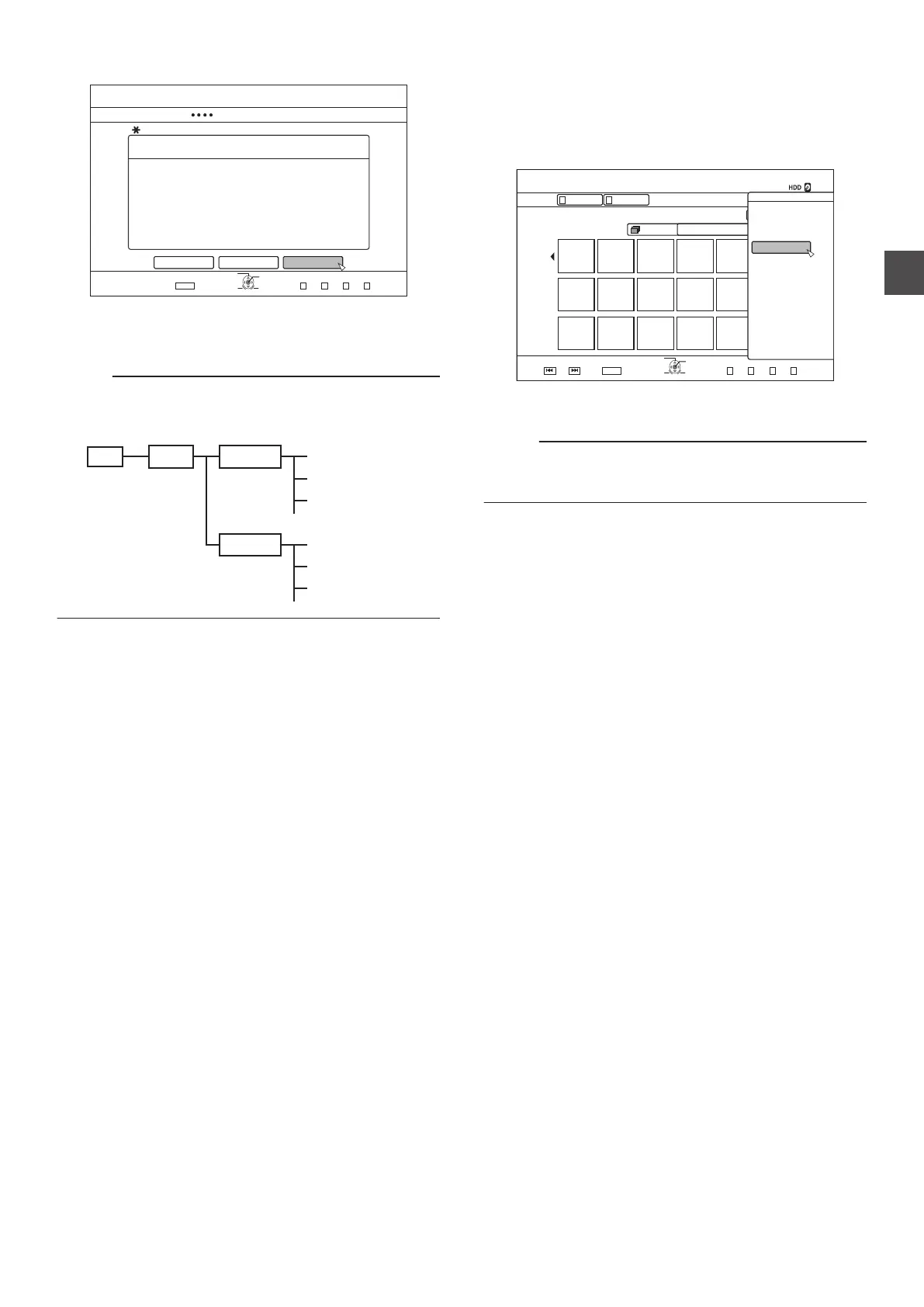
Select “START
”, and press the [OK] button
.
126+10
1-
4'6740
&7$$+0)
56'2
5'.'%656#4661$')+0&7$$+0)
&7$$+0)56+..2+%674'5
07/$'41(56+..2+%674'561$'&7$$'&
%#0%'. $#%- 56#46
':+6
5'.'%6
&7$$+0)
0
Dubbing starts. A progress bar is displayed during the
dubbing process.
0
After dubbing is complete, a
“DUBBING IS
COMPLETED” message appears on the monitor.
Memo :
0
A directory of the following configuration is created in the
media, and still images are written with file names ranging
from “PIC_0001.jpg” to “PIC_9999.jpg”.
.
root DCIM 100JVCS PIC_0001.JPG
PIC_0003.JPG
PIC_0002.JPG
PIC_0001.JPG
PIC_0003.JPG
PIC_0002.JPG
101JVCS
Dubbing from the Playback Navigation screen
Dubbing can also be performed from the Playback Navigation
screen.
1
Select the still images to dub, and press the
[OPTION
] button
.
126+10
1-
4'6740
0#8+)#6+10
8+&'1 2+%674'
)4172 #..
24'82)
0':62)
':+6
5'.'%6
)4172
8+&'1
2+%674'
6+6.' 6*7/$0#+.
0#8+)#6+10
126+105
$#%-
2.#;
&'.'6'
&7$
/1&'%*#0)'
'&+6
'&+6+0(1
16*'45
2
Select “DUB”
, and press the [OK] button
3
Follow steps 3 to 5 of “Dubbing still images”
Memo :
0
Check marks of still images that appear on the Playback
navigation screen will remain added to the image on the still
image selection screen.
Cancel dubbing
To cancel dubbing before it starts
0
Select
“CANCEL” from the menu, and press the [OK] button
to cancel dubbing.
0
Alternatively, you can press the
[RETURN] button to cancel
dubbing and return to the initial screen.
To discontinue dubbing while it is in progress
0
Press the
[OPTION] button. Select “CANCEL” from the
Cancel Dubbing menu, and press the [OK] button. Data will
be written onto the disc up to the point where import is
cancelled.
Dubbing Still Images from the HDD
49
Dubbing/Importing



 To Next Page