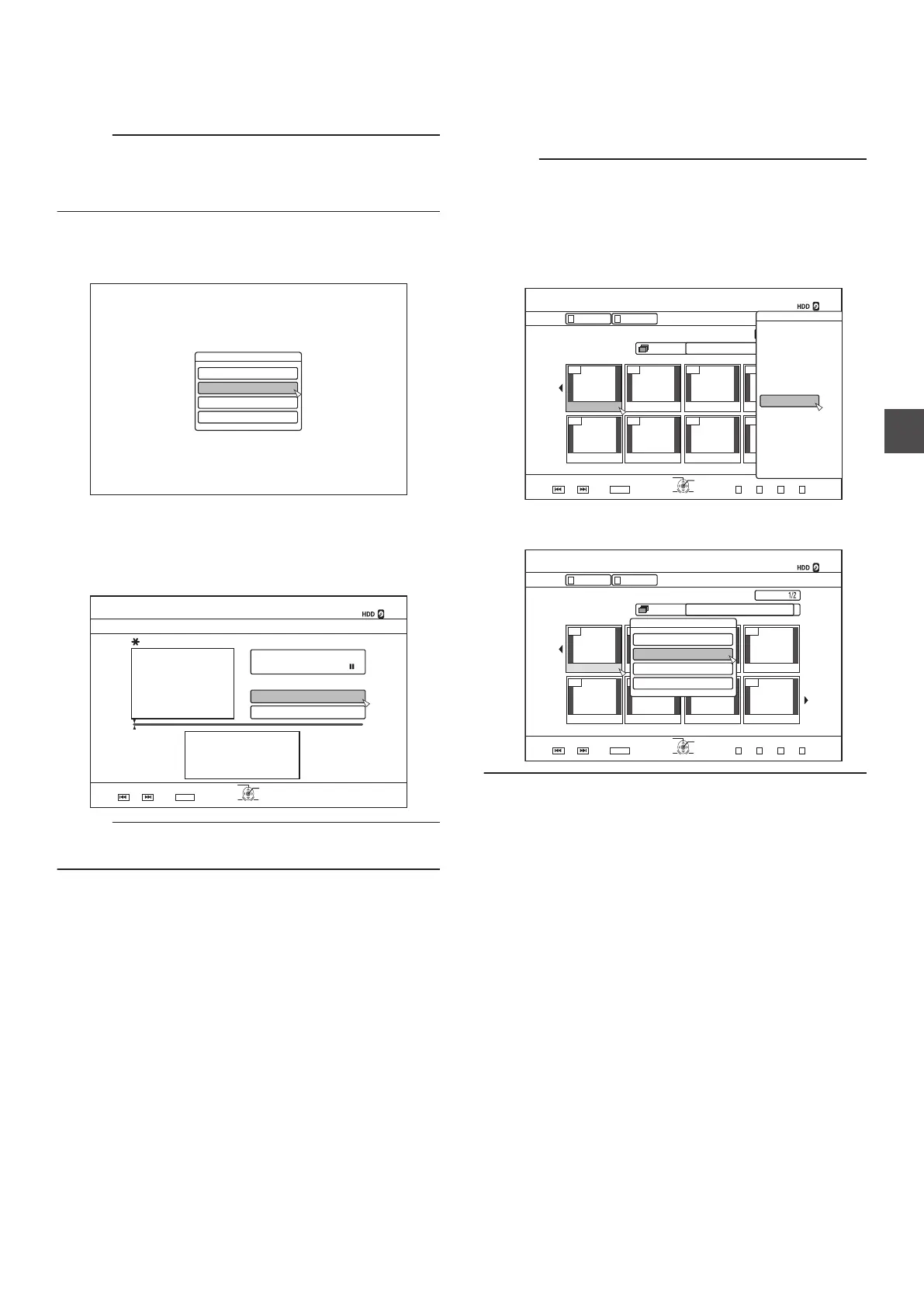
Editing a Thumbnail
Thumbnails (index images) can be changed to a still image
according to your preference.
Memo :
0
Thumbnails
of titles stored on the HDD, BD-RE, BD-R, DVD-
RW, and DVD-R can be edited.
0
However, thumbnails of titles that are stored on an SD card
or finalized disc cannot be edited.
1
Press the
[INFORMATION CORRECT] button on
the remote control unit
0
An information editing screen appears.
.
+0(14/#6+10%144'%6
/1&+(;6+6.'0#/'
/1&+(;6*7/$0#+.
%*#0)'5*116+0)'6+/'
2416'%6
2
Select “MODIFY
THUMBNAIL”, and press the [OK]
button
0
A thumbnail modification screen appears.
3
Play the video, and press the [W] button to stop
at
the scene you want to use as thumbnail display
.
- : -- : --
+0(1%144'%6
126+10
1-
4'6740
;17%#0'&+66*'6+6.'618+'9$;%*#26'45
/1&+(;6*7/$0#+.
;17%#0%*#0)'6*'6+6.'6*7/$0#+.5
%*#0)'
6*7/$0#+.
':+6
5'.'%6
%10(+4/
Memo :
0
For
details on the button operations during playback, refer to
“Video Playback Operation” (A P 61).
4
Select “CHANGE”, and press the
[OK] button
0
The displayed still image now becomes the thumbnail
image.
5
Select “CONFIRM
”, and press the [OK] button
0
Doing so ends the editing of thumbnails.
Memo :
0
You
can also display the thumbnail modification screen from
the Playback Navigation screen.
A
Select the title for which the thumbnail is to be changed,
and press the [
OPTION] button
B
Select “EDIT INFO”, and press the [OK] button
0
An information editing screen appears.
.
001 002 003 004
006005 007 008
126+10
1-
4'6740
5'.'%6
VKVNG
0#8+)#6+10
6+6.' 6*7/$0#+.
8+&'1 2+%674'
)4172 #..
':+6 )4172
2+%674'
0#8+)#6+10
.+56
24'82) 0':62)
126+105
2.#;
&'.'6'
&7$
/1&'%*#0)'
'&+6
'&+6+0(1
16*'45
$#%-
C
Select “MODIFY
THUMBNAIL”, and press the [OK] button
0
A thumbnail modification screen appears.
.
001 002 003 004
006005 007 008
VKVNG
2CIG
OKP
0#8+)#6+10
126+10
4'6740
1-
)41722+%674'.+56
5'.'%6
':+6
0':62)24'82)
)4172 #..
4'/#+0+0)4'%14&+0)6+/':2
2+%674'
8+&'1
6+6.'6*7/$0#+.
0#8+)#6+10
2416'%6
%*#0)'5*116+0)'6+/'
/1&+(;6*7/$0#+.
/1&+(;6+6.'0#/'
+0(14/#6+10%144'%6
Editing a Thumbnail
77
Editing



 To Next Page