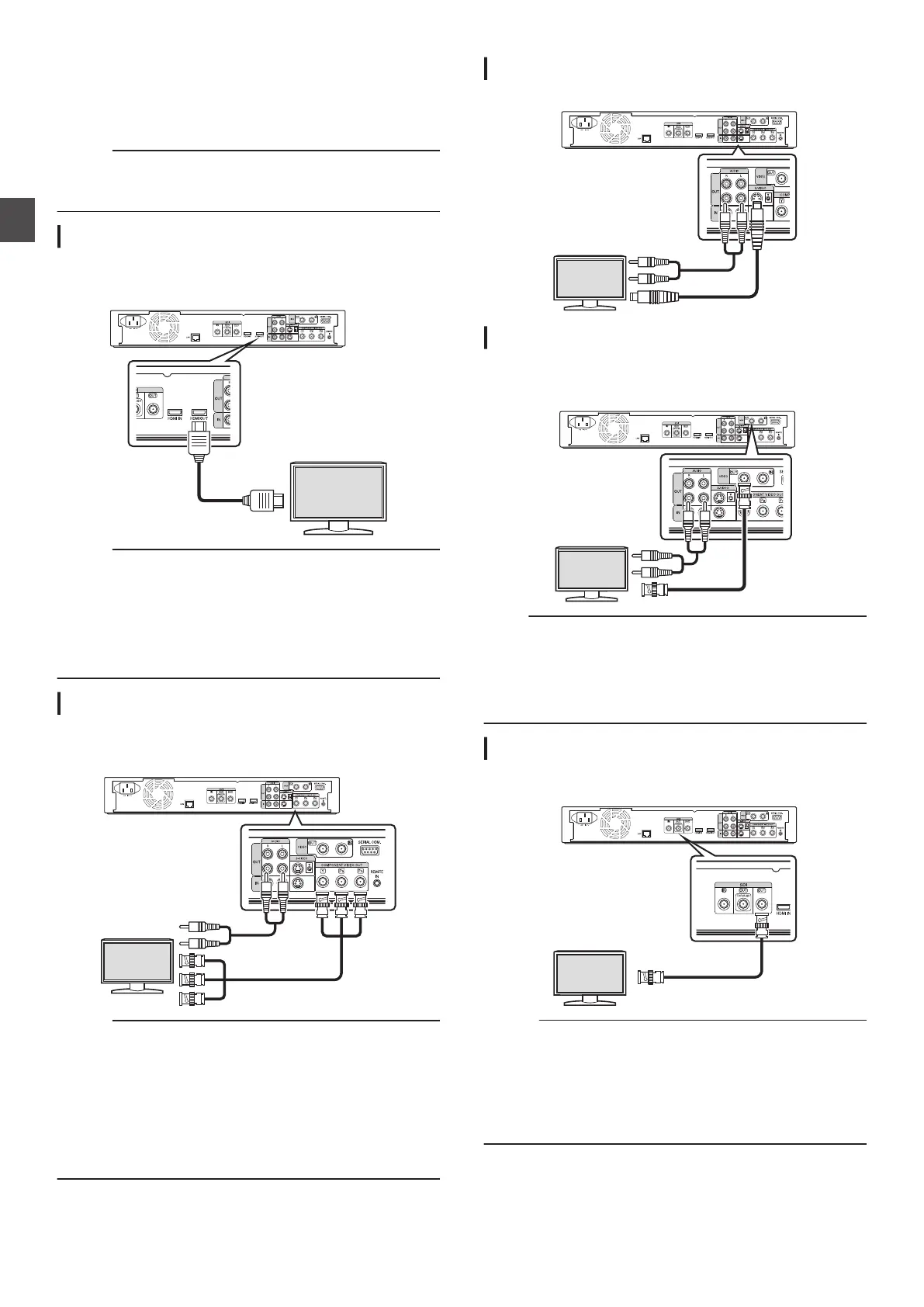
Connecting a Monitor
To display video images from this unit, connect it to a monitor.
0
This unit supports connections using “HDMI cable”,
“component video cable”, “S-video cable”, or “video cable”.
Memo :
0
Switch
to the appropriate monitor input according to the type
of connection cable used.
For details, refer to the instruction manual of the monitor.
Connecting using an HDMI cable
Connecting using an HDMI cable (sold separately) enables
signals
to be maintained in the digital format, and thus playback
of clear video images.
.
Memo :
0
To connect to a monitor that does not support the copyright
protection system (HDCP), set “HDCP
”.
For details, refer to “ HDCP ” (A P 91).
0
Use a High Speed HDMI Cable.
0
After
connecting using an HDMI cable, change the unit setting
to “HDMI CONNECTION”.
For details, refer to “ VIDEO PRIORITY MODE ” (A P
90).
Connecting using a component video cable
Connecting using a component video cable (sold separately)
delivers playback images that are clearer than those by an S-
video cable.
.
Memo :
0
After connecting a component video cable, change the unit
setting to “SDI/COMPONENT OUTPUT
”.
0
For output from the component video output terminals, the
setting will be limited to
“480i” in the case of copyright-
protected videos.
For details, refer to “ SDI/COMPONENT OUTPUT ”
(A P 91
).
0
Videos that are AACS copyright-protected are not output from
the component video output terminals.
Connecting using an S-video cable
For connecting an S-video cable (sold separately).
.
Connecting using a video cable
Connect the output terminal of this unit to the input terminal of a
TV using a video/audio cable (sold separately).
(Use a BNC adapter that is sold separately)
.
Note :
0
Connect the S-video/video output of this unit directly to the
TV
(or monitor). Connecting this unit to the TV or monitor via
a video deck triggers the copy protection function, and may
cause distortion in the video images during playback.
0
Videos
that are AACS copyright-protected are not output from
the S-video/video output terminals.
Connecting using an SDI cable (BNC)
Connect using an SDI cable (sold separately). You can transmit
both digital video and audio signals with a single cable.
.
Memo :
0
The SDI output terminal comes with two outputs, one is an
SDI terminal that enables switching between DIRECT OUT/
MONITOR OUT, while the other is an SDI through terminal
used exclusively for through output.
0
Copyright-protected videos are not output from the SDI
output terminal.
For details, refer to “ SDI/HDMI CONNECTION ” (A P
92).
20
Connecting a Monitor
Preparation



 To Next Page