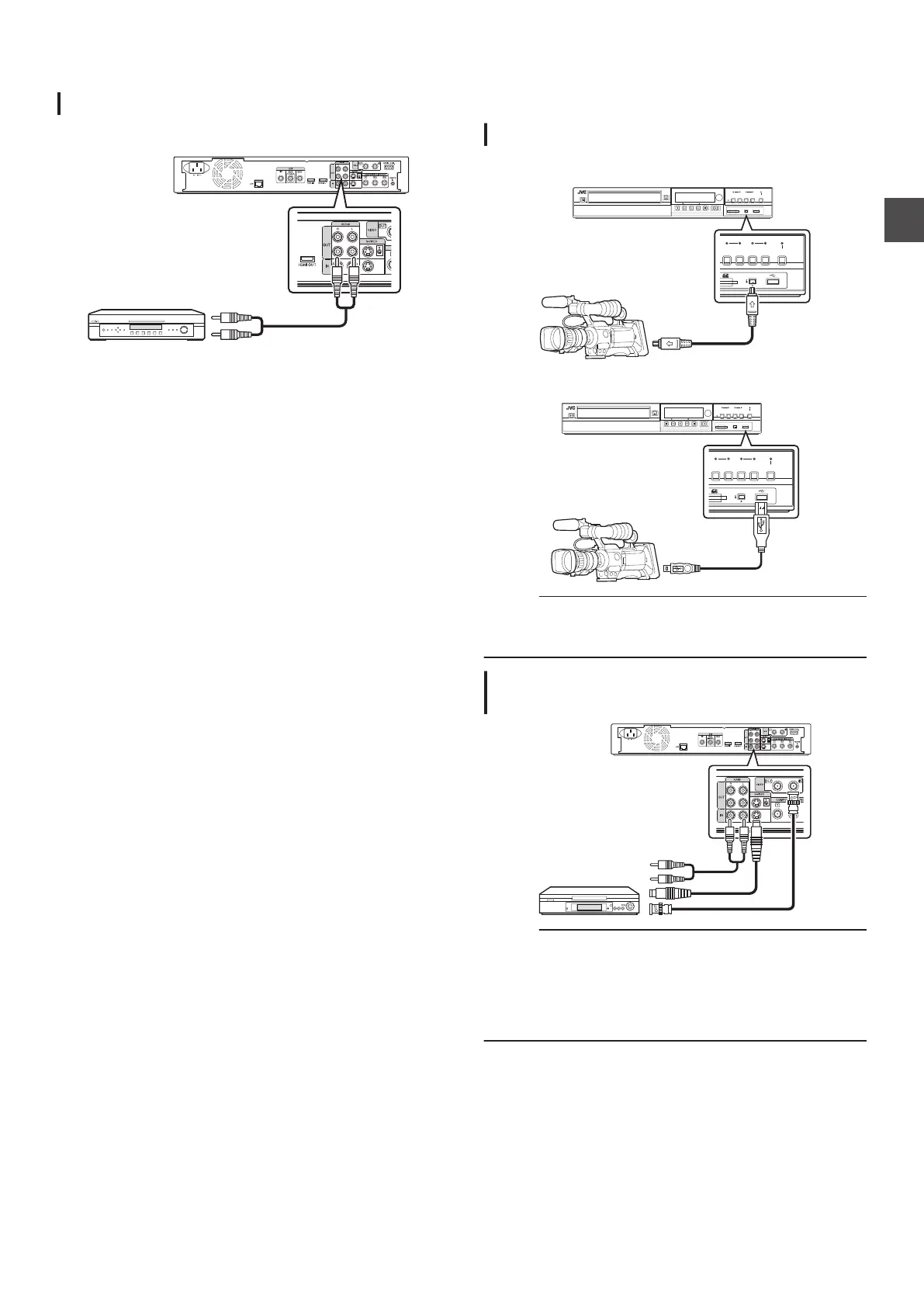
Connecting an Amplifier
Connecting an audio amplifier
Connecting using an audio cable
.
Connecting a Video Camera
or Other Equipment
Connecting a video camera
Connecting via the i.LINK terminal
.
HDV/DV IN
RECHDD RECBD
REC
MODE
INPUT ONE TOUCH
DUBBINGSELECT
HDD
MEDIA SELECT
BD/SD
Connecting via the USB terminal
.
HDV/DV IN
RECHDD RECBD
REC
MODE
INPUT
SELECT
HDD
MEDIA SELECT
BD/SD
ONE TOUCH
DUBBING
Memo :
0
Some video camera models may require an AC adapter
instead of batteries to run. For details, refer to the video
camera’s instruction manual.
Connecting a video deck or other
equipment (recording using this unit)
.
Memo :
0
When
connecting using an S-video cable, change the setting
of “VIDEO INPUT SETTING” to “S-VIDEO”.
For details, refer to “VIDEO INPUT SETTING” (A P
91).
0
To
record video images played back on this unit to an external
device (video deck, etc.), connect the output terminal of this
unit to the input terminal of the external device.
Connecting an Amplifier
21
Preparation



 To Next Page