Turning Off Title/Group
Protection
Protection of a title/group can be turned off.
Titles/groups can be edited and deleted after their protection is
turned off.
0
Title/group
protection can be turned off for video data stored
in the HDD, BD-RE (BDAV), BD-R (BDAV), and DVD-RW
(VR).
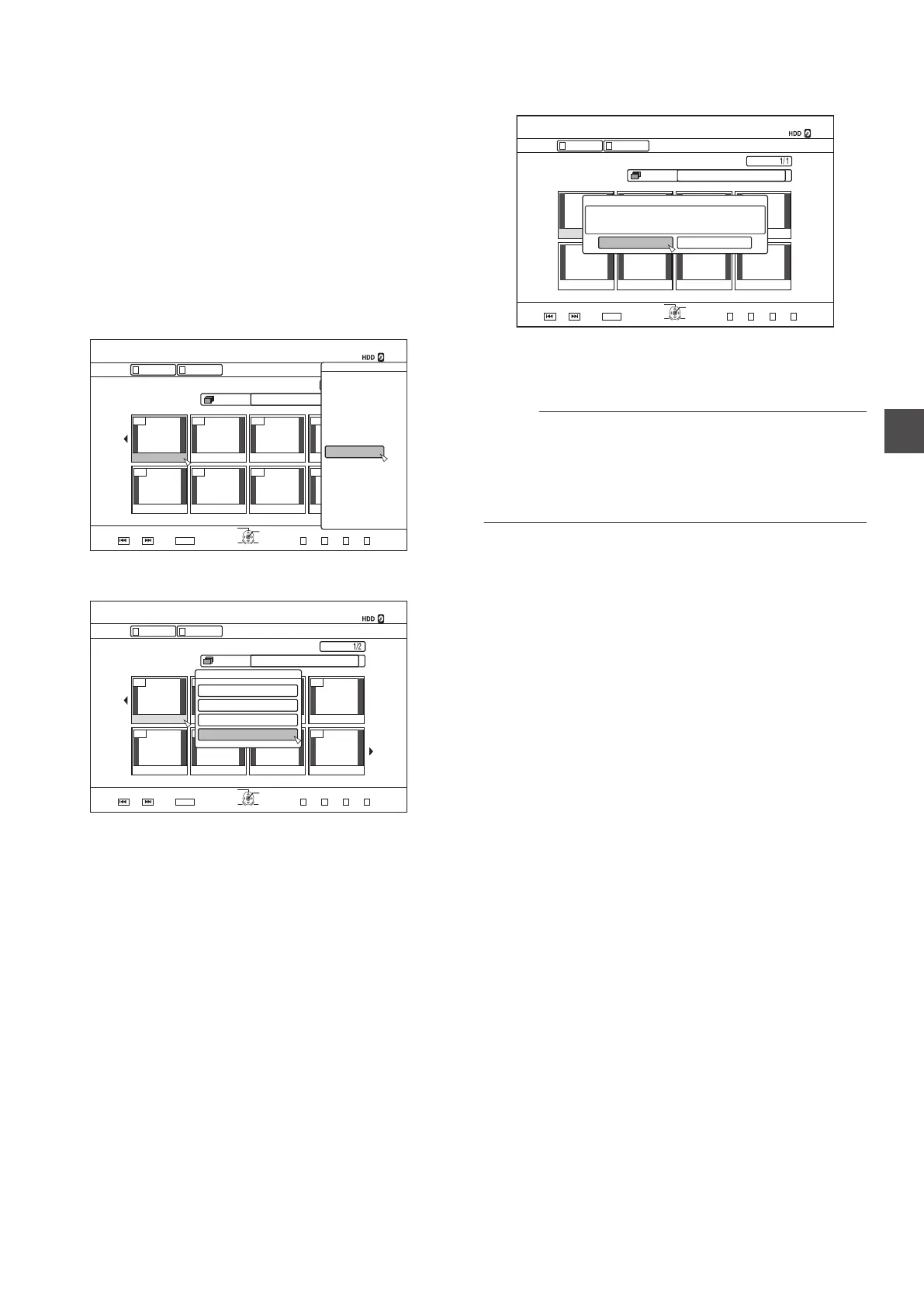
1
Press the
[NAVIGATION] button on the remote
control unit
0
The Playback Navigation screen appears.
2
Select the titles/groups to turn off protection for,
and press the
[OPTION] button
0
A pop-up option list appears.
.
001 002 003 004
006005 007 008
126+10
1-
4'6740
5'.'%6
VKVNG
0#8+)#6+10
6+6.' 6*7/$0#+.
8+&'1 2+%674'
)4172 #..
':+6 )4172
2+%674'
0#8+)#6+10
.+56
24'82) 0':62)
126+105
2.#;
&'.'6'
&7$
/1&'%*#0)'
'&+6
'&+6+0(1
16*'45
$#%-
3
Select “EDIT INFO
”, and press the [OK] button
0
An information editing screen appears.
.
001 002 003 004
006005 007 008
VKVNG
2CIG
OKP
0#8+)#6+10
126+10
4'6740
1-
)41722+%674'.+56
5'.'%6
':+6
0':62)24'82)
)4172 #..
4'/#+0+0)4'%14&+0)6+/':2
2+%674'
8+&'1
6+6.'6*7/$0#+.
0#8+)#6+10
702416'%6
%*#0)'5*116+0)'6+/'
/1&+(;6*7/$0#+.
/1&+(;6+6.'0#/'
+0(14/#6+10%144'%6
4
Select “UNPROTECT
”, and press the [OK] button
0
If only a single title was selected in step 2, a confirmation
screen for turning off protection will appear.
.
2CIG
OKP
0#8+)#6+10
126+10
4'6740
1-
)41722+%674'.+56
5'.'%6
':+6
0':62)24'82)
)4172 #..
4'/#+0+0)4'%14&+0)6+/':2
2+%674'
8+&'1
6+6.'6*7/$0#+.
0#8+)#6+10
01;'5
:::6+6.'5*#8'$''05'.'%6'&614'/18'6*'2416'%6+10
702416'%6
0
If multiple titles or groups were selected in step 2,
“UNPROTECT
” and “PROTECT” items will be displayed.
5
Select
“YES”, and press the [OK] button
0
Protection of the selected titles/groups is now turned off.
Memo :
0
Protection
will be turned off from all selected titles and groups
when multiple titles or groups are selected.
0
If you do not want to turn off the title/group protection, select
“NO” and press the [OK] button.
0
Alternatively, you can press the
[RETURN] button to cancel
protection removal and return to the initial screen.
Turning Off Title/Group Protection
75
Editing



 To Next Page