Instructions for use DSE Expert
5 Operation | 5.4 Control element
38 / 74
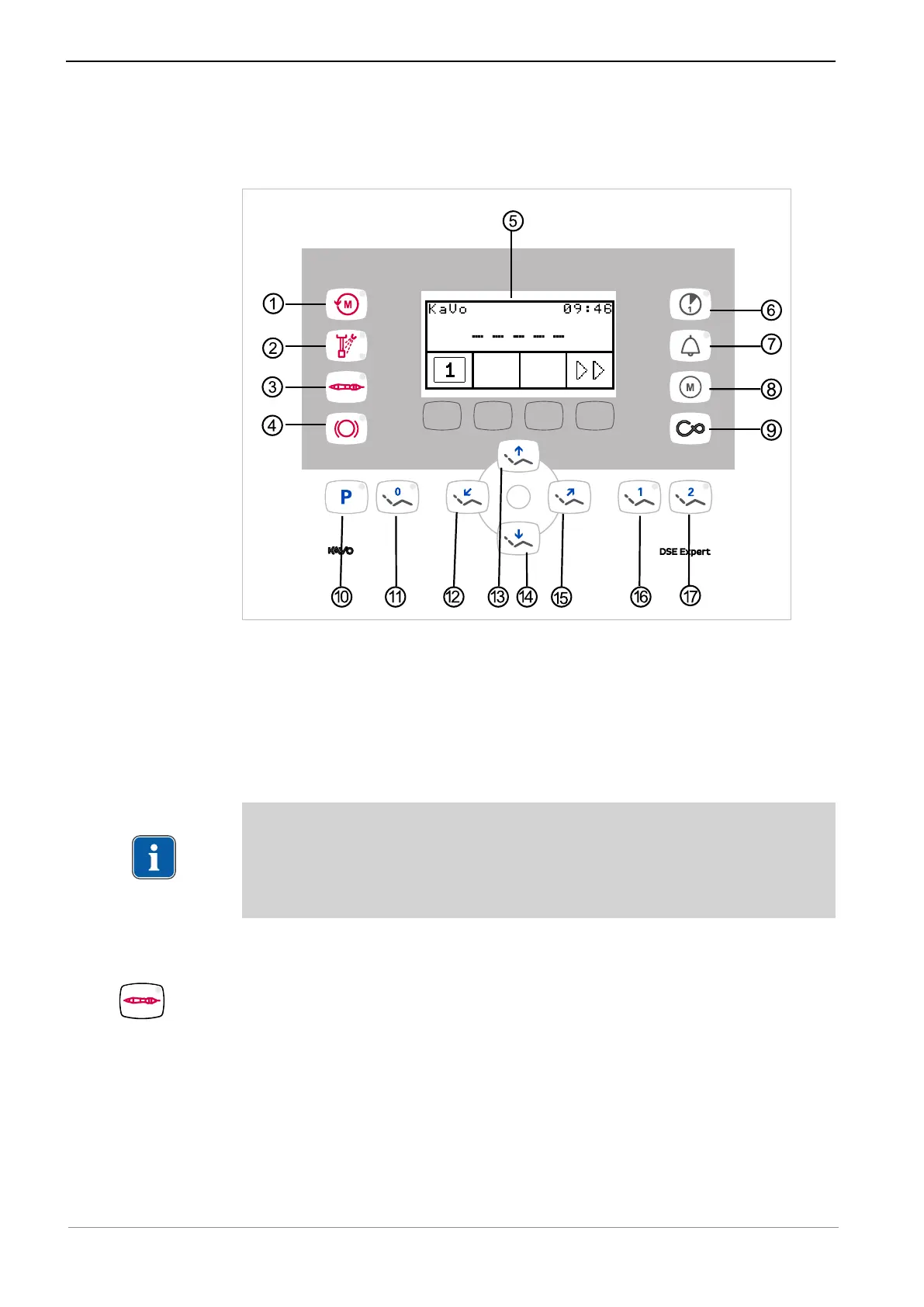
5.4 Control element
5.4.1 Configuration of the preselection buttons
Buttons ①, ②, ③, ④, ⑥, ⑧, ⑨, ⑩ are programmed according to the factory settings
as per the delivered configuration. The Automatic position buttons ⑪, ⑯ and ⑰ can
be programmed to correspond to a certain treatment position.
5.4.2 Reprogramming the preselection buttons
If needed, the preselection keys can be reprogrammed for a different instrumentation.
Note
The optional allocation of an instrument connection with PiezoLED or INTRA LUX
motor KL 701/703 is not possible. If preparations for the PiezoLED have been
made, only an air handpiece can be connected to the corresponding connection as
an alternative.
5.4.3 Selecting and deselecting the laboratory handpiece
▶ Briefly press the "Instrument preselection laboratory handpiece" ① key.
ð Laboratory handpiece is selected and deselected. LED of the selected laboratory
handpiece lights up.



 To Next Page