SoftStep3 hardWare
10
SoftStep3
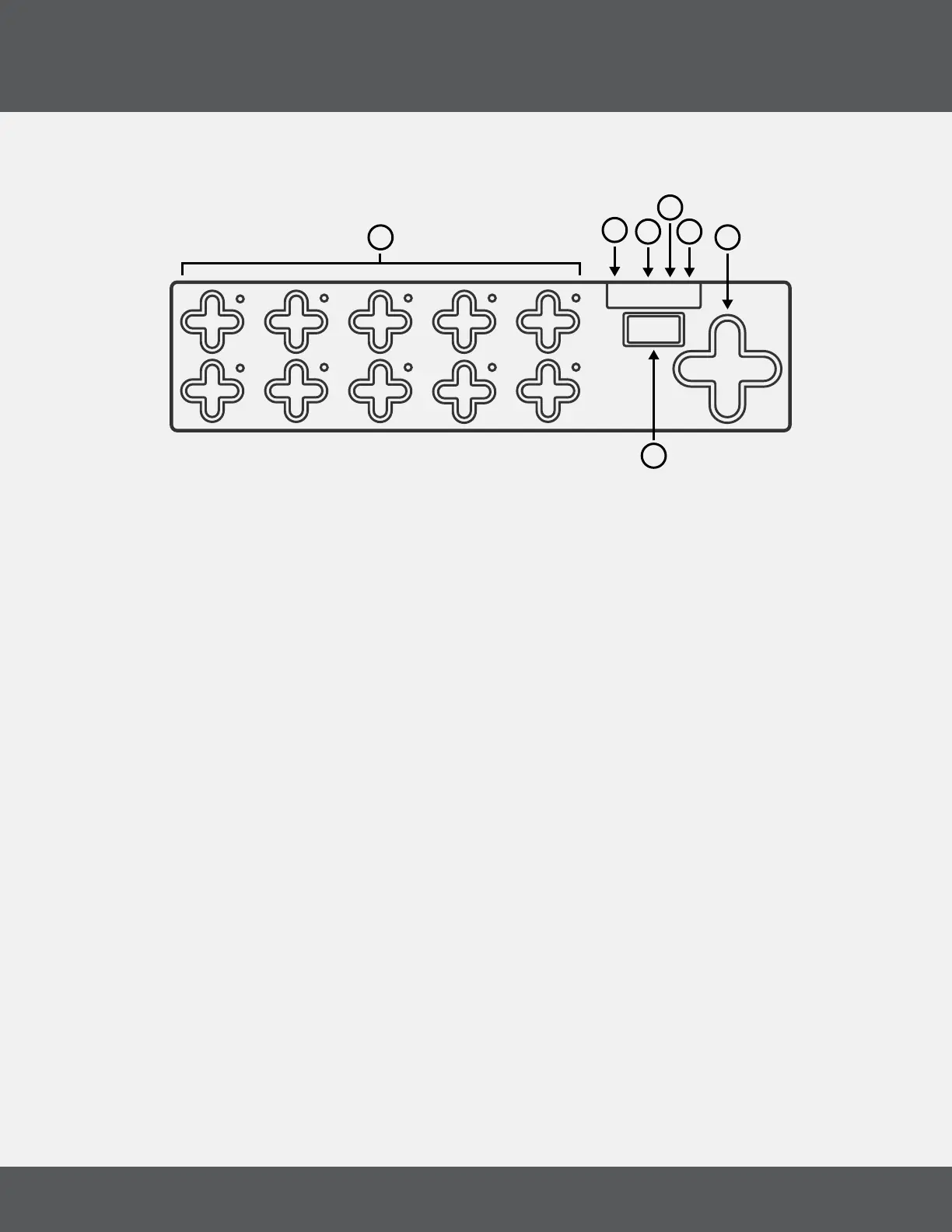
1.1 hardWare overvieW
(1) Keys
Keys are where the action happens. Step on these to make the SoftStep perform its dened functions.
Each key has a green and red LED (at the northeast corner of the key) for visual feedback�
(2) Nav Pad
Press left or right to change presets� Up/Down can be programmed to perform a number of different
functions�
(3) Display
The SoftStep3 display can show what preset is currently loaded, the name of an activated key, and real-
time parameter values�
(4) USB-C
Connect to a computer or tablet to send MIDI over USB, or connect to a power supply when using 12Step
without a computer�
(4) TRS MIDI Out
Connect to hardware via TRS MIDI Out (Type A)� A TRS-MIDI Adapter is available in the KMI Step Adapter
Kit (sold separately)�
(5) CV Out
Stereo jack sends 2 CV Outs� A 1/8” stereo to 2 mono jacks adapter is available in the KMI Step Adapter
Kit (sold separately)�
(7) Pedal Input
Used to connect an expression pedal to the 12 Step� All input should use a 3�5mm (1/8”) TRS cable to work
properly� An Expression Pedal Input Adapter is available in the KMI Step Adapter Kit (sold separately)�
1
6
2
7
3
8
4
9
5
0
V
V
V
V
STEP
1
2
3
4
5
6
7



 To Next Page