SoftStep advanCed editor
23
SoftStep3
diSplay Mode SettinG
The Display Mode switches the display toggled the MIDI offset to display 0-127 or 1-128� The same effect can
be created in Hosted mode using some fancy modline work�
diSablinG SCene ChanGinG
The Scene Changing On/Off setting is only available in Standalone mode�
oUtpUt portS
An important distinction between Hosted and Standalone mode is which output port to use� “SoftStep Control
Surface” should be used in Standalone mode (data coming directly from the SoftStep), and the virtual port
“SoftStep Share” should be used in Hosted mode (data coming from the editor)�
Note: SoftStep Share is a virtual MIDI port built into the Mac OS version of the Advanced Editor� Windows users
will need to install and use a third-party MIDI bus, like LoopMIDI� More information can be found in the SoftStep
Share section�
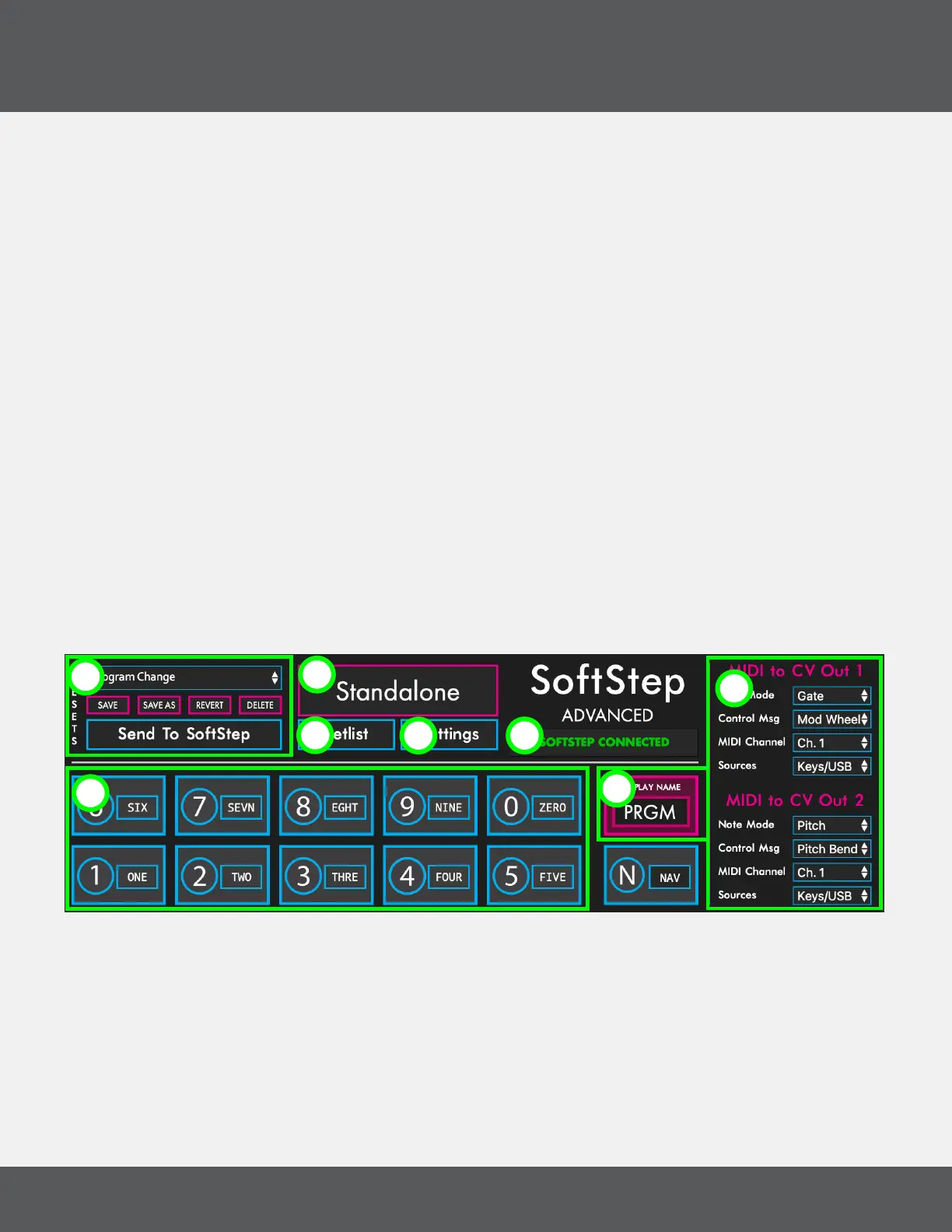
3.2 Main WindoW overvieW
The Main Window is displayed when you open the Advanced Editor software� This is the gateway to everything —
customizing keys, opening the settings and setlist windows, and preset management�
(1) key boxeS
The key boxes in the Advanced Editor’s main window are laid out just as the keys on the SoftStep hardware are
— keys 1-5 on the bottom row, keys 6-0 on the top row (and Nav Pad to the right)� Clicking on a Key Box will open
the Key Modulation Window for that key�
1
2
3
4
5
6 7
8



 To Next Page