Continuous Mode (Adjust Feed)
option is available in the opening menus (Figure 7A for Feed-
Only sets or Figure 7B for Feed & Flush sets). Select this option to program the feeding parameters from the
in Figure 10A to define the rate of delivery. Press the
buttons in Figure 10B to program the rate
from 1 to 400 in increments of 1 ml/hr. Press
(top button) to exit the menu.
in Figure 10A to define the Volume To Be Delivered. Press the
program the volume from 1 to 3000 ml in increments of 1 ml. Press
(top button) to exit the menu. If the
is set to zero, the pump will run until the supply is exhausted.
is set, the remaining volume to be delivered (remaining VTBD) will be displayed next to
the v icon on the lower right-hand portion of the screen (Figure 10A). If the
mode, the pump will restart the feeding and deliver the entire volume of the new VTBD
HOLDING mode, the pump will restart the feeding and deliver the entire volume of the new VTBD HOLDING
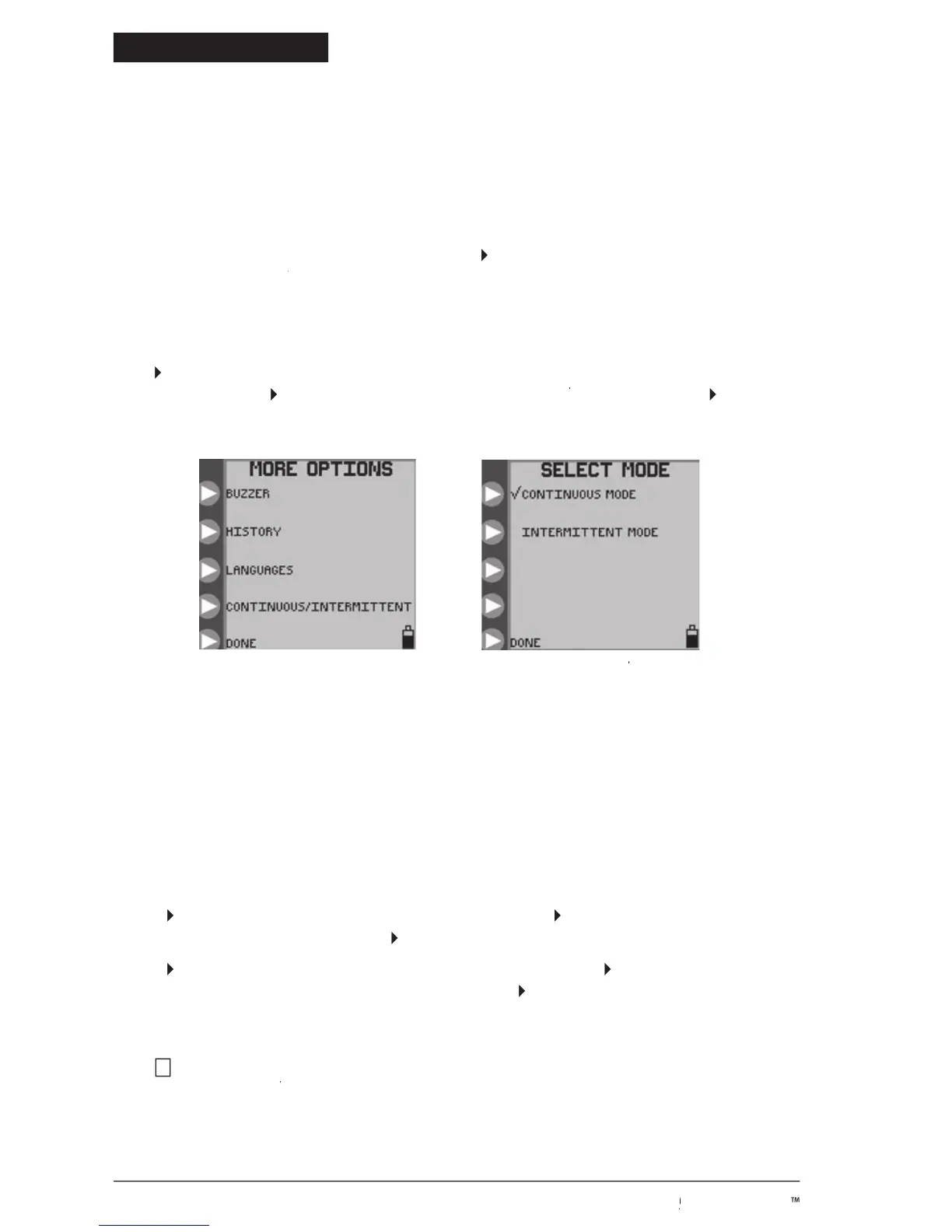
MORE OPTIONS menu.MORE OPTIONS
SELECT MODE menu for SELECT MODE
continuous or intermittent mode
Selecting Continuous or Intermittent
can be programmed to feed continuously or intermittently.
The continuous feeding mode will deliver the enteral nutrition at a steady rate, either until the programmed volume has
been delivered or until the supply has been exhausted.
The Intermittent feeding mode delivers boluses of enteral nutrition
at programmed time intervals. The bolus volume and feed rate are also programmed.
To select continuous feed mode or intermittent feed mode, press
on the opening menu, shown in Figures 5 or 7,
MORE OPTIONS menu, Figure 9A. MORE OPTIONS
option is available either before a Pump Set has been loaded (Figure 5) or after the Pump Set is loaded (Figure
7). See subsection “More Options” for information on the other options in the
MORE OPTIONS menu.MORE OPTIONS
SELECT MODE menu, Figure 9B. PressSELECT MODE
© 2005 Tyco Healthcare Group LP


 To Next Page