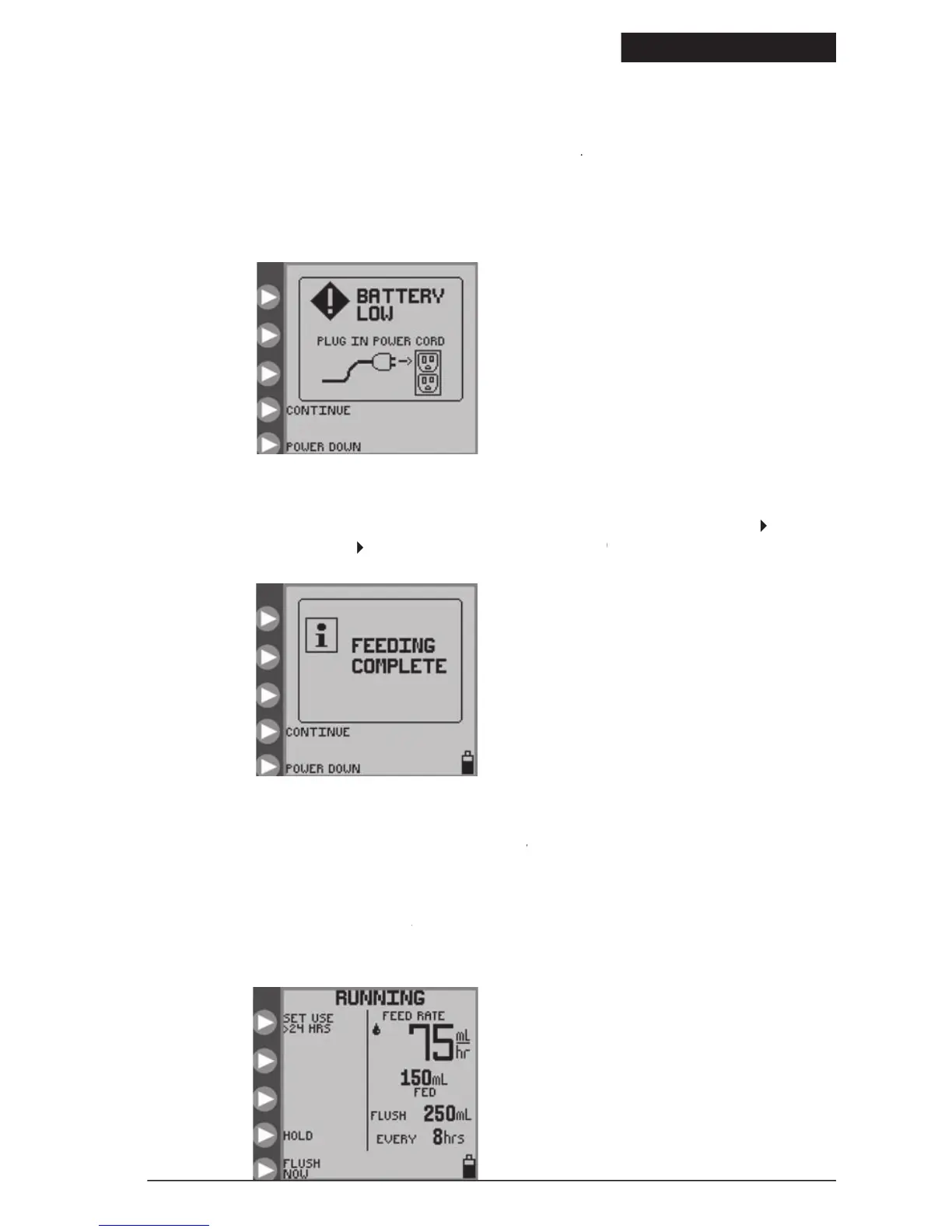
screen appears and the alarm beeps continuously when the battery needs to be recharged. There is
approximately 15 minutes of battery life remaining when this screen appears
Plug the power cord in to begin recharging. The pump will automatically return
to the screen that was active prior to the
The battery will charge continuously whenever the pump is plugged into a wall outlet. Eight hours of charging is
required to fully recharge the battery pack.
information screen appears after completion of the programmed feeding. Press
to turn off the pump. Press
SET LOADED opening menu, Figure 7.SET LOADED
Pump Set Use >24 Hours Warning
ng indicator will blink on the
screen if a Pump Set has been used for 24 or more
RUNNING screen if a Pump Set has been used for 24 or more RUNNING
hours. It is recommended to replace Pump Sets after this length of usage. This icon is only an informational message and
Figure 31 shows an example of t
screen, where a Feed & Flush Set has been in use for more than 24 hours.
RUNNING screen, where a Feed & Flush Set has been in use for more than 24 hours. RUNNING
The informational warning indicat
or shows up in the upper left on the screen.
Figure 29. Battery Low error screen.
Indicates that the battery must be
Figure 30. Feeding Complete
Figure 31. Running screen with the > 24
HRS of Pump Set Usage indicator in upper
© 2005 Tyco Healthcare Group LP


 To Next Page