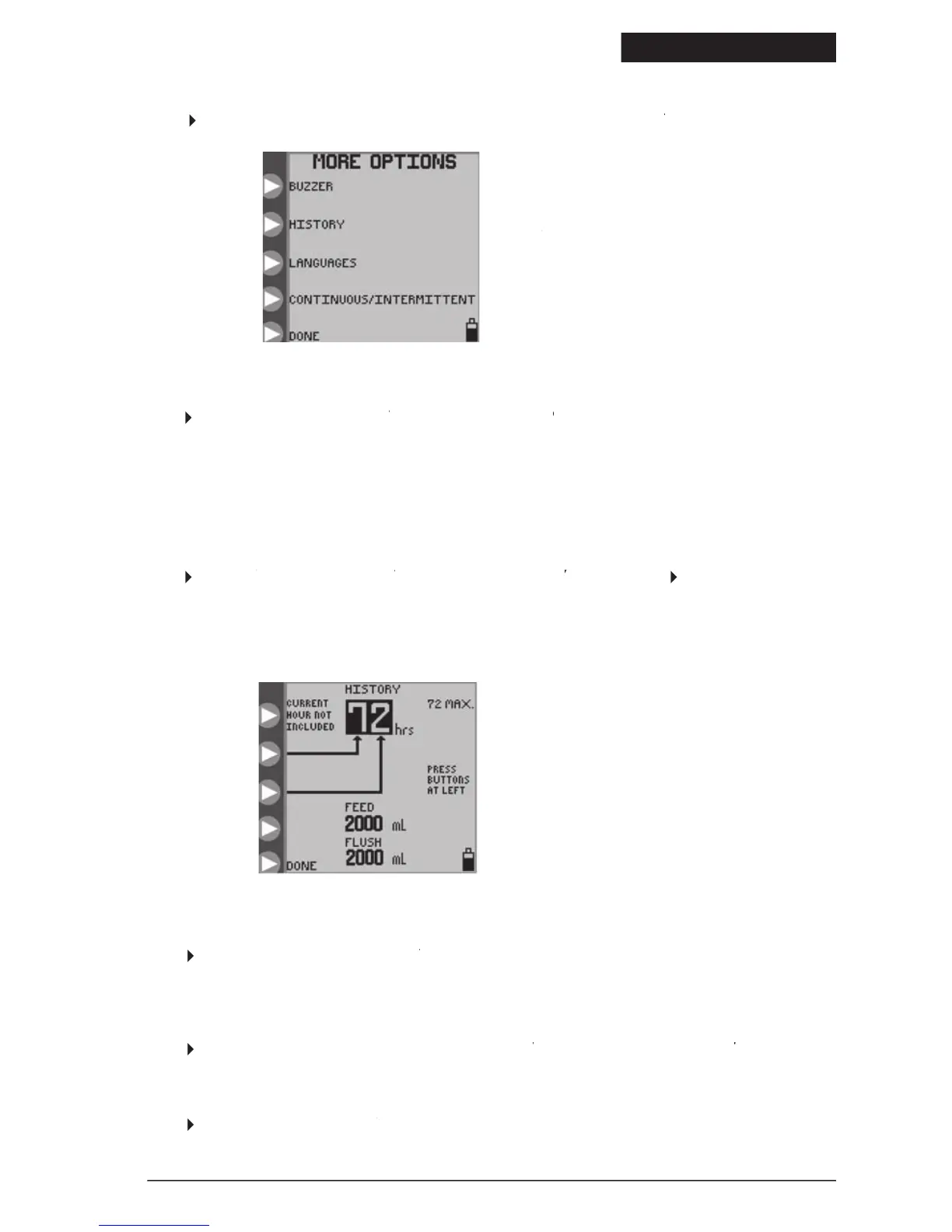
Figure 17. Feed and Flush totals for
up to 72 hours of previous history,
excluding data from the current
in one of the opening menus, Figures 5 or 7, to access the
MORE OPTIONS screen, Figure 16.MORE OPTIONS
menu to change the preferred language for the screen interface.
MORE OPTIONS menu to change the preferred language for the screen interface.MORE OPTIONS
Continuous/Intermittent Mode
MORE OPTIONS menu to access the MORE OPTIONS
SELECT MODE menu, Figure 9B. SELECT MODE
Use this menu to select between continuous feeding mode and intermittent feeding mode. See subsection “Selecting
Continuous or Intermittent Feed Mode” for more information.
MORE OPTIONS menu to exit the menu.MORE OPTIONS
MORE OPTIONS menu to access the MORE OPTIONS
screen and increase or decrease the alarm buzzer
BUZZER screen and increase or decrease the alarm buzzer BUZZER
volume. The alarm will be audible as the volume setting is changed. This sets the volume level for any warning or error
that may occur with the pump. Critical erro
MORE OPTIONS menu to access the MORE OPTIONS
HISTORY screen. Press theHISTORY
buttons in Figure 17 to set
the time history of interest. The totals of
will be shown for the requested history time.
A maximum of 72 hours of past history can be retrieved, excluding data from the current hour.
© 2005 Tyco Healthcare Group LP


 To Next Page