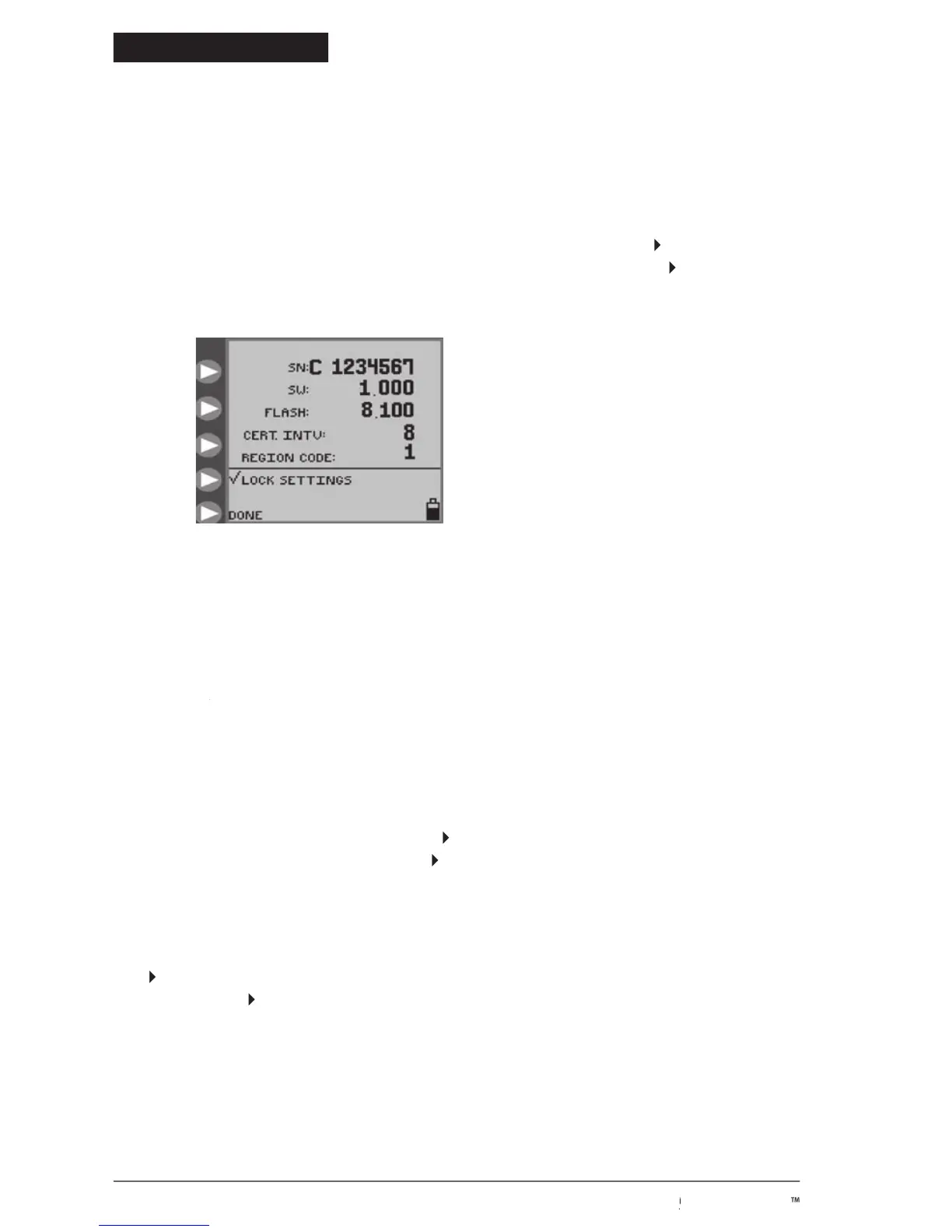
is the serial number of the pump.
shows the software version number in this pump.
shows the version number of the flash data installed in this pump.
indicates the number of times the pump has been powered on since the last re-certification. See Section
CERT INTV indicates the number of times the pump has been powered on since the last re-certification. See Section CERT INTV
VI for details of re-certifying the pump.
Lock Settings Feature (Program Locked)
To “lock” the settings against unauthorized changes, press
to get the check mark, as shown inFigure
18. The settings can only be changed again by pressing
to remove the check mark.
are locked and a change is attempted, the screen will indicate
, and will not allow access to the
c. when settings are locked.
to exit the BioTech menu. To re-enter this menu screen, power down the pump and then power it up
button, as described above.
The BioTech screen will show technical information about the pump, and has a lock feature to lock the Pump Settings
against unauthorized changes.
Accessing the BioTech Screen
To get the BioTech screen, press the power button to start the pump, and press and hold the top
startup sequence (Kangaroo icon “hops” across the screen) executes. You must be pressing the top
the sequence in order to access the BioTech menu. Figure 18 shows the BioTech screen.
Figure 18. BioTech screen, with
Pump Settings “locked” against
© 2005 Tyco Healthcare Group LP


 To Next Page