periodic bolus feeding and periodic flushing, is such that occasional
conflicts can arise where each process need
be running at the same time.
he flushing process is assigned precedence
over the feeding process for Feed & Flush pump sets. “Flushing precedence” means that a flush cycle will run to its end
even if a bolus delivery is scheduled to begin. It also means that a flush cycle will interrupt a bolus feeding cycle that
is already in progress. The feeding cycle will pick up where it was interrupted after the flushing cycle is complete. It is
therefore possible that the net feeding volume is reduced from what may be intended, over a given time period.
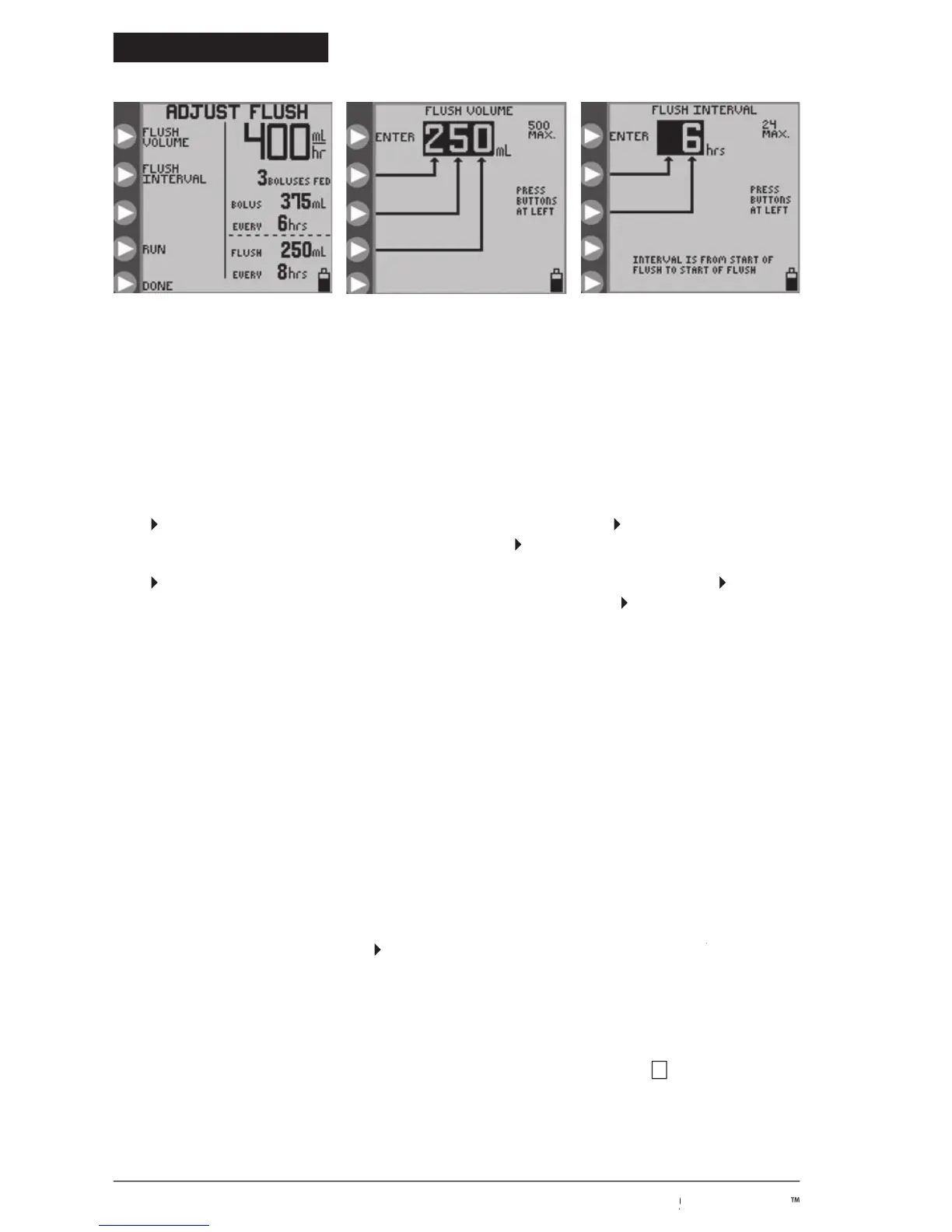
in Figure 13A to define the volume per flush cycle. Press the
program the flush volume from 10 to 500 in increments of 1 ml. Press
(top button) to exit the menu.
in Figure 13A to define the time interval between starts of flushing. Press the
Figure 13C to program the time interval from 1 to 24 hours in increments of 1 hour. Press
The pump will automatically limit flushing settings which exceed pump capabilities to deliver.
The KANGAROO ePump enteral feeding pump flushes at a rate of 1960 mL/hr (32.7 mL/minute). Use care
when programming the flush volume so that it matches the patient’s need.
The pump will automatically flush an additional 25 ml of water after completing the programmed delivery of
formula, as long as at least one flush had occ
urred during formula delivery.
will only run when a Pump Set is properly loaded and the necessary
feeding parameters have been programmed. For a Feed & Flush Set, the flushing parameters do not have to be set for the
pump to begin operating. If flushing parameters are set as zeros, there will be no flushing.
After the pump has been programmed, press
to start operation. Figure 14 shows the
RUNNING screen for RUNNING
continuous feeding with flushing. The status line will indicate
, and the droplet icon will move vertically on
the screen. The green LED indicator will be illuminated to give a quick visual indication of positive status in a darkened
screen shows the feed rate, amount fed, flushing data if a Feed & Flush Pump Set is used, and the
remaining volume to be delivered (remaining VTBD). The remaining VTBD is shown next to the v icon.
Figure 13B. Setting the Flush
Figure 13C. Setting the Flush Time
© 2005 Tyco Healthcare Group LP


 To Next Page