If the error still cannot be resolved, press
to stop operation of the pump and put a different pump into
If the error still cannot be resolved, press
If the error still cannot be resolved, press
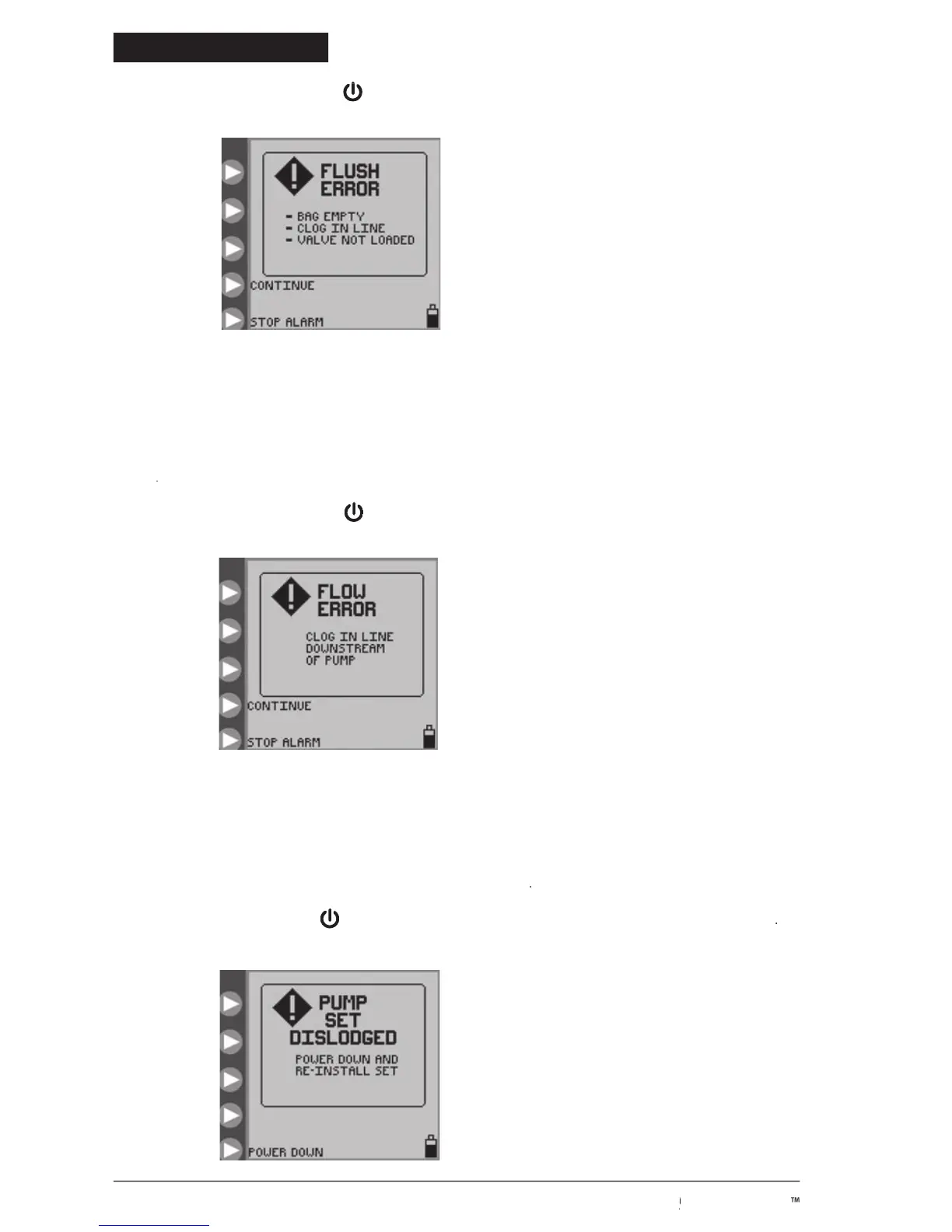
screen appears when either the feeding or the flushing solution is no longer being delivered because
of a clog between the pump and the patient. Check the line to find the occlusion causing the blockage.
be resolved, check the valve pocket in the Pump Set loading area for dampness or dirt, which may be a cause for a false
error. Clean and dry the valve pocket. If the error still cannot be resolved, load a new Pump Set, prime it, and
If the error still cannot be resolved, press
to stop operation of the pump and put a different pump into
If the error still cannot be resolved, press
If the error still cannot be resolved, press
screen will appear if the black ring retainer (MISTIC) is not properly loaded in the MISTIC
pocket in the Pump Set loading area. Check and correct the positioning of the MISTIC retainer if possible. If the error
cannot be resolved, load a new Pump Set, prime it, and
If the error cannot be resolved, press
to stop operation of the pump and put a different pump into service
If the error cannot be resolved, press
If the error cannot be resolved, press
Figure 26. Flush Error screen.
Figure 27. Flow Error screen.
Figure 28. Pump Set Dislodged Error screen.
© 2005 Tyco Healthcare Group LP


 To Next Page