Installation
KD21C can be mounted on the left side of handlebar close to its grip. Adjust the angle for a good
screen view. Cut off the power before connecting the corresponding connectors between display and
controller.
General Operation
◆Switching the E-bike System mode ON/OFF
To switch on the E-bike system and provide the power supply to the controller, hold the On/Off
button for 2s.
To switch off E-bike system, hold the On/Off button for 2s. The E-bike system no longer uses
the battery power.
When E-bike system is switched off, the leakage current is less than 1 μA.
■When the E-bike is parked for approx. 10 minutes, the E-bike system switches off
automatically.
◆
Display Interface
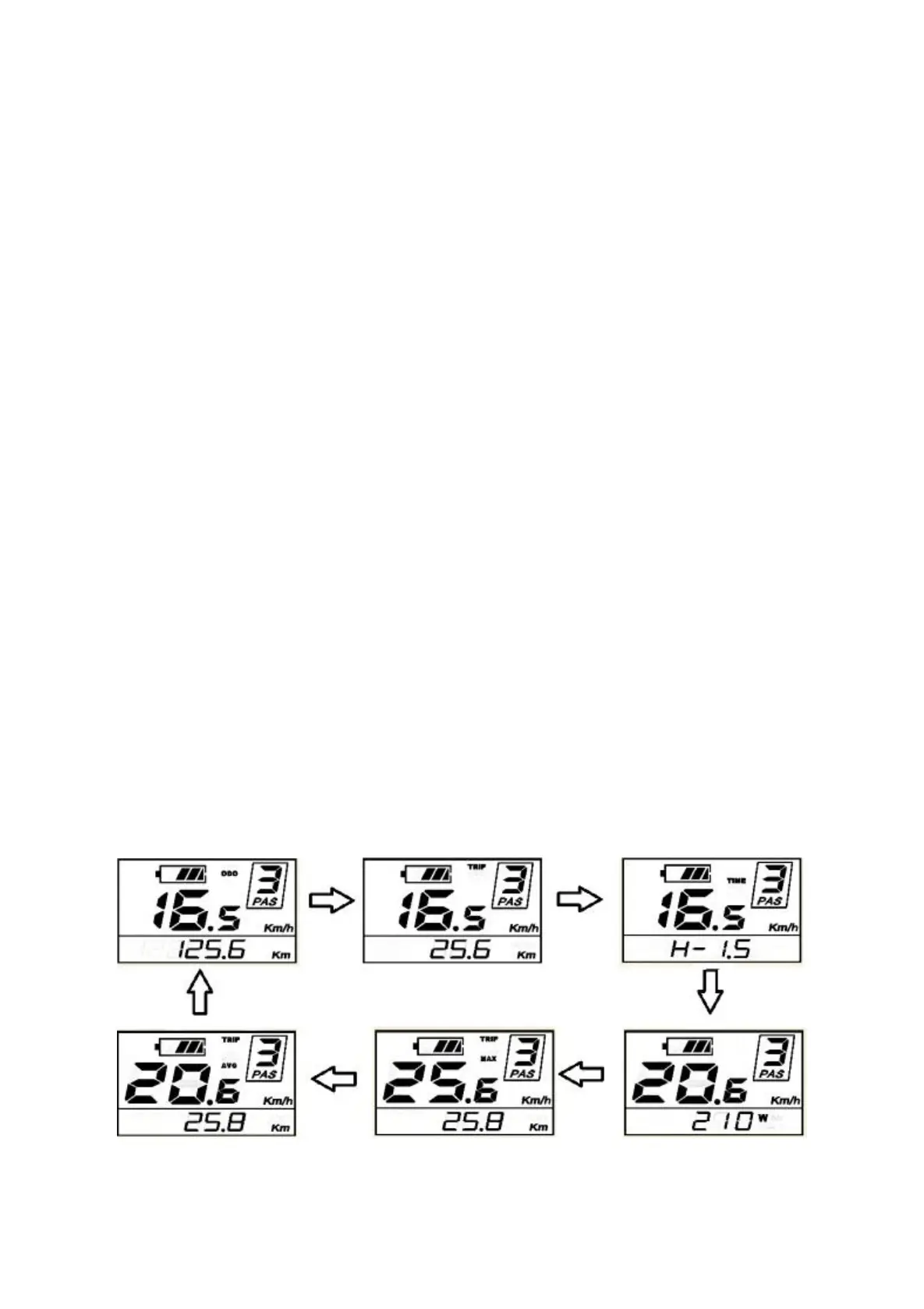
After switching on the E-bike system, the display shows Current Speed and ODO(total distance)
by default.
Press the ON/OFF button to switch between indication functions below:
ODO (Km)→ Trip (Km) → Trip Time (Hour) → Motor Power (W)→ Max. Speed (Km/h)→ Avg.
Speed (Km/h) →ODO (Km). Finally, it cycles back to ODO km again.
Display indication cycle interface



 To Next Page