9
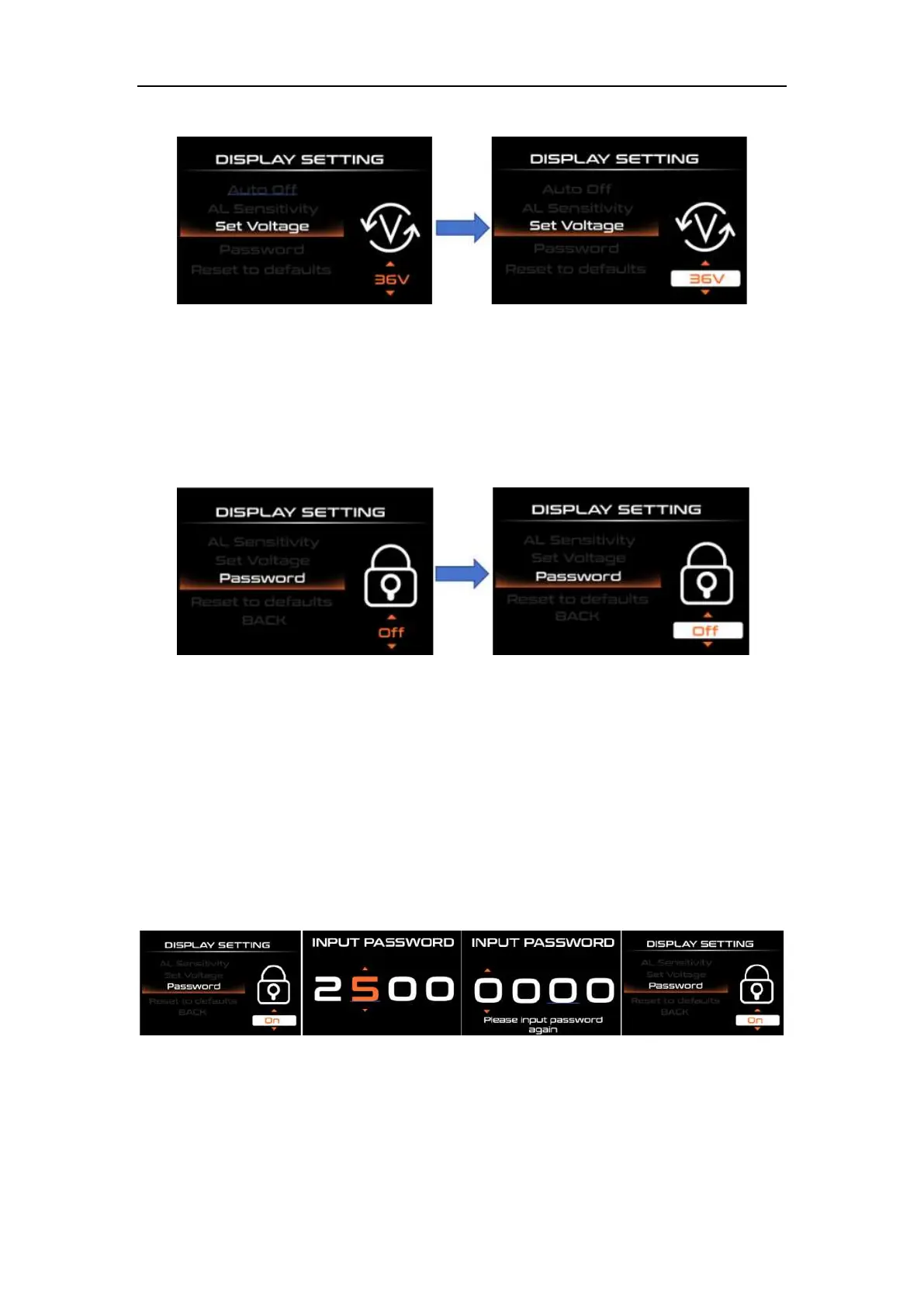
Voltage setting interface
◆Password Setting
Short press the "UP" or "DOWN" key to select "Password", short press the "i" key to
enter settings, and then short press the "i" key to select Start PassWord; by short pressing
the "UP" or "DOWN" key, switch " OFF"/"ON", the following is the specific switching method.
Password setting interface
◆Start PassWord Setting
After selecting "ON" in the "Start PassWord" interface, short press "i" to confirm, the
interface prompts to enter the password, short press the "UP" or "DOWN" key to enter the
value, short press the "i" key to shift, 4 digits After entering the password, short press the
"i" key to confirm; the interface prompts to enter the password again. After the two inputs
are consistent, the system prompts that the password is set successfully. If the two inputs
are inconsistent, you need to repeat the first step and enter the new password and confirm.
The password is set successfully. The rear 2S interface automatically jumps to the original
setting interface.
◆Reset to default Setting
Short press "UP" or "DOWN" to select "Reset to defaults", short press "i" to enter
settings, and short press "UP" or "DOWN" to switch between "YES" (restore factory
settings) / "NO" (do not restore) Factory settings), short press "i" to save and exit to "Reset
to defaults".



 To Next Page