Local Operations 5
Keysight 11713D/E Operating and Service Manual 47
To drive switches
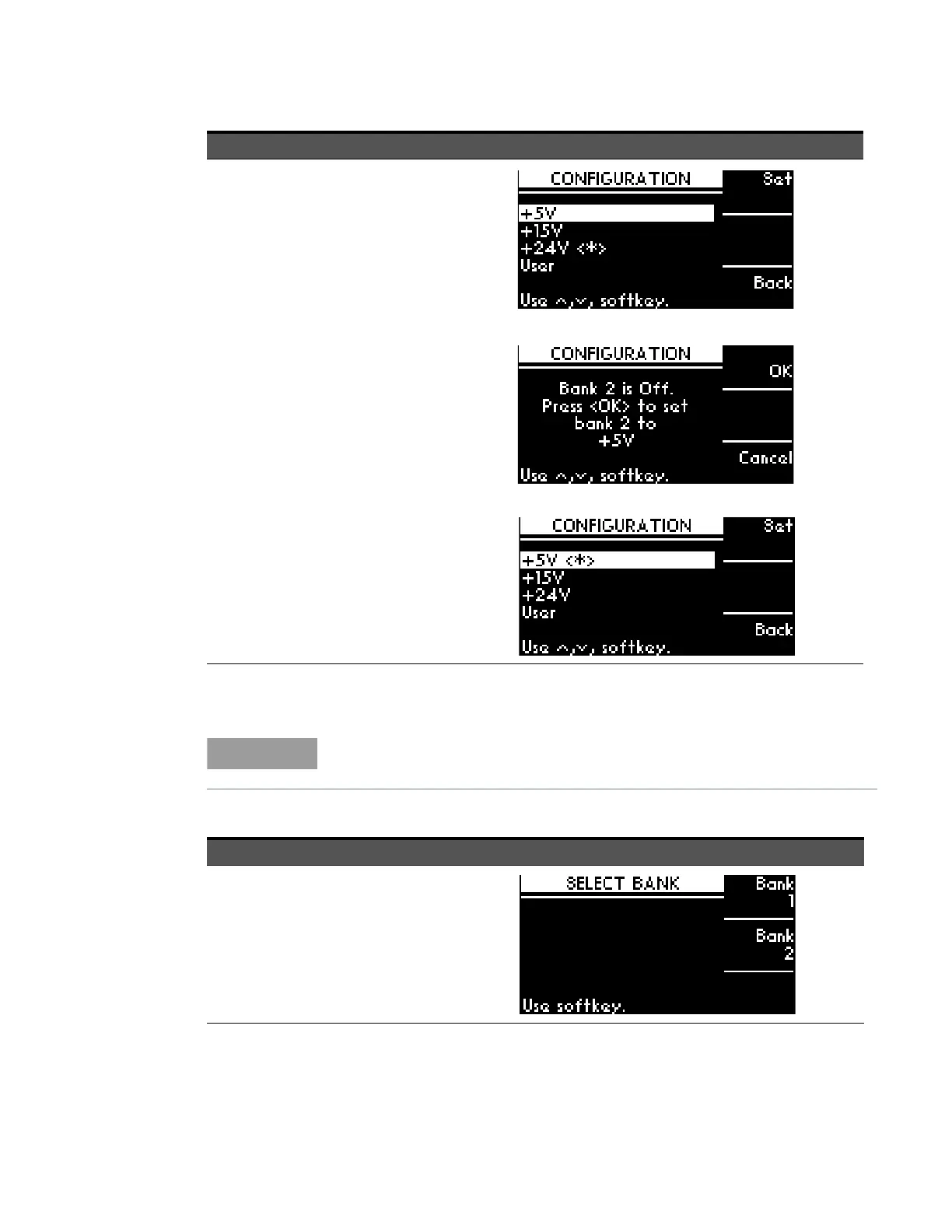
4 Select voltage
type (only for
11713E)
a On CONFIGURATION MENU
screen, press Voltag. Level
softkey.
b On OUTPUT VOLTAGE screen,
scroll to highlight the desired
voltage (e.g. +5V).
c Press SET softkey to assign
highlighted voltage.
d On the next screen, press OK
softkey to confirm decision or
press Cancel softkey to cancel.
e Output voltage assigned is marked
<*>.
f To exit this screen, press Back
softkey.
Step 2 — To drive switches, only applicable to the 11713E as the 11713D is
predefined with +24 Vdc supply and no TTL drive.
Item Action Illustration
1 Select bank
(only for
11713E)
a Press Config button.
b On SELECT BANK screen, you can
see two softkey selections: BANK1
and BANK2.
c Press BANK1 softkey to select
bank 1.
d Press BANK2 softkey to select
bank 2.
Item Action Illustration



 To Next Page