5Local Operations
58 Keysight 11713D/E Operating and Service Manual
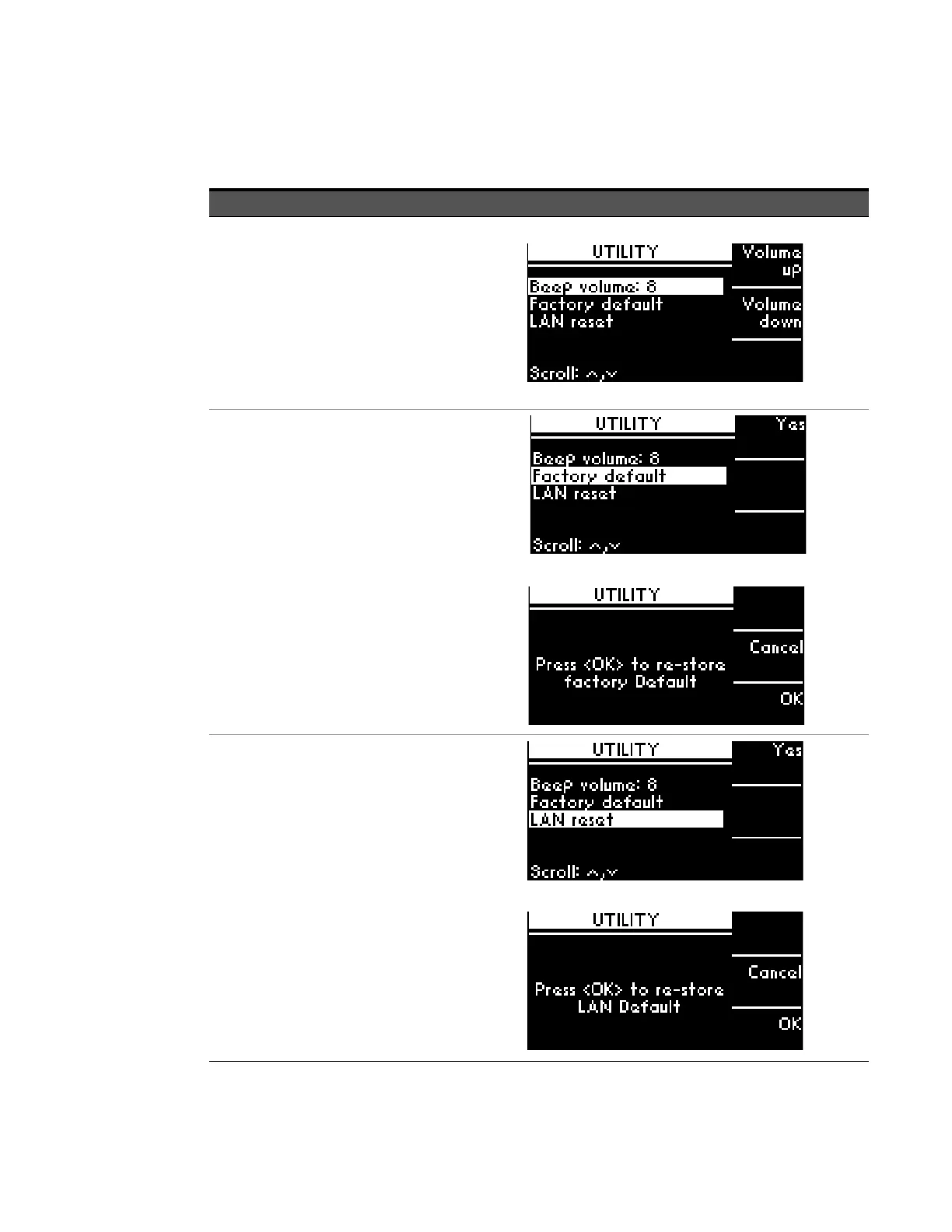
UTILITY menu
Function Action Illustration
Display system
utility settings for
11713D/E and
adjust beep
volume.
Beep volume range
from 0 (mute) to 8
(loudest).
a Navigate to the UTILITY icon using
the navigation keys.
b Press Menu/Enter button when
UTILITY icon is highlighted.
c Scroll to highlight Beep volume
using the navigation keys.
d Adjust beep volume using Volume
up and Volume down softkeys.
e Press Menu/Enter button again to
return to main menu.
Set factory default
– For more
information: “List
of default
values” on
page 61
a Scroll to highlight Factory default
using the navigation keys, then
press Yes softkey.
b On the next screen, press OK
softkey to confirm decision or
press Cancel softkey to cancel.
Reset LAN
a Scroll to highlight LAN reset using
the navigation keys, then press Yes
softkey.
b On the next screen, press OK
softkey to confirm decision or
press Cancel softkey to cancel.



 To Next Page