PLZ-5W User’s Manual 63
Advanced Functions
Setup Memory
The setup memory can store up to 20 sets (0 to 19) of the current conditions of the items listed below. The
current conditions can also be saved in a USB memory device.
• Operation mode
• Load values (current, conductance, voltage, power)
• Current range setting
• Voltage range setting
• Slew rate
• Switching level (current/conductance or percentage)
• Switching interval (frequency/time of one cycle and duty cycle/operating time on the high side)
• Alarm operating conditions
• Content of ABC preset memories
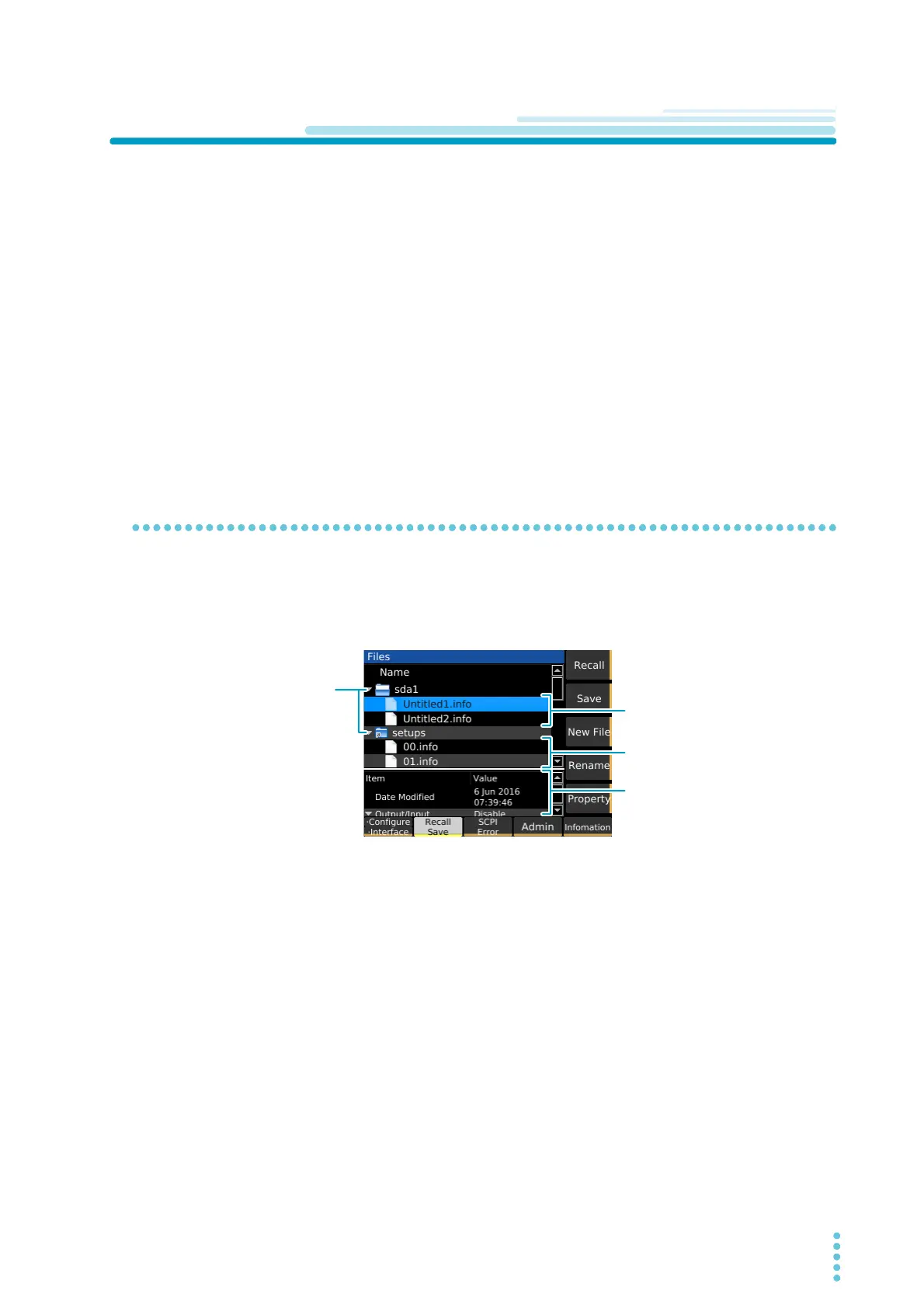
How to view the setup memory edit screen
Press SYSTEM and then Recall Save to display the setup memory edit screen. The internal memory con-
tains an empty setup memory set. Connecting a USB memory device to the USB port on the front panel
displays an “sdxx” folder (the “xx” changes depending on the USB memory device) enabling you to save
and recall the setup memory from the USB memory device.
USB memory deviceUSB memory device
Internal memoryInternal memory
Details of the setup memory
(Property)
Details of the setup memory
(Property)
Select a folder and press
→ to open the folder.
Press ← to close it.
Select a folder and press
→ to open the folder.
Press ← to close it.


 To Next Page